> ## Documentation Index
> Fetch the complete documentation index at: https://docs.testdino.com/llms.txt
> Use this file to discover all available pages before exploring further.
# AI in TestDino for Playwright Testing
> AI-powered failure classification, pattern detection, and fix recommendations.
**What you'll learn**
* How AI classifies test failures into categories (Bug, UI Change, Unstable, Misc)
* How failure patterns and error grouping work across runs
* How to connect AI assistants to your test data via MCP
TestDino uses AI across the platform to classify failures, detect patterns, and recommend fixes. Every AI feature works on real execution data from your test runs.
## In this section
The AI & Automation section pairs AI analysis inside the product with ways to connect your own AI agents and automate reporting.
| Page | Use it to |
| :-------------------------------------------------------- | :--------------------------------------------------------------------- |
| [AI Onboarding](/ai-onboarding) | Connect an AI agent to TestDino with MCP, the CLI, and starter prompts |
| [TestDino MCP](/mcp/overview) | Let assistants query live test runs, failures, and flaky tests |
| [OpenClaw](/integrations/communication/openclaw) | Ask TestDino about failures from Slack, Telegram, Discord, or WhatsApp |
| [Playwright Skill](/ai/playwright-skill) | Give coding agents expert Playwright guidance in your repo |
| [AI Insights](/platform/playwright-ai-failure-analysis) | Review AI failure classification and patterns across runs |
| [Automated Reports](/guides/automated-playwright-reports) | Schedule PDF summaries on a daily, weekly, or monthly cadence |
## AI features in this page
Each AI capability below works on real execution data and is explained in detail further down.
| Feature | Where | What it does |
| :------------------------------------------------ | :------------------------------- | :------------------------------------------------------------ |
| [Failure Classification](#failure-classification) | Test runs, test cases, dashboard | Labels failures as Bug, UI Change, Unstable, or Misc |
| [Failure Patterns](#failure-patterns) | AI Insights, error grouping | Identifies persistent and emerging failures across runs |
| [Test Case Analysis](#test-case-analysis) | Individual test cases | Provides root cause, recommendations, and quick fixes |
| [Error Grouping](#error-grouping) | Test runs, analytics | Groups similar errors by message and stack trace |
| [MCP Integration](#mcp-integration) | AI assistants | Connects Claude, Cursor, and other AI tools to your test data |
**Note**
All AI features are enabled by default. Disable individual features or all AI analysis from [Project Settings](/platform/project-settings#ai-features). Changes apply from the next test run.
AI runs on enterprise AI providers that do not train their models on customer content. See [AI data handling](/data-privacy/security-compliance#ai-data-handling).
## Failure Classification
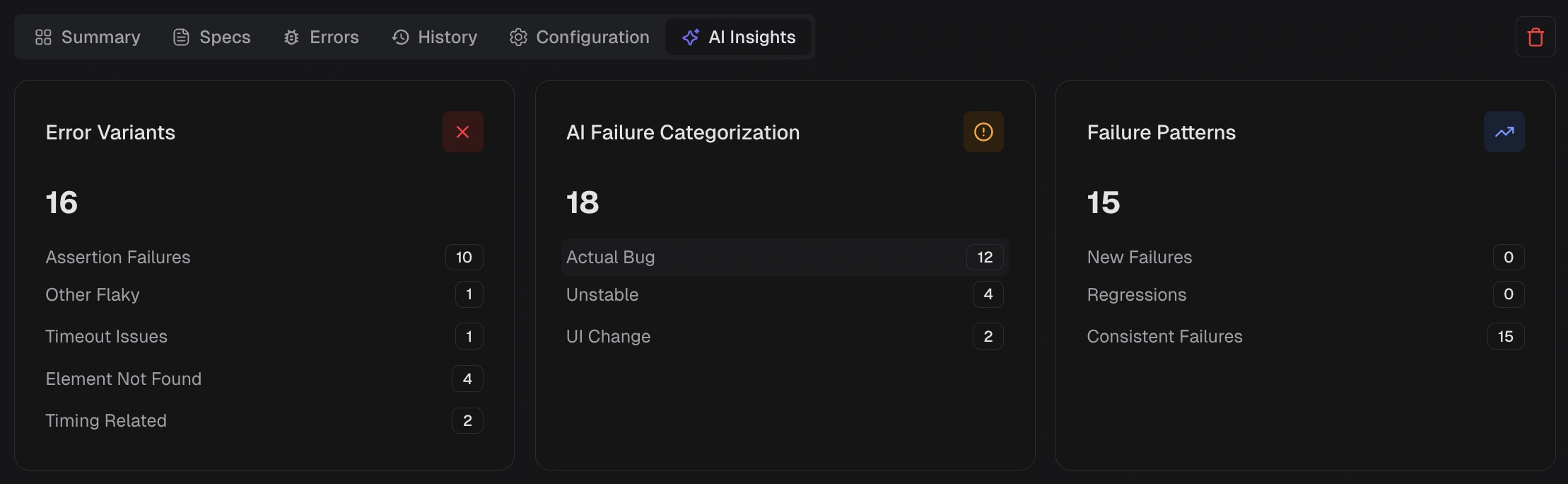
Every failed test receives an AI-assigned category with a confidence score.
 | Category | Meaning |
| :------------ | :------------------------------------------------------------------ |
| Actual Bug | Consistent failure indicating a product defect. Fix first. |
| UI Change | Selector or DOM change broke a test step. Update locators. |
| Unstable Test | Intermittent failure that passes on retry. Stabilize or quarantine. |
| Miscellaneous | Setup, data, or CI issue outside the above categories. |
Classification appears in:
* [Test run AI Insights](/platform/playwright-test-runs/ai-insights) tab
* [Test case AI Insights](/platform/playwright-test-cases/ai-insights) panel
**Tip**
Correct misclassifications through the feedback form on any test case. This improves future analysis.
## Failure Patterns
AI Insights identifies how failures behave across recent runs.
### Persistent Failures
Tests failing across multiple runs in the selected window. These are high-impact, recurring problems.
| Category | Meaning |
| :------------ | :------------------------------------------------------------------ |
| Actual Bug | Consistent failure indicating a product defect. Fix first. |
| UI Change | Selector or DOM change broke a test step. Update locators. |
| Unstable Test | Intermittent failure that passes on retry. Stabilize or quarantine. |
| Miscellaneous | Setup, data, or CI issue outside the above categories. |
Classification appears in:
* [Test run AI Insights](/platform/playwright-test-runs/ai-insights) tab
* [Test case AI Insights](/platform/playwright-test-cases/ai-insights) panel
**Tip**
Correct misclassifications through the feedback form on any test case. This improves future analysis.
## Failure Patterns
AI Insights identifies how failures behave across recent runs.
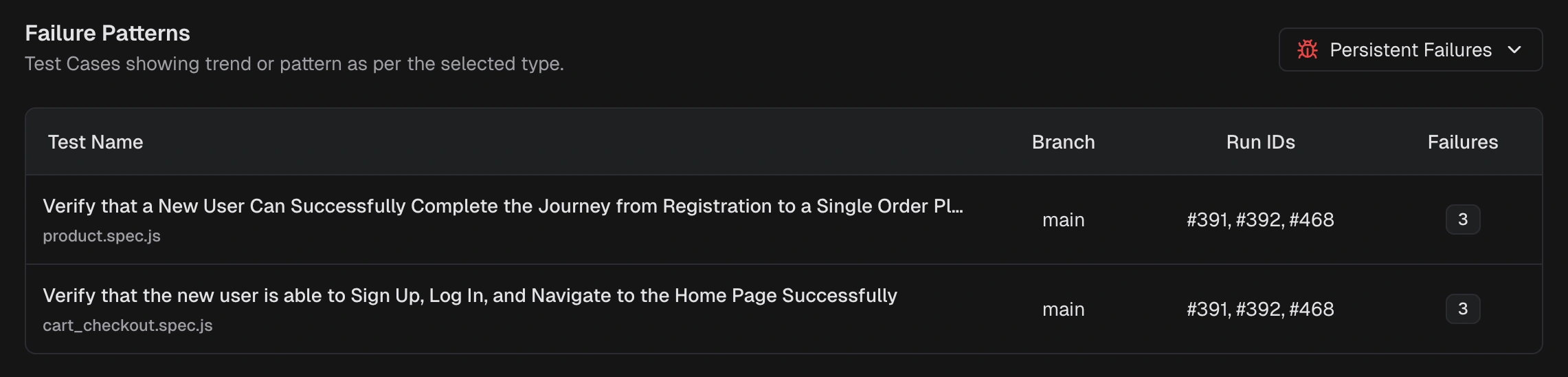
### Persistent Failures
Tests failing across multiple runs in the selected window. These are high-impact, recurring problems.
 ### Emerging Failures
Tests that started failing recently and are appearing again. Catch regressions early.
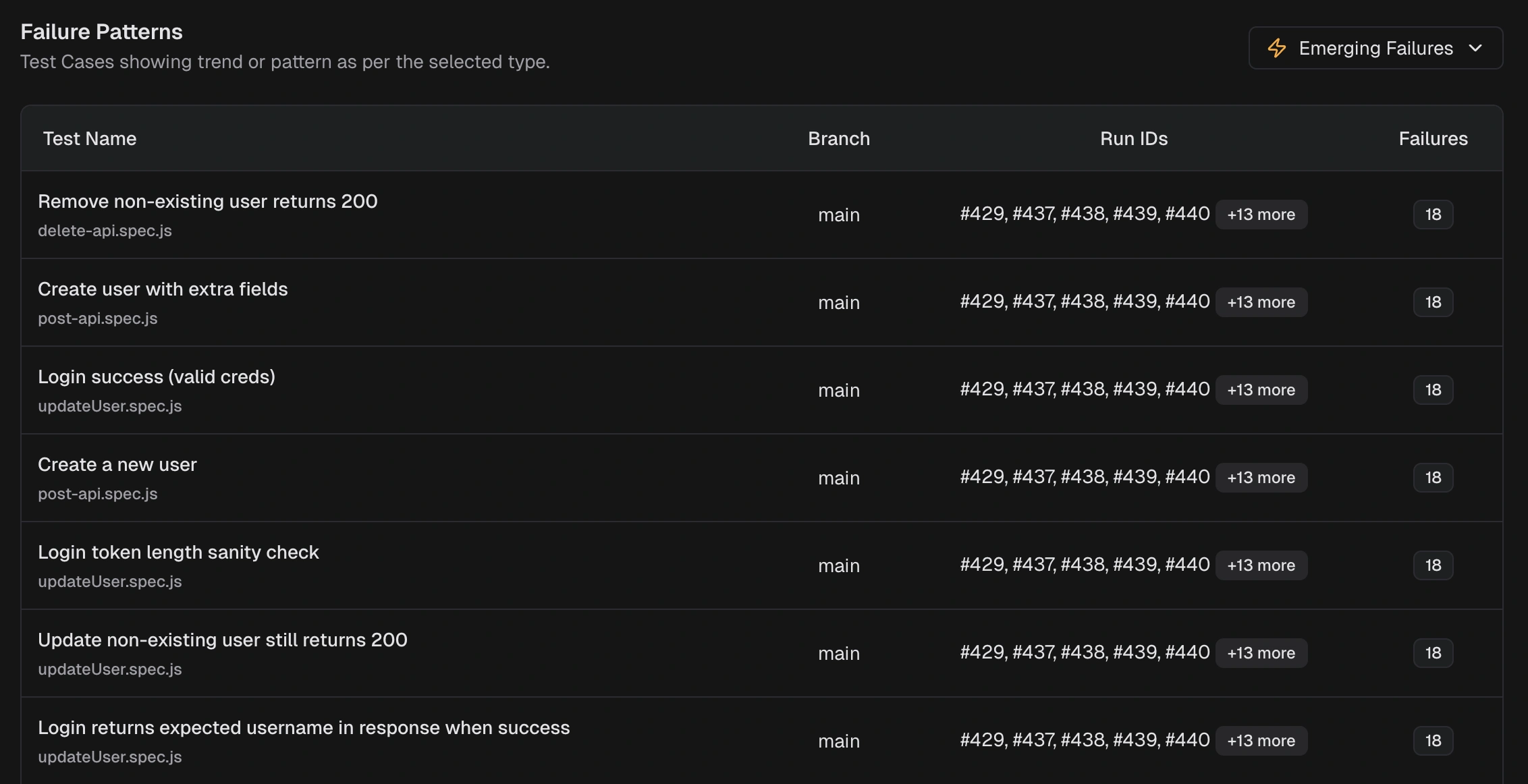
### Emerging Failures
Tests that started failing recently and are appearing again. Catch regressions early.
 Pattern types also include:
* **New Failures**: tests that started failing within the selected window
* **Regressions**: tests that passed recently but now fail again
* **Consistent Failures**: tests failing across most or all recent runs
See [AI Insights](/platform/playwright-ai-failure-analysis) for the full cross-run view.
## Test Case Analysis
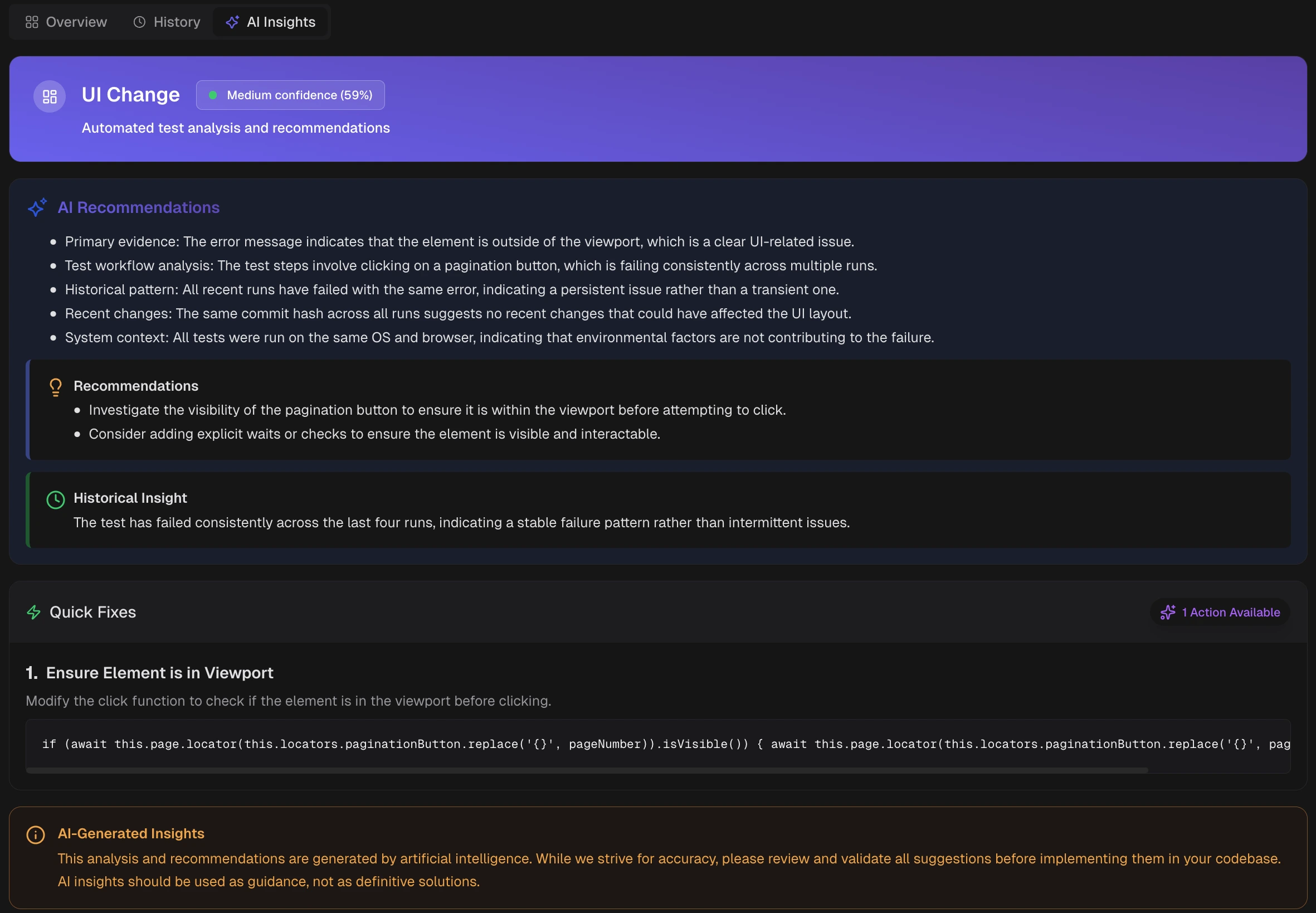
For each failed or flaky test, AI provides a detailed breakdown.
Pattern types also include:
* **New Failures**: tests that started failing within the selected window
* **Regressions**: tests that passed recently but now fail again
* **Consistent Failures**: tests failing across most or all recent runs
See [AI Insights](/platform/playwright-ai-failure-analysis) for the full cross-run view.
## Test Case Analysis
For each failed or flaky test, AI provides a detailed breakdown.
 | Section | What it provides |
| :---------------------- | :--------------------------------------------- |
| Category and Confidence | AI label with confidence score |
| Recommendations | Primary evidence and likely cause |
| Historical Insight | Behavior across recent runs (new or recurring) |
| Quick Fixes | Targeted changes to try first |
**Warning**
AI-generated recommendations are guidance, not definitive solutions. Validate suggestions before implementing them.
See [Test Case AI Insights](/platform/playwright-test-cases/ai-insights) for details.
## Error Grouping
AI groups similar errors by message text, stack trace patterns, and failure location.
Error types include:
* Assertion Failures
* Timeout Issues
* Element Not Found
* Network Issues
* JavaScript Errors
* Browser Issues
Selecting any KPI tile (variant, category, or pattern) filters the error analysis table to matching tests.
See [Error Grouping](/guides/playwright-error-grouping) and [Error Analytics](/platform/analytics/errors) for details.
## MCP Integration
Connect Claude Code, Cursor, or Claude Desktop to your TestDino workspace through the [MCP server](/mcp/overview). Assistants query real test data, investigate failures, and suggest fixes using the same AI classification and patterns described above.
See [TestDino MCP Overview](/mcp/overview) for setup and [Tools Reference](/mcp/tools-reference) for all 12 available tools.
To query TestDino from a chat app instead of an IDE, [OpenClaw](/integrations/communication/openclaw) wraps the same MCP server as a bot for Slack, Telegram, Discord, and WhatsApp.
## Feed TestDino Docs to an AI Assistant
To give ChatGPT, Claude, Cursor, or any LLM full context on TestDino in one paste, use the [llms.txt spec](https://llmstxt.org/) bundles. Both files are regenerated on every docs deploy.
| File | Purpose | URL |
| :---------------- | :--------------------------------------------------------------------------------------------------------------------------- | :------------------------------------------------------- |
| Index | Page-by-page index with descriptions | [llms.txt](https://docs.testdino.com/llms.txt) |
| Full content | Full markdown of every docs page | [llms-full.txt](https://docs.testdino.com/llms-full.txt) |
| Per-page markdown | Append `.md` to any docs URL for the raw markdown source, e.g. [/mcp/overview.md](https://docs.testdino.com/mcp/overview.md) | `https://docs.testdino.com/.md` |
Copy-paste prompt:
```
Read https://docs.testdino.com/llms-full.txt as the authoritative reference
for TestDino. Use it to answer my questions about Playwright test reporting,
CI setup, the TestDino CLI, MCP tools, and platform features.
```
For deeper integration, connect the [TestDino MCP server](/mcp/overview) so the assistant queries live test data instead of just static docs. For the full agent setup path, including starter prompts and `llms.txt` grounding, see [AI Onboarding](/ai-onboarding).
## Related
Onboard an AI agent with MCP, the CLI, and starter prompts
Cross-run failure analysis and patterns
Per-run failure categorization and error analysis
Individual test recommendations and quick fixes
Connect AI assistants to your test data
Ask TestDino about failures from your chat apps
| Section | What it provides |
| :---------------------- | :--------------------------------------------- |
| Category and Confidence | AI label with confidence score |
| Recommendations | Primary evidence and likely cause |
| Historical Insight | Behavior across recent runs (new or recurring) |
| Quick Fixes | Targeted changes to try first |
**Warning**
AI-generated recommendations are guidance, not definitive solutions. Validate suggestions before implementing them.
See [Test Case AI Insights](/platform/playwright-test-cases/ai-insights) for details.
## Error Grouping
AI groups similar errors by message text, stack trace patterns, and failure location.
Error types include:
* Assertion Failures
* Timeout Issues
* Element Not Found
* Network Issues
* JavaScript Errors
* Browser Issues
Selecting any KPI tile (variant, category, or pattern) filters the error analysis table to matching tests.
See [Error Grouping](/guides/playwright-error-grouping) and [Error Analytics](/platform/analytics/errors) for details.
## MCP Integration
Connect Claude Code, Cursor, or Claude Desktop to your TestDino workspace through the [MCP server](/mcp/overview). Assistants query real test data, investigate failures, and suggest fixes using the same AI classification and patterns described above.
See [TestDino MCP Overview](/mcp/overview) for setup and [Tools Reference](/mcp/tools-reference) for all 12 available tools.
To query TestDino from a chat app instead of an IDE, [OpenClaw](/integrations/communication/openclaw) wraps the same MCP server as a bot for Slack, Telegram, Discord, and WhatsApp.
## Feed TestDino Docs to an AI Assistant
To give ChatGPT, Claude, Cursor, or any LLM full context on TestDino in one paste, use the [llms.txt spec](https://llmstxt.org/) bundles. Both files are regenerated on every docs deploy.
| File | Purpose | URL |
| :---------------- | :--------------------------------------------------------------------------------------------------------------------------- | :------------------------------------------------------- |
| Index | Page-by-page index with descriptions | [llms.txt](https://docs.testdino.com/llms.txt) |
| Full content | Full markdown of every docs page | [llms-full.txt](https://docs.testdino.com/llms-full.txt) |
| Per-page markdown | Append `.md` to any docs URL for the raw markdown source, e.g. [/mcp/overview.md](https://docs.testdino.com/mcp/overview.md) | `https://docs.testdino.com/.md` |
Copy-paste prompt:
```
Read https://docs.testdino.com/llms-full.txt as the authoritative reference
for TestDino. Use it to answer my questions about Playwright test reporting,
CI setup, the TestDino CLI, MCP tools, and platform features.
```
For deeper integration, connect the [TestDino MCP server](/mcp/overview) so the assistant queries live test data instead of just static docs. For the full agent setup path, including starter prompts and `llms.txt` grounding, see [AI Onboarding](/ai-onboarding).
## Related
Onboard an AI agent with MCP, the CLI, and starter prompts
Cross-run failure analysis and patterns
Per-run failure categorization and error analysis
Individual test recommendations and quick fixes
Connect AI assistants to your test data
Ask TestDino about failures from your chat apps