> ## Documentation Index
> Fetch the complete documentation index at: https://docs.testdino.com/llms.txt
> Use this file to discover all available pages before exploring further.
# Re-run failed Playwright tests
> Re-run only the failed or flaky test cases from a finished Playwright run, on the same commit or the latest code.
Re-run takes a finished test run and executes only the test cases that failed or were flaky in it. Start one from the test run page, a terminal, or an AI agent.
Re-run requires the `@testdino/playwright` npm package at 2.7.0 or later, and Playwright 1.56 or later. Check yours with `npm ls @testdino/playwright`. An earlier version exits with `error: unknown option '--rerun'`.
## Quick Reference
| Topic | Link | Best for |
| :------------------ | :---------------------------------------------------------------------- | :--------------------------------------- |
| Dashboard button | [Start a re-run from the dashboard](#start-a-re-run-from-the-dashboard) | A test run you are already reading |
| Scope the selection | [Choose which test cases run](#choose-which-test-cases-run) | Narrowing to your own failures |
| Same or new code | [Choose which code runs](#choose-which-code-runs) | Telling a flaky test from a real failure |
| Repository setup | [Enable the dashboard button](#enable-the-dashboard-button) | Turning on one-click re-runs |
| Terminal | [Re-run from the command line](#re-run-from-the-command-line) | CI without GitHub, or scripting |
| Agents | [Re-run from an AI agent](#re-run-from-an-ai-agent) | Agent-driven fix loops |
## Start a re-run from the dashboard
**Re-run** sits in the action row right of the tab strip on a test run's page, next to **Debug with AI**. It appears once the test run has finished and carries at least 1 failed or flaky test case. A test run reporting `passed` still shows it when the run carries flaky test cases.
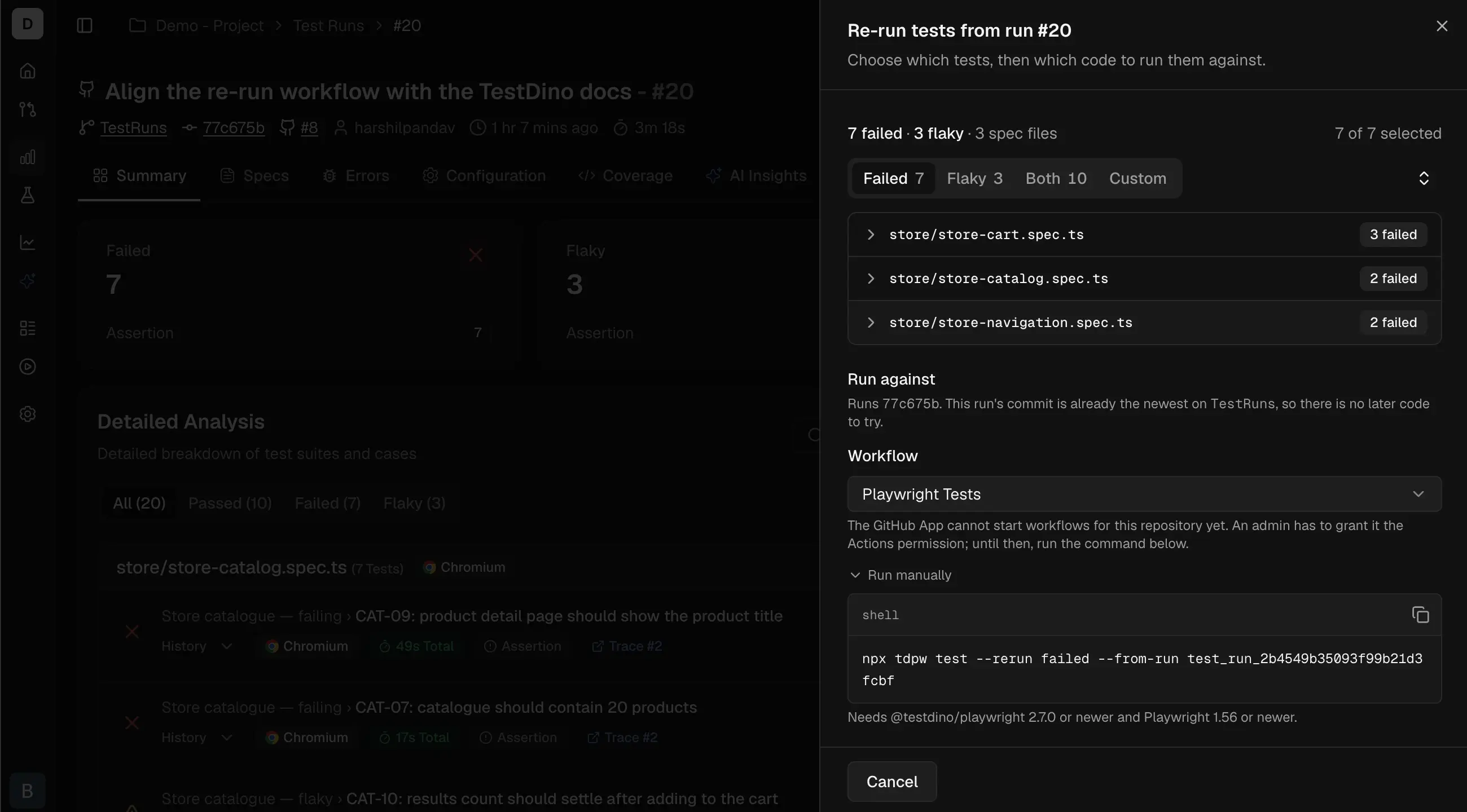 The panel shows the count that will run as `7 of 9 selected`, the code choice, and the workflow that will run it. The button states what happens:
| Button reads | Meaning |
| :-------------------------- | :--------------------------------------------- |
| `Re-run 6 failed tests` | The scope's test cases, on the original commit |
| `Re-run 11 tests on latest` | The scope's test cases, on the branch tip |
| `Re-run 3 selected tests` | A hand-picked subset |
| `Select tests to re-run` | Nothing is ticked, so the button is disabled |
The new test run appears in the run list once CI picks it up, linked to the run it came from.
## Choose which test cases run
| Choice | Selects |
| :--------- | :------------------------------------------------------- |
| **Failed** | Test cases that failed, including timeouts. The default. |
| **Flaky** | Test cases that passed only after a retry. |
| **Both** | Failed and flaky together. |
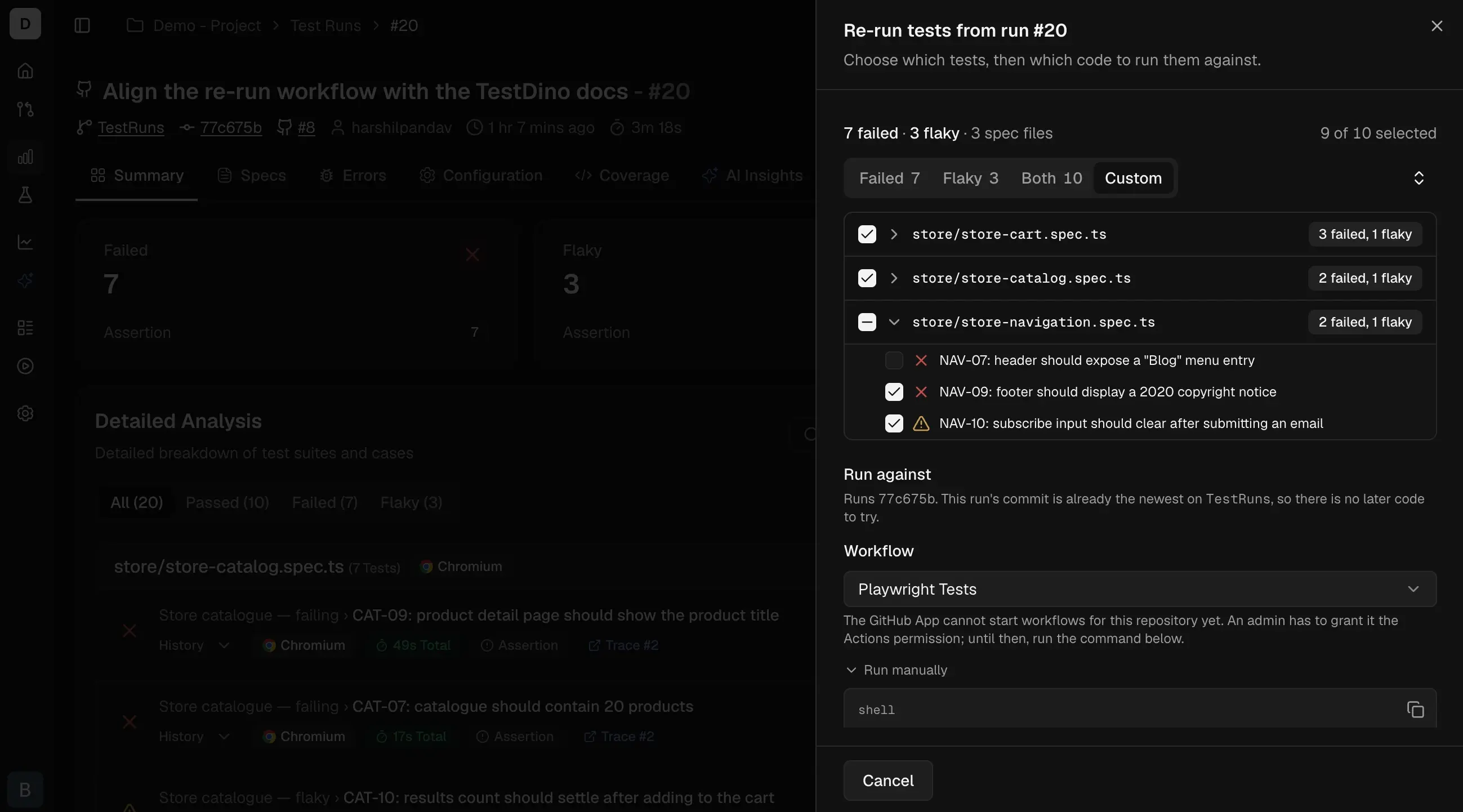
| **Custom** | Test cases you tick by hand. |
**Custom** appears when there is more than 1 test case to choose between. On large test runs it adds a search box and a group-by choice for spec file, failure reason, or browser.
The panel shows the count that will run as `7 of 9 selected`, the code choice, and the workflow that will run it. The button states what happens:
| Button reads | Meaning |
| :-------------------------- | :--------------------------------------------- |
| `Re-run 6 failed tests` | The scope's test cases, on the original commit |
| `Re-run 11 tests on latest` | The scope's test cases, on the branch tip |
| `Re-run 3 selected tests` | A hand-picked subset |
| `Select tests to re-run` | Nothing is ticked, so the button is disabled |
The new test run appears in the run list once CI picks it up, linked to the run it came from.
## Choose which test cases run
| Choice | Selects |
| :--------- | :------------------------------------------------------- |
| **Failed** | Test cases that failed, including timeouts. The default. |
| **Flaky** | Test cases that passed only after a retry. |
| **Both** | Failed and flaky together. |
| **Custom** | Test cases you tick by hand. |
**Custom** appears when there is more than 1 test case to choose between. On large test runs it adds a search box and a group-by choice for spec file, failure reason, or browser.
 ## Choose which code runs
**Run against** offers 2 options, and they answer different questions:
| Option | What runs | What the result tells you |
| :----------------------- | :------------------------------------ | :------------------------------------------------------------------------- |
| **This commit** | The commit the original test run used | Still failing is a real failure. Passing now means the test case is flaky. |
| **Latest on ``** | The current branch tip | Whether a fix that landed since works. |
**This commit** is unavailable, with the reason shown, when the original test run recorded no commit or recorded uncommitted changes alongside it. **Latest** is unavailable when the branch is gone; the re-run then dispatches on the default branch, still pinned to the original commit.
## Enable the dashboard button
Connect GitHub to the project in Project settings, under Integrations, and grant the TestDino GitHub App permission to start workflows. Then declare the re-run inputs on a workflow. Either shape works, because TestDino offers any active workflow that declares `testdino_rerun_from`:
| Choice | Pick it when |
| :-------------------- | :----------------------------------------------------------------------------------------------------------- |
| **Existing workflow** | You want one workflow definition to maintain. It keeps its normal triggers and gains a re-run path. |
| **Separate workflow** | You want re-runs isolated: their own logs, their own concurrency, no change to the workflow CI already runs. |
Add `workflow_dispatch` and the inputs to the workflow you already run Playwright with. The `if [ -n "$TD_RERUN_FROM" ]` guard is what keeps a normal push unchanged: on a push the input is empty, so no re-run arguments are added.
```yaml .github/workflows/playwright.yml theme={null}
on:
push:
workflow_dispatch:
inputs:
testdino_rerun_from:
required: true
testdino_rerun_scope:
default: failed
testdino_rerun_test_ids:
required: false
testdino_rerun_exclude_ids:
required: false
testdino_rerun_sha:
required: false
jobs:
test:
runs-on: ubuntu-latest
steps:
- uses: actions/checkout@v4
with:
ref: ${{ inputs.testdino_rerun_sha || github.sha }}
- uses: actions/setup-node@v4
with:
node-version: 22
- run: npm ci
- name: Run tests
env:
TESTDINO_TOKEN: ${{ secrets.TESTDINO_TOKEN }}
TD_RERUN_FROM: ${{ inputs.testdino_rerun_from }}
TD_RERUN_SCOPE: ${{ inputs.testdino_rerun_scope }}
TD_RERUN_TEST_IDS: ${{ inputs.testdino_rerun_test_ids }}
TD_RERUN_EXCLUDE_IDS: ${{ inputs.testdino_rerun_exclude_ids }}
shell: bash
run: |
args=()
if [ -n "$TD_RERUN_FROM" ]; then
args+=(--rerun "${TD_RERUN_SCOPE:-failed}" --from-run "$TD_RERUN_FROM")
if [ -n "$TD_RERUN_TEST_IDS" ]; then
args+=(--test-ids "$TD_RERUN_TEST_IDS")
fi
if [ -n "$TD_RERUN_EXCLUDE_IDS" ]; then
args+=(--exclude-ids "$TD_RERUN_EXCLUDE_IDS")
fi
fi
npx tdpw test "${args[@]}"
```
A workflow that only ever runs a re-run needs no guard: `workflow_dispatch` is its only trigger and `testdino_rerun_from` is required, so the input is always present.
```yaml .github/workflows/rerun.yml theme={null}
name: Re-run failed tests
on:
workflow_dispatch:
inputs:
testdino_rerun_from:
required: true
testdino_rerun_scope:
default: failed
testdino_rerun_test_ids:
required: false
testdino_rerun_exclude_ids:
required: false
testdino_rerun_sha:
required: false
jobs:
test:
runs-on: ubuntu-latest
steps:
- uses: actions/checkout@v4
with:
ref: ${{ inputs.testdino_rerun_sha || github.sha }}
- uses: actions/setup-node@v4
with:
node-version: 22
- run: npm ci
- name: Run the selected tests
env:
TESTDINO_TOKEN: ${{ secrets.TESTDINO_TOKEN }}
TD_RERUN_FROM: ${{ inputs.testdino_rerun_from }}
TD_RERUN_SCOPE: ${{ inputs.testdino_rerun_scope }}
TD_RERUN_TEST_IDS: ${{ inputs.testdino_rerun_test_ids }}
TD_RERUN_EXCLUDE_IDS: ${{ inputs.testdino_rerun_exclude_ids }}
shell: bash
run: |
args=(--rerun "${TD_RERUN_SCOPE:-failed}" --from-run "$TD_RERUN_FROM")
if [ -n "$TD_RERUN_TEST_IDS" ]; then
args+=(--test-ids "$TD_RERUN_TEST_IDS")
fi
if [ -n "$TD_RERUN_EXCLUDE_IDS" ]; then
args+=(--exclude-ids "$TD_RERUN_EXCLUDE_IDS")
fi
npx tdpw test "${args[@]}"
```
TestDino reads the workflow files on the branch and offers only the ones that declare these inputs:
| Input | Required? | Without it |
| :--------------------------------------------------------- | :------------------ | :--------------------------------------------------------------------- |
| `testdino_rerun_from` | Yes | The workflow is not offered for re-runs. |
| `testdino_rerun_scope` | Recommended | Only **Failed** can be sent. |
| `testdino_rerun_test_ids` and `testdino_rerun_exclude_ids` | For Custom | The workflow cannot receive a hand-picked list, and the panel says so. |
| `testdino_rerun_sha` | For **This commit** | Only **Latest** can be sent. |
A workflow that declares `testdino_rerun_sha` without passing it to `checkout` reports a same-commit re-run while running current code. The `ref:` line above is what makes the pin real.
The workflow file itself always comes from the branch tip, so a same-commit re-run runs the original test code under your current pipeline definition.
## Re-run from the command line
Without a GitHub connection the panel gives you this command under **Run manually**, with the id lists filled in:
```bash theme={null}
npx tdpw test --rerun failed --from-run test_run_a66fa0ee4f7a28ef5986e907
```
Before running anything, the CLI checks the selection against the code you have checked out. Test cases renamed, moved, or deleted since the original test run are reported and skipped. If none of them match, the CLI stops with an error rather than reporting a green test run that executed nothing.
## CLI flags
| Flag | Description |
| :-------------------- | :---------------------------------------------------------- |
| `--rerun ` | `failed`, `flaky`, or `failed-and-flaky`. |
| `--from-run ` | The test run to re-run from. Required with `--rerun`. |
| `--test-ids ` | Comma-separated test case ids to run, overriding the scope. |
| `--exclude-ids ` | Comma-separated test case ids to drop from the scope. |
`--rerun` is refused alongside a Playwright argument that would fight the selection: `--grep`, `--grep-invert`, `--last-failed`, `--test-list`, and `--shard`. Full flag reference in [`@testdino/playwright`](/cli/testdino-playwright-nodejs).
## Re-run from an AI agent
| Tool | Does |
| :-------------------- | :--------------------------------------------------------------------- |
| `get_rerun_selection` | Resolves which test cases would run, plus the command. Nothing starts. |
| `rerun_test` | Starts the GitHub Actions workflow for that selection. |
`rerun_test` runs only after you have seen the selection and said yes, so an agent cannot spend CI minutes on its own. Parameters for both are in the [MCP tools reference](/mcp/tools-reference).
## Troubleshooting
The project resolves `npx tdpw` to a CLI older than 2.7.0, which passes the flag through to Playwright. Upgrade `@testdino/playwright` to 2.7.0 or later.
No workflow on the branch declares a `testdino_rerun_from` input, or the TestDino GitHub App lacks permission to start workflows. The panel falls back to the terminal command. See [Enable the dashboard button](#enable-the-dashboard-button).
The test run finished seconds ago and its results are still being read. The panel updates itself; the CLI waits. This is not the same as having nothing to re-run.
Playwright identifies a test case by its full name, splitting the parts on `›` and trimming each one, with no escape for either. A title containing that separator, or starting or ending with a space, a non-breaking space, or a line break, cannot be requested exactly.
Those test cases are listed separately everywhere the selection appears, and the selected count excludes them, so a re-run never reports success for a test case it could not execute. Run them with your usual Playwright command, or rename the test case.
The original test run recorded no commit, or recorded uncommitted changes alongside one, so pinning to it would run different code than the test run did. Use **Latest**, or re-run from a test run whose working tree was clean.
## Related
Hand a failure to your coding agent from the same action row.
How TestDino decides a test case is flaky.
The run page this panel opens from.
Reporting Playwright results from GitHub Actions.
## Choose which code runs
**Run against** offers 2 options, and they answer different questions:
| Option | What runs | What the result tells you |
| :----------------------- | :------------------------------------ | :------------------------------------------------------------------------- |
| **This commit** | The commit the original test run used | Still failing is a real failure. Passing now means the test case is flaky. |
| **Latest on ``** | The current branch tip | Whether a fix that landed since works. |
**This commit** is unavailable, with the reason shown, when the original test run recorded no commit or recorded uncommitted changes alongside it. **Latest** is unavailable when the branch is gone; the re-run then dispatches on the default branch, still pinned to the original commit.
## Enable the dashboard button
Connect GitHub to the project in Project settings, under Integrations, and grant the TestDino GitHub App permission to start workflows. Then declare the re-run inputs on a workflow. Either shape works, because TestDino offers any active workflow that declares `testdino_rerun_from`:
| Choice | Pick it when |
| :-------------------- | :----------------------------------------------------------------------------------------------------------- |
| **Existing workflow** | You want one workflow definition to maintain. It keeps its normal triggers and gains a re-run path. |
| **Separate workflow** | You want re-runs isolated: their own logs, their own concurrency, no change to the workflow CI already runs. |
Add `workflow_dispatch` and the inputs to the workflow you already run Playwright with. The `if [ -n "$TD_RERUN_FROM" ]` guard is what keeps a normal push unchanged: on a push the input is empty, so no re-run arguments are added.
```yaml .github/workflows/playwright.yml theme={null}
on:
push:
workflow_dispatch:
inputs:
testdino_rerun_from:
required: true
testdino_rerun_scope:
default: failed
testdino_rerun_test_ids:
required: false
testdino_rerun_exclude_ids:
required: false
testdino_rerun_sha:
required: false
jobs:
test:
runs-on: ubuntu-latest
steps:
- uses: actions/checkout@v4
with:
ref: ${{ inputs.testdino_rerun_sha || github.sha }}
- uses: actions/setup-node@v4
with:
node-version: 22
- run: npm ci
- name: Run tests
env:
TESTDINO_TOKEN: ${{ secrets.TESTDINO_TOKEN }}
TD_RERUN_FROM: ${{ inputs.testdino_rerun_from }}
TD_RERUN_SCOPE: ${{ inputs.testdino_rerun_scope }}
TD_RERUN_TEST_IDS: ${{ inputs.testdino_rerun_test_ids }}
TD_RERUN_EXCLUDE_IDS: ${{ inputs.testdino_rerun_exclude_ids }}
shell: bash
run: |
args=()
if [ -n "$TD_RERUN_FROM" ]; then
args+=(--rerun "${TD_RERUN_SCOPE:-failed}" --from-run "$TD_RERUN_FROM")
if [ -n "$TD_RERUN_TEST_IDS" ]; then
args+=(--test-ids "$TD_RERUN_TEST_IDS")
fi
if [ -n "$TD_RERUN_EXCLUDE_IDS" ]; then
args+=(--exclude-ids "$TD_RERUN_EXCLUDE_IDS")
fi
fi
npx tdpw test "${args[@]}"
```
A workflow that only ever runs a re-run needs no guard: `workflow_dispatch` is its only trigger and `testdino_rerun_from` is required, so the input is always present.
```yaml .github/workflows/rerun.yml theme={null}
name: Re-run failed tests
on:
workflow_dispatch:
inputs:
testdino_rerun_from:
required: true
testdino_rerun_scope:
default: failed
testdino_rerun_test_ids:
required: false
testdino_rerun_exclude_ids:
required: false
testdino_rerun_sha:
required: false
jobs:
test:
runs-on: ubuntu-latest
steps:
- uses: actions/checkout@v4
with:
ref: ${{ inputs.testdino_rerun_sha || github.sha }}
- uses: actions/setup-node@v4
with:
node-version: 22
- run: npm ci
- name: Run the selected tests
env:
TESTDINO_TOKEN: ${{ secrets.TESTDINO_TOKEN }}
TD_RERUN_FROM: ${{ inputs.testdino_rerun_from }}
TD_RERUN_SCOPE: ${{ inputs.testdino_rerun_scope }}
TD_RERUN_TEST_IDS: ${{ inputs.testdino_rerun_test_ids }}
TD_RERUN_EXCLUDE_IDS: ${{ inputs.testdino_rerun_exclude_ids }}
shell: bash
run: |
args=(--rerun "${TD_RERUN_SCOPE:-failed}" --from-run "$TD_RERUN_FROM")
if [ -n "$TD_RERUN_TEST_IDS" ]; then
args+=(--test-ids "$TD_RERUN_TEST_IDS")
fi
if [ -n "$TD_RERUN_EXCLUDE_IDS" ]; then
args+=(--exclude-ids "$TD_RERUN_EXCLUDE_IDS")
fi
npx tdpw test "${args[@]}"
```
TestDino reads the workflow files on the branch and offers only the ones that declare these inputs:
| Input | Required? | Without it |
| :--------------------------------------------------------- | :------------------ | :--------------------------------------------------------------------- |
| `testdino_rerun_from` | Yes | The workflow is not offered for re-runs. |
| `testdino_rerun_scope` | Recommended | Only **Failed** can be sent. |
| `testdino_rerun_test_ids` and `testdino_rerun_exclude_ids` | For Custom | The workflow cannot receive a hand-picked list, and the panel says so. |
| `testdino_rerun_sha` | For **This commit** | Only **Latest** can be sent. |
A workflow that declares `testdino_rerun_sha` without passing it to `checkout` reports a same-commit re-run while running current code. The `ref:` line above is what makes the pin real.
The workflow file itself always comes from the branch tip, so a same-commit re-run runs the original test code under your current pipeline definition.
## Re-run from the command line
Without a GitHub connection the panel gives you this command under **Run manually**, with the id lists filled in:
```bash theme={null}
npx tdpw test --rerun failed --from-run test_run_a66fa0ee4f7a28ef5986e907
```
Before running anything, the CLI checks the selection against the code you have checked out. Test cases renamed, moved, or deleted since the original test run are reported and skipped. If none of them match, the CLI stops with an error rather than reporting a green test run that executed nothing.
## CLI flags
| Flag | Description |
| :-------------------- | :---------------------------------------------------------- |
| `--rerun ` | `failed`, `flaky`, or `failed-and-flaky`. |
| `--from-run ` | The test run to re-run from. Required with `--rerun`. |
| `--test-ids ` | Comma-separated test case ids to run, overriding the scope. |
| `--exclude-ids ` | Comma-separated test case ids to drop from the scope. |
`--rerun` is refused alongside a Playwright argument that would fight the selection: `--grep`, `--grep-invert`, `--last-failed`, `--test-list`, and `--shard`. Full flag reference in [`@testdino/playwright`](/cli/testdino-playwright-nodejs).
## Re-run from an AI agent
| Tool | Does |
| :-------------------- | :--------------------------------------------------------------------- |
| `get_rerun_selection` | Resolves which test cases would run, plus the command. Nothing starts. |
| `rerun_test` | Starts the GitHub Actions workflow for that selection. |
`rerun_test` runs only after you have seen the selection and said yes, so an agent cannot spend CI minutes on its own. Parameters for both are in the [MCP tools reference](/mcp/tools-reference).
## Troubleshooting
The project resolves `npx tdpw` to a CLI older than 2.7.0, which passes the flag through to Playwright. Upgrade `@testdino/playwright` to 2.7.0 or later.
No workflow on the branch declares a `testdino_rerun_from` input, or the TestDino GitHub App lacks permission to start workflows. The panel falls back to the terminal command. See [Enable the dashboard button](#enable-the-dashboard-button).
The test run finished seconds ago and its results are still being read. The panel updates itself; the CLI waits. This is not the same as having nothing to re-run.
Playwright identifies a test case by its full name, splitting the parts on `›` and trimming each one, with no escape for either. A title containing that separator, or starting or ending with a space, a non-breaking space, or a line break, cannot be requested exactly.
Those test cases are listed separately everywhere the selection appears, and the selected count excludes them, so a re-run never reports success for a test case it could not execute. Run them with your usual Playwright command, or rename the test case.
The original test run recorded no commit, or recorded uncommitted changes alongside one, so pinning to it would run different code than the test run did. Use **Latest**, or re-run from a test run whose working tree was clean.
## Related
Hand a failure to your coding agent from the same action row.
How TestDino decides a test case is flaky.
The run page this panel opens from.
Reporting Playwright results from GitHub Actions.