> ## Documentation Index
> Fetch the complete documentation index at: https://docs.testdino.com/llms.txt
> Use this file to discover all available pages before exploring further.
# Playwright Flaky Tests
> Detect, classify, and track flaky Playwright tests automatically.
**What you'll learn**
* How TestDino detects and classifies flaky tests
* Where to find flaky tests across dashboard, analytics, and explorer views
* How to track flakiness trends and prioritize stabilization
A flaky test produces different results across runs without code changes. It passes on one execution and fails on the next, or passes only after a retry.
## Quick Reference
| View | Path | Best for |
| :---------------------------------------------- | :--------------------------- | :------------------------------------- |
| [Dashboard](#dashboard) | Dashboard → Most Flaky Tests | Top flaky tests in the selected period |
| [Analytics Summary](#analytics-summary) | Analytics → Summary | Flakiness trends |
| [Test Run Summary](#test-run-summary) | Test Runs → Summary | Per-run flaky breakdown |
| [Test Case History](#test-case-history) | Test Case → History | Single test stability |
| [Test Explorer](#test-explorer) | Test Explorer | Flaky rate by file and test case |
| [Environment Analytics](#environment-analytics) | Analytics → Environment | Flaky rates per environment |
## How Detection Works
Flaky test detection activates automatically when [retries are enabled](https://playwright.dev/docs/test-retries) in Playwright. No additional configuration required.
```typescript playwright.config.ts theme={null}
export default defineConfig({
retries: process.env.CI ? 2 : 0,
});
```
TestDino detects flaky tests in two ways:
**Within a single run.** A test that fails initially but passes on retry is marked flaky. The retry count appears in the test details.
**Across multiple runs.** Tests with inconsistent outcomes on the same code are flagged. TestDino tracks pass/fail patterns and calculates a stability percentage.
**Note**
Both detection methods indicate that the test result depends on something other than your code.
## Flaky Test Categories
TestDino classifies flaky tests by root cause:
| Category | Description |
| :--------------------- | :---------------------------------------------------------- |
| Timing Related | Race conditions, order dependencies, and insufficient waits |
| Environment Dependent | Fails only in specific environments or runners |
| Network Dependent | Intermittent API or service failures |
| Assertion Intermittent | Non-deterministic data causes occasional mismatches |
| Other | Unstable for reasons outside the above |
### Common causes
* Fixed waits instead of waiting for the page to be ready
* Missing `await` causes steps to run out of order
* Weak selectors that match more than one element
* Tests share data and affect each other
* Parallel runs collide on the same user or record
* Slow or unstable network or third-party APIs
* CI setup differs from local environment
## Where to Find Flaky Tests
### Dashboard
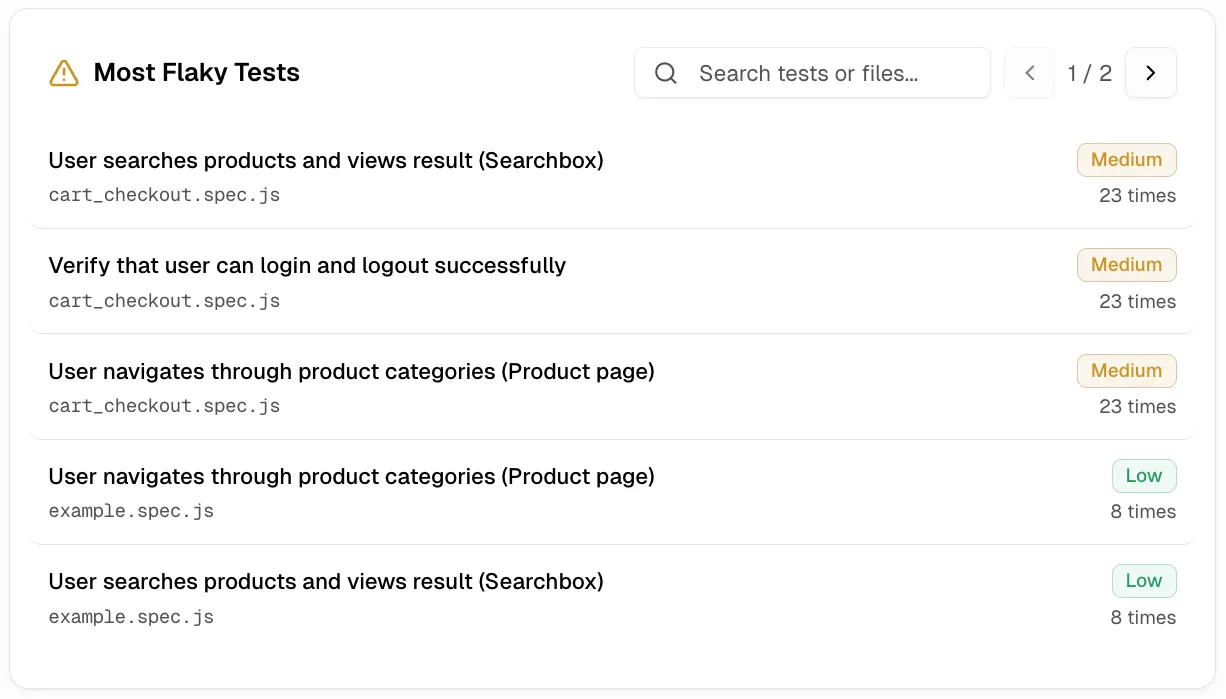
Open the [Dashboard](/platform/playwright-test-dashboard). The **Most Flaky Tests** panel lists tests with the highest flaky rates in the selected period.
Each entry shows the test name, spec file, flaky rate percentage, and a link to the latest run. Click any test to open its most recent execution.
### Analytics Summary
Open **Analytics → Summary**. The **Flakiness & Test Issues** chart shows the flaky rate trend over time and a list of flaky tests with spec file and execution date.
A rising trend indicates increasing instability in your test suite.
### Test Run Summary
Open any test run. The **Summary** tab shows flaky test counts grouped by category: Timing Related, Environment Dependent, Network Dependent, Assertion Intermittent, and Other Flaky.
Click a category to filter the detailed analysis table.
### Test Case History
Open a specific test case and go to the **History** tab. The stability percentage shows how often the test passes:
Stability = (Passed Runs / Total Runs) x 100
A test with 100% stability has never failed or been flaky. Any value below 100% indicates inconsistent behavior. The **Last Flaky** tile links to the most recent run where the test was marked flaky.
### Test Explorer
Open **Test Explorer** from the sidebar. The **Flaky Rate** column shows the percentage of executions with flaky results for each spec file or test case.
Sort by flaky rate to find the most unstable specs. Expand a spec row to see flaky rates for individual test cases, or switch to Flat view to compare across files.
### Environment Analytics
Open [**Analytics → Environment**](/platform/analytics/environment). The **Flaky Rate** row shows flaky percentages per environment, so you can compare stability across staging, production, and other environments.
**Note**
High flaky rates in specific environments suggest environment-dependent issues like resource constraints or service availability.
## CI Check Behavior
GitHub CI Checks handle flaky tests in two modes:
| Mode | Behavior | Use case |
| :------ | :---------------------------------- | :------------------------------------------ |
| Strict | Flaky tests count as failures | Production branches where stability matters |
| Neutral | Flaky tests excluded from pass rate | Development branches to reduce noise |
See [GitHub CI Checks](/guides/github-status-checks) for configuration details.
## Export Flaky Test Data
Use the TestDino MCP server to query flaky tests programmatically:
```bash theme={null}
List flaky tests from the last 7 days on the main environment
```
**Tip**
The MCP server returns test names, flaky rates, and run IDs for further analysis.
See [TestDino MCP](/mcp/overview) for more details.
## Related
Test Explorer, CI checks, MCP, and analytics.
Analyze flaky rates across spec files and test cases
Configure flaky handling in CI
Query flaky data with AI
Project-wide test analytics
 **Across multiple runs.** Tests with inconsistent outcomes on the same code are flagged. TestDino tracks pass/fail patterns and calculates a stability percentage.

 ### Analytics Summary
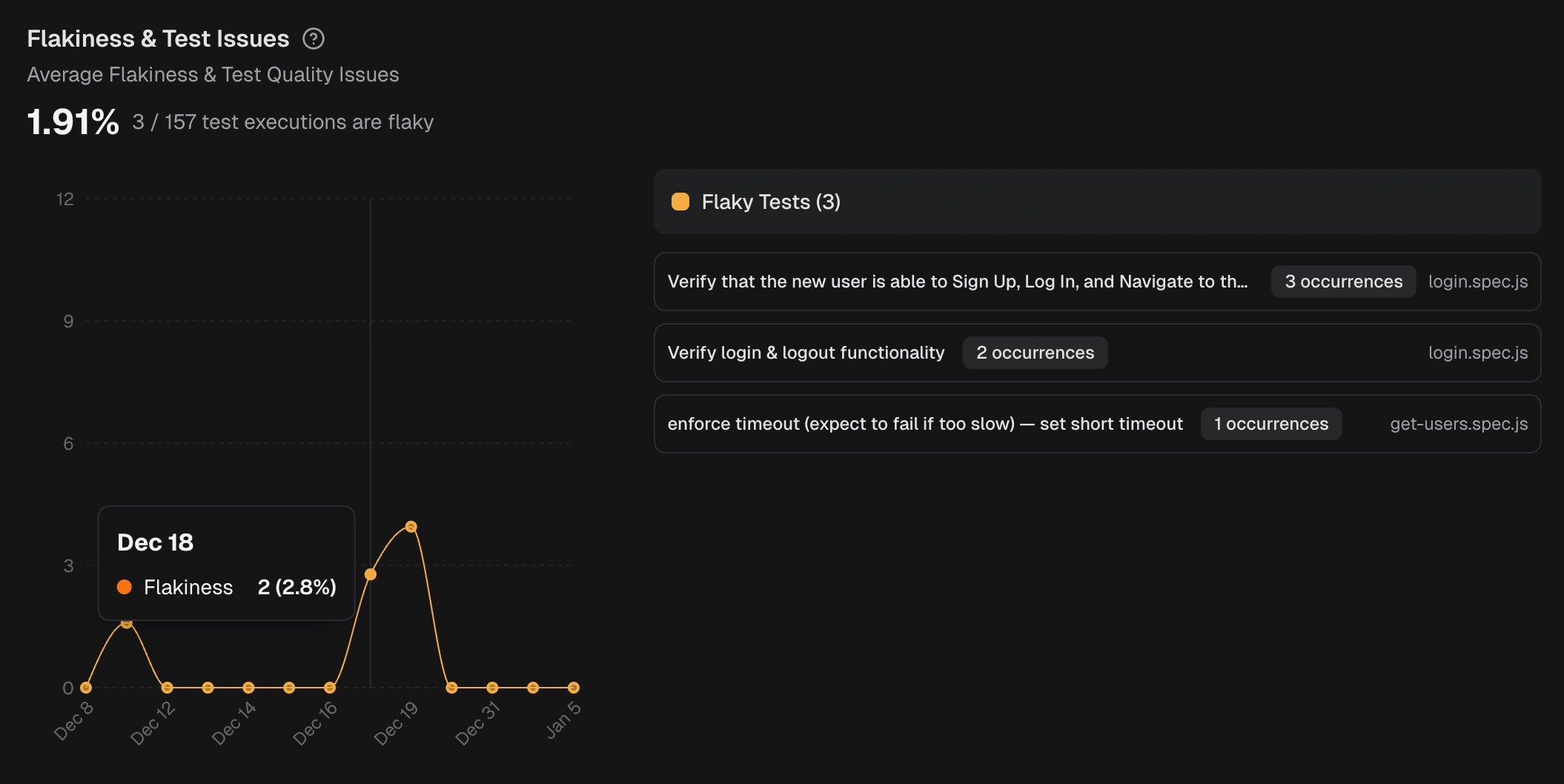
Open **Analytics → Summary**. The **Flakiness & Test Issues** chart shows the flaky rate trend over time and a list of flaky tests with spec file and execution date.
A rising trend indicates increasing instability in your test suite.
### Analytics Summary
Open **Analytics → Summary**. The **Flakiness & Test Issues** chart shows the flaky rate trend over time and a list of flaky tests with spec file and execution date.
A rising trend indicates increasing instability in your test suite.
 ### Test Run Summary
Open any test run. The **Summary** tab shows flaky test counts grouped by category: Timing Related, Environment Dependent, Network Dependent, Assertion Intermittent, and Other Flaky.
### Test Run Summary
Open any test run. The **Summary** tab shows flaky test counts grouped by category: Timing Related, Environment Dependent, Network Dependent, Assertion Intermittent, and Other Flaky.
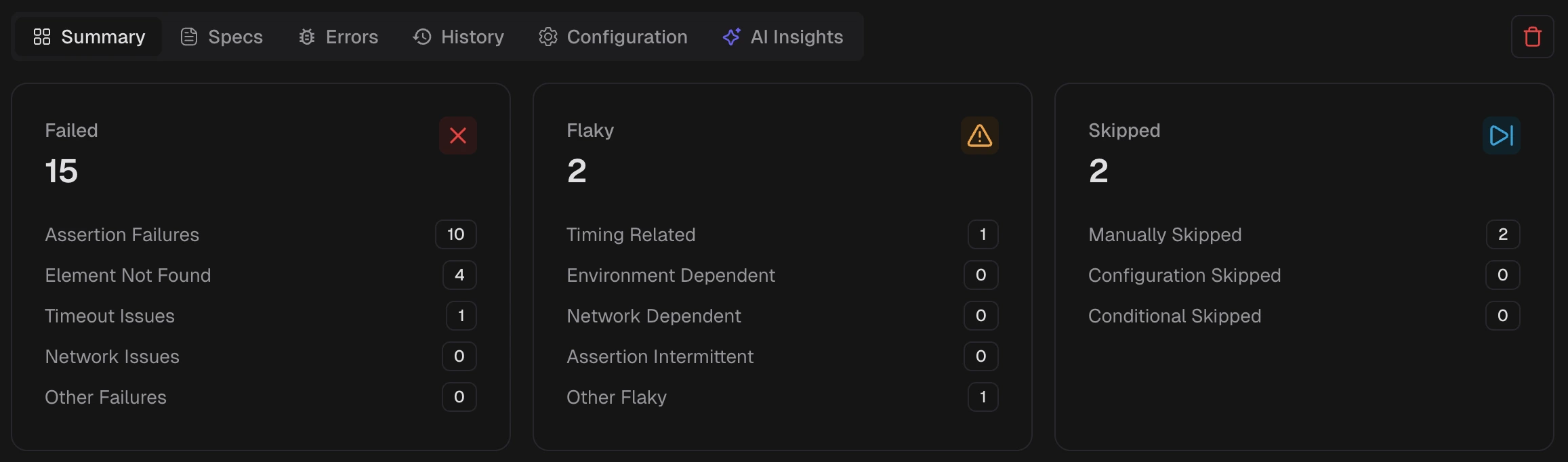 Click a category to filter the detailed analysis table.
### Test Case History
Open a specific test case and go to the **History** tab. The stability percentage shows how often the test passes:
Stability = (Passed Runs / Total Runs) x 100
A test with 100% stability has never failed or been flaky. Any value below 100% indicates inconsistent behavior. The **Last Flaky** tile links to the most recent run where the test was marked flaky.
Click a category to filter the detailed analysis table.
### Test Case History
Open a specific test case and go to the **History** tab. The stability percentage shows how often the test passes:
Stability = (Passed Runs / Total Runs) x 100
A test with 100% stability has never failed or been flaky. Any value below 100% indicates inconsistent behavior. The **Last Flaky** tile links to the most recent run where the test was marked flaky.
 ### Test Explorer
Open **Test Explorer** from the sidebar. The **Flaky Rate** column shows the percentage of executions with flaky results for each spec file or test case.
Sort by flaky rate to find the most unstable specs. Expand a spec row to see flaky rates for individual test cases, or switch to Flat view to compare across files.
### Environment Analytics
Open [**Analytics → Environment**](/platform/analytics/environment). The **Flaky Rate** row shows flaky percentages per environment, so you can compare stability across staging, production, and other environments.
### Test Explorer
Open **Test Explorer** from the sidebar. The **Flaky Rate** column shows the percentage of executions with flaky results for each spec file or test case.
Sort by flaky rate to find the most unstable specs. Expand a spec row to see flaky rates for individual test cases, or switch to Flat view to compare across files.
### Environment Analytics
Open [**Analytics → Environment**](/platform/analytics/environment). The **Flaky Rate** row shows flaky percentages per environment, so you can compare stability across staging, production, and other environments.