> ## Documentation Index
> Fetch the complete documentation index at: https://docs.testdino.com/llms.txt
> Use this file to discover all available pages before exploring further.
# Playwright GitLab CI Setup
> Upload Playwright test results from GitLab CI/CD to TestDino, with sharded jobs and merged reports.
**What you'll learn**
* How to upload Playwright results from GitLab CI/CD to TestDino
* How to configure sharded test runs with merged reporting
Set up a GitLab CI/CD pipeline to upload Playwright test results to TestDino and view aggregated analytics, failure analysis, and flaky test detection on your dashboard.
This guide covers a basic pipeline, sharded pipeline for parallel test execution across multiple shards, and merged reporting.
## Prerequisites
Before setting up, ensure you have:
* A TestDino account with a project created
* A TestDino API key ([Generate API Keys](/guides/generate-api-keys))
* A GitLab account with CI/CD pipelines enabled on your repository
* A Playwright test project (or clone the TestDino Example Repository to get started)
* Playwright configured with JSON and HTML reporters in `playwright.config.js`:
```javascript playwright.config.js theme={null}
// ...existing config
reporter: [
['html', { outputDir: './playwright-report' }], // Optional
['json', { outputFile: './playwright-report/report.json' }], // ✅ Required
]
```
## Set Up Your API Key
1. Go to your GitLab project
2. Open **Settings → CI/CD**
3. Expand the **Variables** section
4. Click **Add variable**
5. Set the key to `TESTDINO_TOKEN`
6. Paste your TestDino API key as the value
7. Check **Mask variable** to hide it from job logs
8. Save the variable
**Warning**
Never commit your API key directly in pipeline files. Always use CI/CD variables. Masked variables are hidden from job output.
## Basic Pipeline Config
For a simple setup without sharding, add the upload step after your Playwright tests.
```yaml .gitlab-ci.yml theme={null}
image: mcr.microsoft.com/playwright:v1.59.1-noble
variables:
CI: "true"
stages:
- test
playwright:
stage: test
script:
- npm ci
- npx playwright test
- npx tdpw upload ./playwright-report --token="$TESTDINO_TOKEN"
artifacts:
when: always
paths:
- playwright-report/
- test-results/
expire_in: 14 days
rules:
- if: $CI_PIPELINE_SOURCE == "merge_request_event"
- if: $CI_COMMIT_BRANCH == $CI_DEFAULT_BRANCH
- if: $CI_PIPELINE_SOURCE == "web"
```
**Tip**
The `artifacts: when: always` ensures test results are saved even if tests fail.
## Upload Options
| Flag | Description | Default |
| :---------------------- | :-------------------------------------------------- | :------ |
| `--environment ` | Target environment tag (staging, production, qa) | unknown |
| `--tag ` | Comma-separated run tags for categorization (max 5) | None |
| `--upload-images` | Upload image attachments | false |
| `--upload-videos` | Upload video attachments | false |
| `--upload-html` | Upload HTML reports | false |
| `--upload-traces` | Upload trace files | false |
| `--upload-files` | Upload file attachments (.md, .pdf, .txt, .log) | false |
| `--upload-full-json` | Upload all attachments | false |
| `--json` | Output results as JSON to stdout (for CI/CD) | false |
| `-v, --verbose` | Enable verbose logging | false |
## Sharded Test Runs
For larger test suites, GitLab CI/CD `parallel` keyword splits tests across multiple jobs. Each shard produces a blob report that gets merged before uploading to TestDino.
### How it works
1. GitLab CI/CD runs Playwright across 4 parallel shards
2. Each shard saves its blob report as a job artifact
3. A separate `merge-report` job collects all blob reports, merges them into a single `report.json`, and uploads to TestDino
4. The merge job runs even if some shards fail (`when: always`)
### Full sharded config
```yaml .gitlab-ci.yml theme={null}
image: mcr.microsoft.com/playwright:v1.59.1-noble
stages:
- test
- report
variables:
CI: "true"
playwright:
stage: test
parallel: 4
script:
- npm ci
- npx playwright test --shard=$CI_NODE_INDEX/$CI_NODE_TOTAL
artifacts:
when: always
paths:
- blob-report/
- test-results/
expire_in: 14 days
rules:
- if: $CI_PIPELINE_SOURCE == "merge_request_event"
- if: $CI_COMMIT_BRANCH == $CI_DEFAULT_BRANCH
- if: $CI_PIPELINE_SOURCE == "web"
merge-report:
stage: report
when: always
needs:
- job: playwright
artifacts: true
script:
- npm ci
- mkdir -p merged-blob-reports playwright-report
- find . -type f -path "*/blob-report/*.zip" -exec cp {} merged-blob-reports/ \;
- npx playwright merge-reports --reporter=json ./merged-blob-reports > playwright-report/report.json
- npx tdpw upload ./playwright-report --token="$TESTDINO_TOKEN"
artifacts:
when: always
paths:
- playwright-report/
expire_in: 14 days
```
### Key details
| Config Block | What It Does |
| :-------------------------------------- | :---------------------------------------------------------- |
| `parallel: 4` | Runs 4 shard jobs in parallel |
| `--shard=$CI_NODE_INDEX/$CI_NODE_TOTAL` | GitLab provides 1-based index and total count automatically |
| `artifacts: when: always` | Saves blob reports even if shards fail |
| `needs: - job: playwright` | Downloads artifacts from all parallel shard jobs |
| `when: always` on merge job | Ensures merge and upload run regardless of shard outcomes |
### Pipeline execution
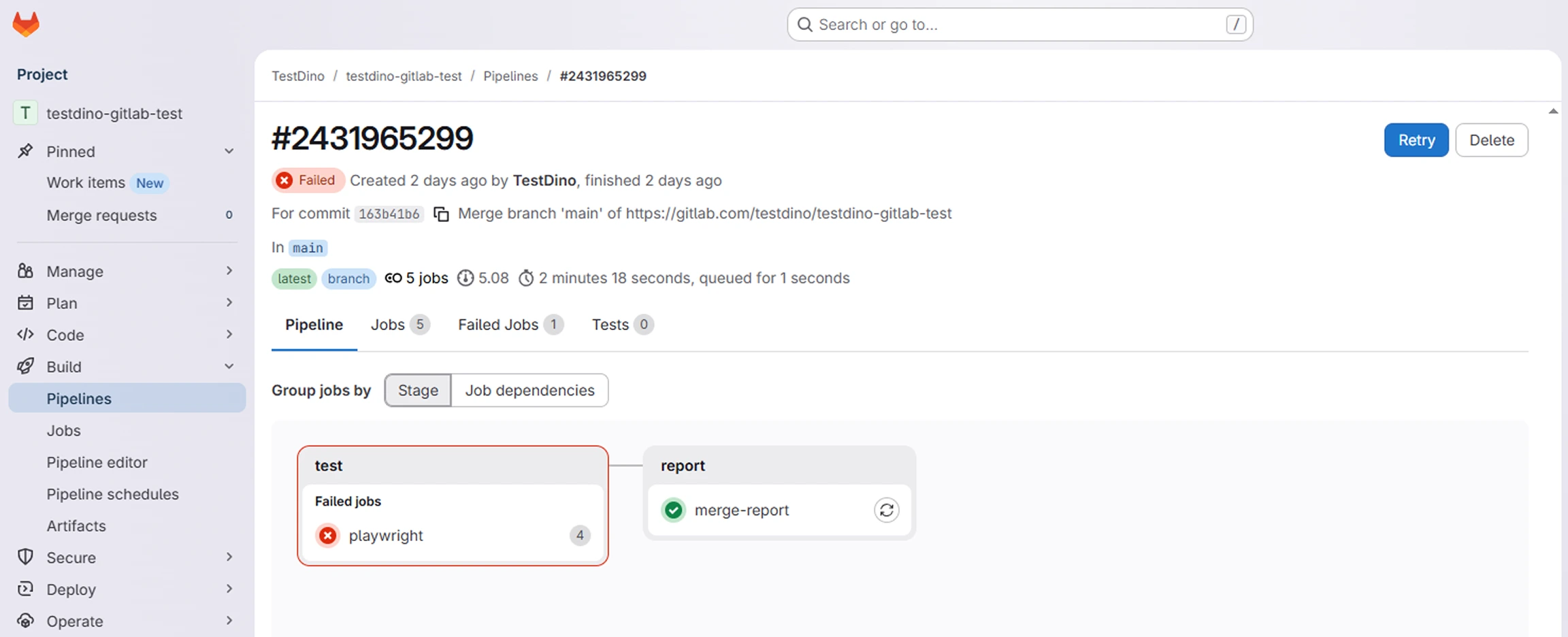
After the pipeline runs, GitLab shows all shard jobs and the merge stage in the pipeline view.
 ### Results in TestDino
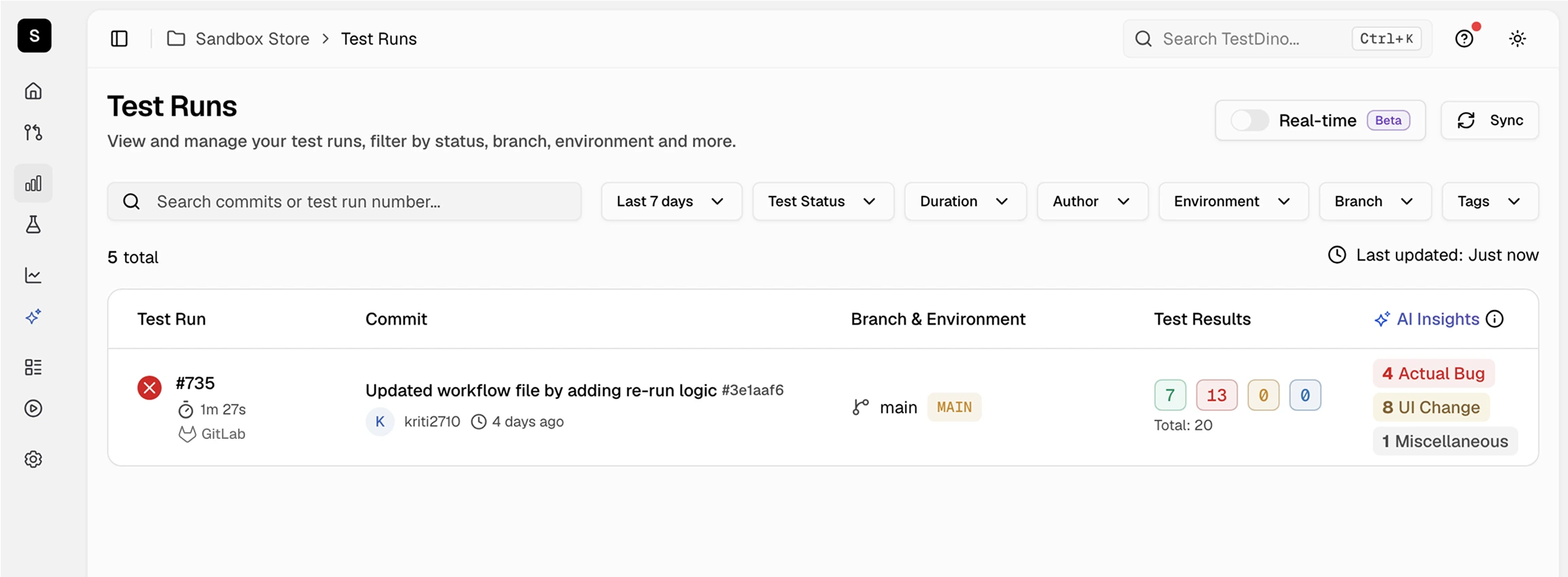
Once uploaded, the test run appears in your TestDino dashboard with full failure details, flaky detection, and trend data.
### Results in TestDino
Once uploaded, the test run appears in your TestDino dashboard with full failure details, flaky detection, and trend data.
 ## Rerun Failed Tests
Cache test metadata to enable selective reruns:
```yaml .gitlab-ci.yml theme={null}
playwright:
stage: test
script:
- npm ci
- npx playwright test
- npx tdpw cache --token="$TESTDINO_TOKEN"
- npx tdpw upload ./playwright-report --token="$TESTDINO_TOKEN" --upload-full-json
artifacts:
when: always
paths:
- playwright-report/
```
Rerun only failed tests on the next run:
```yaml .gitlab-ci.yml theme={null}
rerun-failed:
stage: test
script:
- npm ci
- FAILED=$(npx tdpw last-failed --token="$TESTDINO_TOKEN")
- |
if [ -n "$FAILED" ]; then
npx playwright test $FAILED
else
echo "No failed tests found."
fi
when: manual
```
For advanced rerun strategies, caching patterns, and CI optimization techniques, see [CI Optimization](/guides/playwright-ci-optimization).
## Troubleshooting
Ensure `artifacts: when: always` is set on the test job so blob reports are saved on failure. The `merge-report` job must use `when: always` to run regardless of shard outcomes.
Verify your `playwright.config.js` includes both HTML and JSON reporters with HTML listed first. For sharded runs, ensure blob reports are listed in the test job `artifacts: paths`.
Confirm the variable is set in **Settings → CI/CD → Variables**. If the variable is marked **Protected**, it is only available on protected branches.
## Next Steps
Reduce CI time with smart reruns
Map branches to environments for organized test runs
Connect Slack, Jira, Linear, Asana, and more
MR comments and merge request sync
## Rerun Failed Tests
Cache test metadata to enable selective reruns:
```yaml .gitlab-ci.yml theme={null}
playwright:
stage: test
script:
- npm ci
- npx playwright test
- npx tdpw cache --token="$TESTDINO_TOKEN"
- npx tdpw upload ./playwright-report --token="$TESTDINO_TOKEN" --upload-full-json
artifacts:
when: always
paths:
- playwright-report/
```
Rerun only failed tests on the next run:
```yaml .gitlab-ci.yml theme={null}
rerun-failed:
stage: test
script:
- npm ci
- FAILED=$(npx tdpw last-failed --token="$TESTDINO_TOKEN")
- |
if [ -n "$FAILED" ]; then
npx playwright test $FAILED
else
echo "No failed tests found."
fi
when: manual
```
For advanced rerun strategies, caching patterns, and CI optimization techniques, see [CI Optimization](/guides/playwright-ci-optimization).
## Troubleshooting
Ensure `artifacts: when: always` is set on the test job so blob reports are saved on failure. The `merge-report` job must use `when: always` to run regardless of shard outcomes.
Verify your `playwright.config.js` includes both HTML and JSON reporters with HTML listed first. For sharded runs, ensure blob reports are listed in the test job `artifacts: paths`.
Confirm the variable is set in **Settings → CI/CD → Variables**. If the variable is marked **Protected**, it is only available on protected branches.
## Next Steps
Reduce CI time with smart reruns
Map branches to environments for organized test runs
Connect Slack, Jira, Linear, Asana, and more
MR comments and merge request sync