> ## Documentation Index
> Fetch the complete documentation index at: https://docs.testdino.com/llms.txt
> Use this file to discover all available pages before exploring further.
# Playwright Jenkins Pipeline Setup
> Upload Playwright results from Jenkins pipelines to TestDino, with sharded parallel stages.
**What you'll learn**
* How to upload Playwright results from Jenkins pipelines to TestDino
* How to configure sharded test runs with merged reporting
* How to store the TESTDINO\_TOKEN as a Jenkins credential
Set up a Jenkins pipeline to upload Playwright test results to TestDino and view aggregated analytics, failure analysis, and flaky test detection on your dashboard.
This guide covers a basic pipeline, sharded pipeline for parallel test execution across multiple shards, and merged reporting.
## Prerequisites
Before setting up, ensure you have:
* A TestDino account with a project created
* A TestDino API key ([Generate API Keys](/guides/generate-api-keys))
* Jenkins instance with pipeline support
* A Playwright test project (or clone the TestDino Example Repository to get started)
* Playwright configured with JSON and HTML reporters in `playwright.config.js`:
```javascript playwright.config.js theme={null}
// ...existing config
reporter: [
['html', { outputDir: './playwright-report' }], // Optional
['json', { outputFile: './playwright-report/report.json' }], // ✅ Required
]
```
## Set Up Your API Key
Store your TestDino API key as a Jenkins credential so it is available to your pipeline without exposing it in logs or config files.
1. Open Jenkins
2. Go to **Manage Jenkins → Credentials**
3. Open the store where you want to add the secret
4. Click **Add Credentials**
5. Set **Kind** to `Secret text`
6. Paste your TestDino API key into **Secret**
7. Set the **ID** to `TESTDINO_TOKEN`
8. Click **Save**
**Warning**
Never commit your API key directly in pipeline files. Always use Jenkins credentials. Secret credentials are not exposed in build logs.
## Basic Pipeline Config
For a simple setup without sharding, add the upload step after your Playwright tests.
```groovy Jenkinsfile theme={null}
pipeline {
agent {
docker {
image 'mcr.microsoft.com/playwright:v1.59.1-noble'
args '-u root'
}
}
environment {
CI = 'true'
HOME = '/root'
TESTDINO_TOKEN = credentials('TESTDINO_TOKEN')
}
stages {
stage('Install') {
steps {
sh 'npm ci'
}
}
stage('Test') {
steps {
sh 'npx playwright test'
}
}
stage('Upload to TestDino') {
steps {
sh 'npx tdpw upload ./playwright-report --token="$TESTDINO_TOKEN"'
}
}
}
post {
always {
sh 'npx tdpw upload ./playwright-report --token="$TESTDINO_TOKEN"'
archiveArtifacts artifacts: 'playwright-report/**', allowEmptyArchive: true
}
}
}
```
**Tip**
The `post.always` block ensures the upload runs even if tests fail. The `credentials()` function maps the Jenkins credential to an environment variable accessible in the script.
## Upload Options
| Flag | Description | Default |
| :---------------------- | :-------------------------------------------------- | :------ |
| `--environment ` | Target environment tag (staging, production, qa) | unknown |
| `--tag ` | Comma-separated run tags for categorization (max 5) | None |
| `--upload-images` | Upload image attachments | false |
| `--upload-videos` | Upload video attachments | false |
| `--upload-html` | Upload HTML reports | false |
| `--upload-traces` | Upload trace files | false |
| `--upload-files` | Upload file attachments (.md, .pdf, .txt, .log) | false |
| `--upload-full-json` | Upload all attachments | false |
| `--json` | Output results as JSON to stdout (for CI/CD) | false |
| `-v, --verbose` | Enable verbose logging | false |
## Sharded Test Runs
For larger test suites, Jenkins parallel stages split tests across multiple shards. Each shard produces a blob report that gets merged before uploading to TestDino.
### How it works
1. Jenkins runs Playwright across 4 shards using parallel stages
2. Each shard stashes its blob report as a build artifact
3. A separate `Merge and upload` stage unstashes all blob reports, merges them into a single `report.json`, and uploads to TestDino
4. Each shard marks the build as `unstable` (not failed) if tests fail, so the merge stage always runs
### Full sharded config
```groovy Jenkinsfile theme={null}
pipeline {
agent {
docker {
image 'mcr.microsoft.com/playwright:v1.59.1-noble'
args '-u root'
}
}
environment {
CI = 'true'
HOME = '/root'
TESTDINO_TOKEN = credentials('TESTDINO_TOKEN')
}
options {
timeout(time: 45, unit: 'MINUTES')
disableConcurrentBuilds()
}
stages {
stage('Checkout') {
steps {
checkout scm
stash includes: '**/*', name: 'source'
}
}
stage('Run Playwright shards') {
parallel {
stage('Shard 1') {
steps {
dir('shard-1') {
unstash 'source'
sh 'npm ci'
script {
def testExitCode = sh(returnStatus: true, script: 'npx playwright test --shard=1/4')
stash allowEmpty: true, includes: 'blob-report/**', name: 'blob-report-1'
junit allowEmptyResults: true, testResults: 'test-results/junit.xml'
if (testExitCode != 0) {
unstable('Playwright shard 1 reported test failures.')
}
}
}
}
}
stage('Shard 2') {
steps {
dir('shard-2') {
unstash 'source'
sh 'npm ci'
script {
def testExitCode = sh(returnStatus: true, script: 'npx playwright test --shard=2/4')
stash allowEmpty: true, includes: 'blob-report/**', name: 'blob-report-2'
junit allowEmptyResults: true, testResults: 'test-results/junit.xml'
if (testExitCode != 0) {
unstable('Playwright shard 2 reported test failures.')
}
}
}
}
}
stage('Shard 3') {
steps {
dir('shard-3') {
unstash 'source'
sh 'npm ci'
script {
def testExitCode = sh(returnStatus: true, script: 'npx playwright test --shard=3/4')
stash allowEmpty: true, includes: 'blob-report/**', name: 'blob-report-3'
junit allowEmptyResults: true, testResults: 'test-results/junit.xml'
if (testExitCode != 0) {
unstable('Playwright shard 3 reported test failures.')
}
}
}
}
}
stage('Shard 4') {
steps {
dir('shard-4') {
unstash 'source'
sh 'npm ci'
script {
def testExitCode = sh(returnStatus: true, script: 'npx playwright test --shard=4/4')
stash allowEmpty: true, includes: 'blob-report/**', name: 'blob-report-4'
junit allowEmptyResults: true, testResults: 'test-results/junit.xml'
if (testExitCode != 0) {
unstable('Playwright shard 4 reported test failures.')
}
}
}
}
}
}
}
stage('Merge and upload') {
steps {
dir('merge') {
unstash 'source'
sh 'npm ci'
dir('shard-1') { unstash 'blob-report-1' }
dir('shard-2') { unstash 'blob-report-2' }
dir('shard-3') { unstash 'blob-report-3' }
dir('shard-4') { unstash 'blob-report-4' }
sh '''
mkdir -p all-blob-reports playwright-report
for shard in shard-1 shard-2 shard-3 shard-4; do
if [ -d "$shard/blob-report" ]; then
cp "$shard"/blob-report/* all-blob-reports/
fi
done
'''
sh 'npx playwright merge-reports --reporter=json ./all-blob-reports > playwright-report/report.json'
sh 'npx tdpw upload ./playwright-report --token="$TESTDINO_TOKEN"'
}
}
}
}
post {
always {
archiveArtifacts artifacts: 'merge/playwright-report/**', allowEmptyArchive: true
}
}
}
```
### Key details
| Config Block | What It Does |
| :---------------------------------- | :-------------------------------------------------------------------------------------- |
| `docker { image ... }` | Uses the official Playwright Docker image with all browsers pre-installed |
| `parallel { stage('Shard N') }` | Runs 4 shard stages in parallel |
| `--shard=1/4` through `--shard=4/4` | Passes the shard value directly to Playwright |
| `stash / unstash` | Passes blob reports between parallel stages and the merge stage |
| `unstable()` | Marks the build as unstable (not failed) when tests fail, so the merge stage still runs |
| `junit` | Publishes JUnit test results for Jenkins test reporting |
| `merge-reports --reporter=json` | Merges blob reports into a single `report.json` |
| `archiveArtifacts` in `post.always` | Archives the merged Playwright report regardless of build outcome |
### Pipeline execution
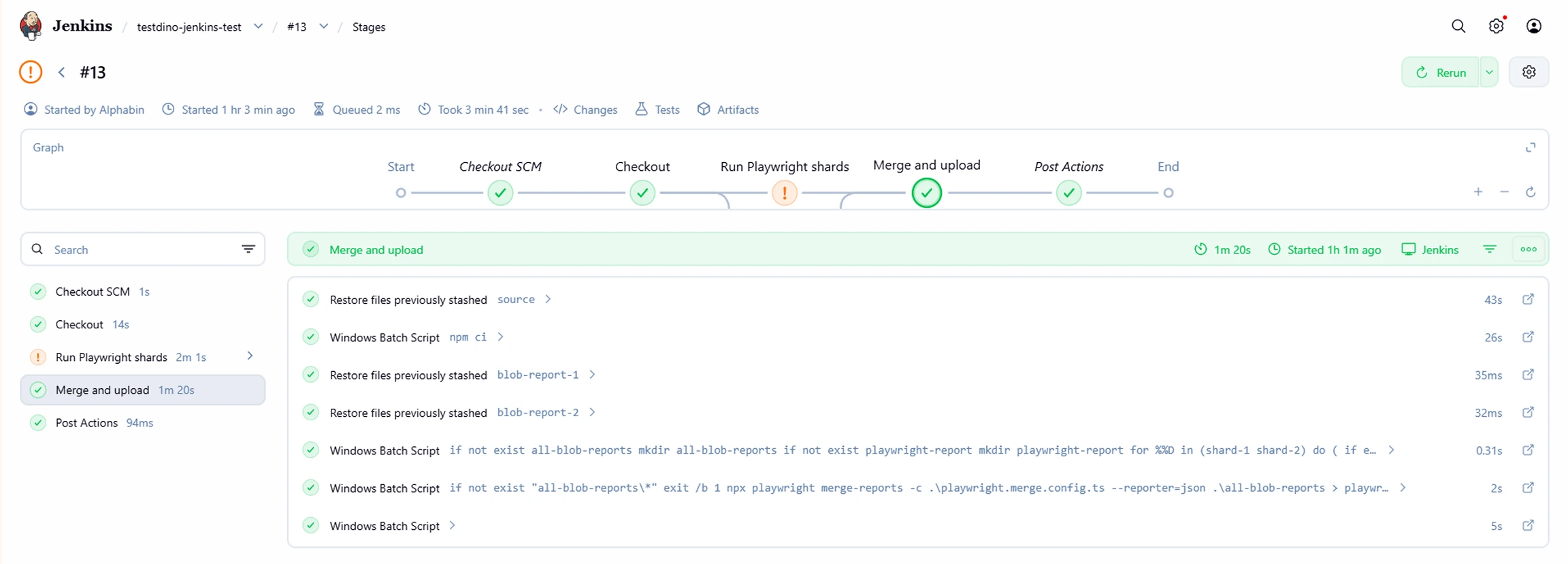
After the pipeline runs, Jenkins shows each stage in the pipeline graph with pass, fail, or unstable status.
 ### Results in TestDino
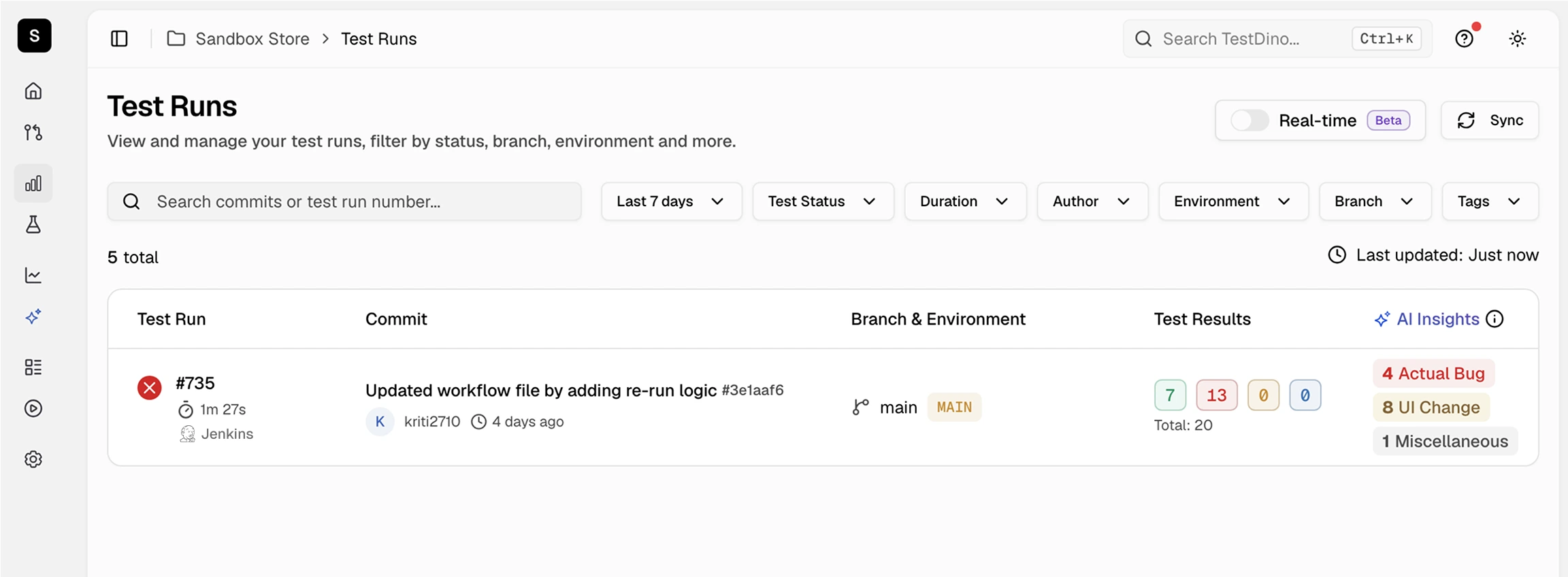
Once uploaded, the test run appears in your TestDino dashboard with full failure details, flaky detection, and trend data.
### Results in TestDino
Once uploaded, the test run appears in your TestDino dashboard with full failure details, flaky detection, and trend data.
 ## Rerun Failed Tests
Cache test metadata to enable selective reruns:
```groovy theme={null}
stage('Cache rerun metadata') {
steps {
sh 'npx tdpw cache --token="$TESTDINO_TOKEN"'
}
}
```
Rerun only failed tests on the next run:
```groovy theme={null}
stage('Rerun failed tests') {
steps {
script {
def failed = sh(returnStdout: true, script: 'npx tdpw last-failed --token="$TESTDINO_TOKEN"').trim()
if (failed) {
sh "npx playwright test ${failed}"
} else {
echo 'No failed tests found.'
}
}
}
}
```
For advanced rerun strategies, caching patterns, and CI optimization techniques, see [CI Optimization](/guides/playwright-ci-optimization).
## Troubleshooting
Use `unstable()` instead of letting the build fail. This marks the build as unstable so subsequent stages (merge, upload) still execute. Alternatively, move the upload to a `post.always` block.
Verify your `playwright.config.js` includes both HTML and JSON reporters with HTML listed first. For sharded runs, ensure all shards stash their `blob-report` directory and the merge stage unstashes them before merging.
Confirm the credential is set in **Manage Jenkins → Credentials** with the ID `TESTDINO_TOKEN`. Use `credentials('TESTDINO_TOKEN')` in the `environment` block to map it to an environment variable.
Ensure each shard uses `stash allowEmpty: true` to stash blob reports even on failure. Verify that the merge stage unstashes each shard's blob report into separate directories before copying into `all-blob-reports/`.
## Next Steps
Reduce CI time with smart reruns
Map branches to environments for organized test runs
Connect Slack, Jira, Linear, Asana, and more
Access test results and fix issues with AI agents
## Rerun Failed Tests
Cache test metadata to enable selective reruns:
```groovy theme={null}
stage('Cache rerun metadata') {
steps {
sh 'npx tdpw cache --token="$TESTDINO_TOKEN"'
}
}
```
Rerun only failed tests on the next run:
```groovy theme={null}
stage('Rerun failed tests') {
steps {
script {
def failed = sh(returnStdout: true, script: 'npx tdpw last-failed --token="$TESTDINO_TOKEN"').trim()
if (failed) {
sh "npx playwright test ${failed}"
} else {
echo 'No failed tests found.'
}
}
}
}
```
For advanced rerun strategies, caching patterns, and CI optimization techniques, see [CI Optimization](/guides/playwright-ci-optimization).
## Troubleshooting
Use `unstable()` instead of letting the build fail. This marks the build as unstable so subsequent stages (merge, upload) still execute. Alternatively, move the upload to a `post.always` block.
Verify your `playwright.config.js` includes both HTML and JSON reporters with HTML listed first. For sharded runs, ensure all shards stash their `blob-report` directory and the merge stage unstashes them before merging.
Confirm the credential is set in **Manage Jenkins → Credentials** with the ID `TESTDINO_TOKEN`. Use `credentials('TESTDINO_TOKEN')` in the `environment` block to map it to an environment variable.
Ensure each shard uses `stash allowEmpty: true` to stash blob reports even on failure. Verify that the merge stage unstashes each shard's blob report into separate directories before copying into `all-blob-reports/`.
## Next Steps
Reduce CI time with smart reruns
Map branches to environments for organized test runs
Connect Slack, Jira, Linear, Asana, and more
Access test results and fix issues with AI agents