> ## Documentation Index
> Fetch the complete documentation index at: https://docs.testdino.com/llms.txt
> Use this file to discover all available pages before exploring further.
# Manage TestDino Billing and Subscription
> Upgrade, downgrade, or cancel your TestDino subscription.
**What you'll learn**
* How to upgrade, downgrade, or cancel your plan
* The difference between billing and usage cycles
* What happens when you cancel
The Manage Billing tab controls plan changes, upgrades, downgrades, and cancellations for your organization.
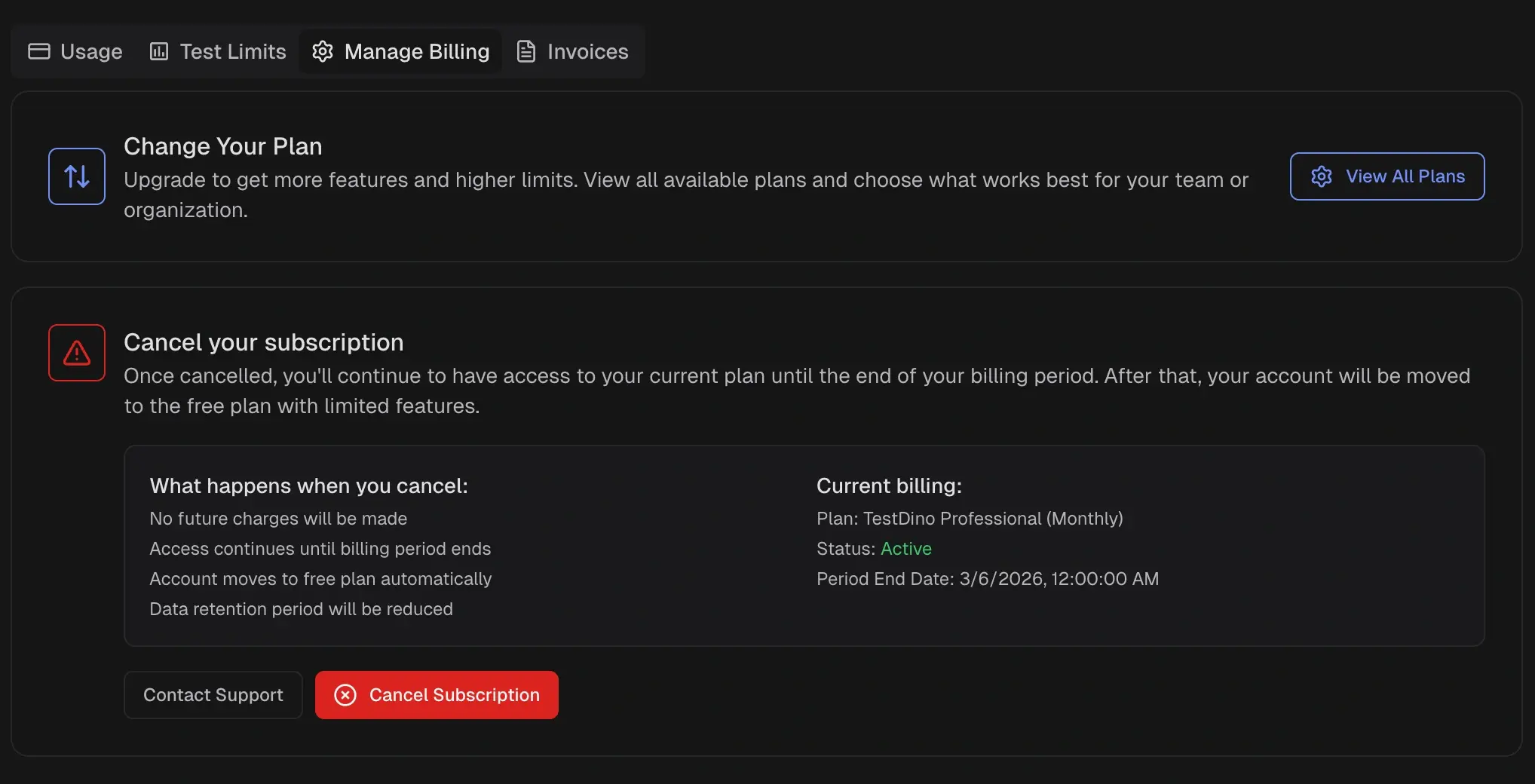 ## Change Plan
To switch plans:
1. Open **Billing & Usage** from the organization sidebar.
2. Select the **Manage Billing** tab.
3. Click **View All Plans** to compare available options.
4. Select the target plan and confirm the change.
Upgrades take effect immediately. Downgrades apply at the end of the current billing period.
**Warning**
Downgrading reduces plan limits, including data retention. Historical data beyond the new retention window is permanently removed after the downgrade takes effect.
## Subscription Types
### Monthly
Billed each month on the renewal date. Usage resets on the organization's usage cycle. Overage is billed in the next invoice.
### Annual
Prepaid for twelve months. Usage resets on the standard monthly cycle.
## Billing Cycle vs Usage Cycle
* **Usage cycle** resets monthly on the organization's reset date.
* **Billing cycle** is either monthly or annual, depending on the subscription.
| Usage Cycle | Billing Cycle | Notes |
| :---------- | :------------ | :-------------------------------------- |
| Monthly | Monthly | Standard subscription |
| Monthly | Annual | Annual prepay with monthly usage resets |
| Annual | Annual | Enterprise contracts only |
| Annual | Monthly | Not supported |
## Cancel Subscription
To cancel, open the Manage Billing tab and select **Cancel Subscription**.
| Behavior | Detail |
| :------------- | :----------------------------------------------------- |
| Access | Continues until the current billing period ends |
| Charges | No future charges after cancellation |
| Plan | Organization moves to the Community plan automatically |
| Data Retention | Reduced to Community plan limits |
View subscription status and test limit allocation.
View, download, and filter billing invoices.
## Change Plan
To switch plans:
1. Open **Billing & Usage** from the organization sidebar.
2. Select the **Manage Billing** tab.
3. Click **View All Plans** to compare available options.
4. Select the target plan and confirm the change.
Upgrades take effect immediately. Downgrades apply at the end of the current billing period.
**Warning**
Downgrading reduces plan limits, including data retention. Historical data beyond the new retention window is permanently removed after the downgrade takes effect.
## Subscription Types
### Monthly
Billed each month on the renewal date. Usage resets on the organization's usage cycle. Overage is billed in the next invoice.
### Annual
Prepaid for twelve months. Usage resets on the standard monthly cycle.
## Billing Cycle vs Usage Cycle
* **Usage cycle** resets monthly on the organization's reset date.
* **Billing cycle** is either monthly or annual, depending on the subscription.
| Usage Cycle | Billing Cycle | Notes |
| :---------- | :------------ | :-------------------------------------- |
| Monthly | Monthly | Standard subscription |
| Monthly | Annual | Annual prepay with monthly usage resets |
| Annual | Annual | Enterprise contracts only |
| Annual | Monthly | Not supported |
## Cancel Subscription
To cancel, open the Manage Billing tab and select **Cancel Subscription**.
| Behavior | Detail |
| :------------- | :----------------------------------------------------- |
| Access | Continues until the current billing period ends |
| Charges | No future charges after cancellation |
| Plan | Organization moves to the Community plan automatically |
| Data Retention | Reduced to Community plan limits |
View subscription status and test limit allocation.
View, download, and filter billing invoices.