> ## Documentation Index
> Fetch the complete documentation index at: https://docs.testdino.com/llms.txt
> Use this file to discover all available pages before exploring further.
# Users, Roles & Permissions
> Manage team members, assign roles, and control access across your organization.
**What you'll learn**
* The five organization roles and what each can do
* How to invite, manage, and remove members
* How external (guest) access works
* The full permission matrix by feature area
TestDino uses role-based access control (RBAC) at the organization level. All permissions are determined by a user's organization role, which applies uniformly across every project in the organization. There are no separate project-level roles.
## Organization Roles
Five roles form a hierarchy. Higher roles inherit all permissions from lower roles.
| Role | Description |
| :------------------ | :-------------------------------------------------------------- |
| **Owner** | Full control. Can transfer ownership. One per org. |
| **Administrator** | Manages members, projects, settings, integrations. |
| **Member** | View data, edit test cases, connect personal integrations. |
| **Billing Manager** | Manages subscriptions, invoices, payments. No test data access. |
| **Viewer** | Read-only access. Cannot modify anything. |
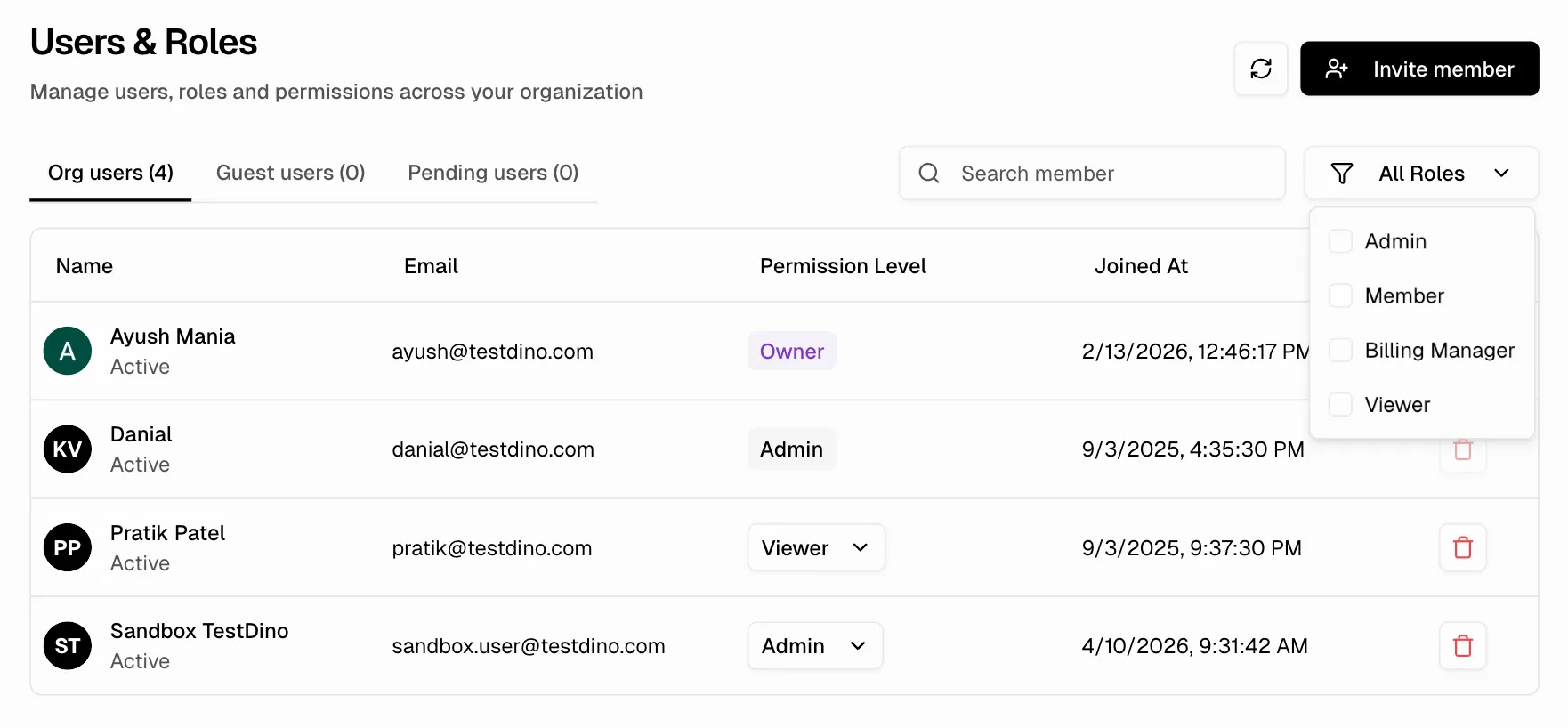 ## Manage Members
### Invite a member
1. Click **Invite Member** on the Users & Roles page
2. Enter the email address
3. Select a role from the dropdown
4. Optionally check **External User** for time-limited guest access
5. Click **Send Invite**
**Note**
Only Owners and Administrators can invite members. The invite recipient receives an email with a link to join the organization.
### Change a role
Click the role dropdown next to any member in the list and select a new role. Role changes take effect immediately.
### Remove a member
Click the remove button next to the member. A confirmation dialog appears. Removing a member revokes all access to the organization and its projects.
### Filter members
Use the **All Roles** filter to show only specific roles (Administrator, Member, Viewer, etc.).
## Role Delegation Rules
When assigning roles, these rules apply:
| Assigner | Can Assign |
| :------------ | :--------------------------------------------- |
| Owner | All roles |
| Administrator | Administrator, Member, Billing Manager, Viewer |
| Member | Cannot assign roles |
| Others | Cannot assign roles |
**Constraints:**
* You cannot change your own role
* You cannot remove yourself from the organization
* The last administrator cannot be removed or demoted if no owner exists
## External (Guest) Access
External members are users from outside the organization who receive time-limited access.
| Property | Value |
| :--------------- | :-------------------------------------- |
| Default duration | 30 days |
| Maximum duration | 365 days |
| Cleanup | Expired access is automatically removed |
| Allowed roles | Member, Viewer only |
| Blocked roles | Owner, Administrator, Billing Manager |
Administrators can extend or revoke external access at any time from the Users & Roles page.
**Tip**
Use external access for contractors, auditors, or temporary collaborators who need to view test results but should not have permanent organization membership.
## Permission Matrix
## Manage Members
### Invite a member
1. Click **Invite Member** on the Users & Roles page
2. Enter the email address
3. Select a role from the dropdown
4. Optionally check **External User** for time-limited guest access
5. Click **Send Invite**
**Note**
Only Owners and Administrators can invite members. The invite recipient receives an email with a link to join the organization.
### Change a role
Click the role dropdown next to any member in the list and select a new role. Role changes take effect immediately.
### Remove a member
Click the remove button next to the member. A confirmation dialog appears. Removing a member revokes all access to the organization and its projects.
### Filter members
Use the **All Roles** filter to show only specific roles (Administrator, Member, Viewer, etc.).
## Role Delegation Rules
When assigning roles, these rules apply:
| Assigner | Can Assign |
| :------------ | :--------------------------------------------- |
| Owner | All roles |
| Administrator | Administrator, Member, Billing Manager, Viewer |
| Member | Cannot assign roles |
| Others | Cannot assign roles |
**Constraints:**
* You cannot change your own role
* You cannot remove yourself from the organization
* The last administrator cannot be removed or demoted if no owner exists
## External (Guest) Access
External members are users from outside the organization who receive time-limited access.
| Property | Value |
| :--------------- | :-------------------------------------- |
| Default duration | 30 days |
| Maximum duration | 365 days |
| Cleanup | Expired access is automatically removed |
| Allowed roles | Member, Viewer only |
| Blocked roles | Owner, Administrator, Billing Manager |
Administrators can extend or revoke external access at any time from the Users & Roles page.
**Tip**
Use external access for contractors, auditors, or temporary collaborators who need to view test results but should not have permanent organization membership.
## Permission Matrix
### Organization & Members
| Action | Owner | Admin | Member | Billing | Viewer |
| :--------------------------- | :---: | :---: | :----: | :-----: | :----: |
| View organization & members | ✅ | ✅ | ✅ | ✅ | ✅ |
| Update organization settings | ✅ | ✅ | ❌ | ❌ | ❌ |
| Delete organization | ✅ | ❌ | ❌ | ❌ | ❌ |
| Transfer ownership | ✅ | ❌ | ❌ | ❌ | ❌ |
| Invite / remove members | ✅ | ✅ | ❌ | ❌ | ❌ |
| Change member roles | ✅ | ✅ | ❌ | ❌ | ❌ |
### Projects
| Action | Owner | Admin | Member | Billing | Viewer |
| :------------------------------- | :---: | :---: | :----: | :-----: | :----: |
| View all projects | ✅ | ✅ | ✅ | ✅ | ✅ |
| Create / update / delete project | ✅ | ✅ | ❌ | ❌ | ❌ |
| Configure branch mapping | ✅ | ✅ | ❌ | ❌ | ❌ |
### Test Runs & Test Cases
| Action | Owner | Admin | Member | Billing | Viewer |
| :---------------------------------- | :---: | :---: | :----: | :-----: | :----: |
| View test runs, details & artifacts | ✅ | ✅ | ✅ | ✅ | ✅ |
| Delete test runs | ✅ | ✅ | ❌ | ❌ | ❌ |
| View test cases & history | ✅ | ✅ | ✅ | ✅ | ✅ |
| Generate bug reports | ✅ | ✅ | ✅ | ✅ | ✅ |
### Manual Test Cases & Suites
| Action | Owner | Admin | Member | Billing | Viewer |
| :------------------------------- | :---: | :---: | :----: | :-----: | :----: |
| View manual test cases & suites | ✅ | ✅ | ✅ | ✅ | ✅ |
| Create / edit / clone test cases | ✅ | ✅ | ✅ | ❌ | ❌ |
| Delete manual test cases | ✅ | ✅ | ❌ | ❌ | ❌ |
| Create / edit / reorder suites | ✅ | ✅ | ✅ | ❌ | ❌ |
| Delete suites | ✅ | ✅ | ❌ | ❌ | ❌ |
| Bulk update / upload attachments | ✅ | ✅ | ✅ | ❌ | ❌ |
### API Keys & Integrations
| Action | Owner | Admin | Member | Billing | Viewer |
| :----------------------------------- | :---: | :---: | :----: | :-----: | :----: |
| View API keys | ✅ | ✅ | ✅ | ✅ | ✅ |
| Create / edit / delete / rotate keys | ✅ | ✅ | ❌ | ❌ | ❌ |
| View integration status | ✅ | ✅ | ✅ | ✅ | ✅ |
| Manage project-level integrations | ✅ | ✅ | ❌ | ❌ | ❌ |
| Manage own user-level integrations | ✅ | ✅ | ✅ | ❌ | ❌ |
Project-level: GitHub App, GitLab, monday, Azure DevOps, Slack App, Slack Webhook.
User-level: Jira, Linear, Asana.
### Analytics, Reports & Dashboard
| Action | Owner | Admin | Member | Billing | Viewer |
| :------------------------------------ | :---: | :---: | :----: | :-----: | :----: |
| View analytics, dashboards & explorer | ✅ | ✅ | ✅ | ✅ | ✅ |
| View / preview reports | ✅ | ✅ | ✅ | ✅ | ✅ |
| Create / update report configs | ✅ | ✅ | ✅ | ❌ | ❌ |
| Delete report configs | ✅ | ✅ | ❌ | ❌ | ❌ |
### Billing & Subscription
| Action | Owner | Admin | Member | Billing | Viewer |
| :------------------------ | :---: | :---: | :----: | :-----: | :----: |
| View subscription & plans | ✅ | ✅ | ✅ | ✅ | ✅ |
| View invoices | ✅ | ✅ | ❌ | ✅ | ❌ |
| Manage subscription | ✅ | ❌ | ❌ | ✅ | ❌ |
| Reallocate usage limits | ✅ | ✅ | ❌ | ✅ | ❌ |
**Info**
Members can create and edit manual test cases but cannot delete them. Only Owners and Administrators can perform destructive actions on test data.
## Best Practices
| Practice | Why |
| :-------------------------------------------------------------- | :--------------------------------------------------------------- |
| Assign the minimum role needed for each task | Reduces accidental changes and limits blast radius |
| Use external access for contractors and temporary collaborators | Access expires automatically, no manual cleanup needed |
| Keep the Owner role to one person | Prevents conflicting organization-level decisions |
| Use Billing Manager for finance teams | Separates billing access from project data access |
| Use API keys for CI/CD, not user credentials | API keys are scoped to projects and can be rotated independently |
| Review member roles and external access periodically | Catch stale permissions and expired contractors |
## Troubleshooting
* Only Owners and Administrators can invite members. Verify your role on the Users & Roles page.
* Check if your organization has reached the member limit for your plan. See [Billing & Usage](/platform/billing-and-usage/overview).
* You can only assign roles at or below your own level. Administrators cannot assign the Owner role.
* You cannot change your own role. Ask another Owner or Administrator to update it.
* All permissions are organization-level. There are no separate project-level roles. Check the member's organization role in the permission matrix above.
* Viewers have read-only access. Members cannot perform destructive actions (delete test runs, delete test cases). Promote the role if more access is needed.
* External access is time-limited (default 30 days). An Owner or Administrator can extend access from the Users & Roles page.
* Expired external members are automatically removed. Re-invite them if continued access is needed.
* Project-level integrations (GitHub, GitLab, Slack, monday, Azure DevOps) require Owner or Administrator role.
* User-level integrations (Jira, Linear, Asana) require at least Member role. Viewers and Billing Managers cannot connect personal integrations.
* Only Owners and Billing Managers can create, upgrade, pause, or cancel subscriptions.
* Administrators can view invoices and reallocate usage limits but cannot modify the subscription itself.
Organization setup and structure
Create and manage projects
Manage subscriptions and usage limits
Configure project-level settings
Set up SSO and the default role for new users