> ## Documentation Index
> Fetch the complete documentation index at: https://docs.testdino.com/llms.txt
> Use this file to discover all available pages before exploring further.
# Playwright AI Test Audit
> AI audit for Playwright suites. Returns a quality score with prioritized fixes.
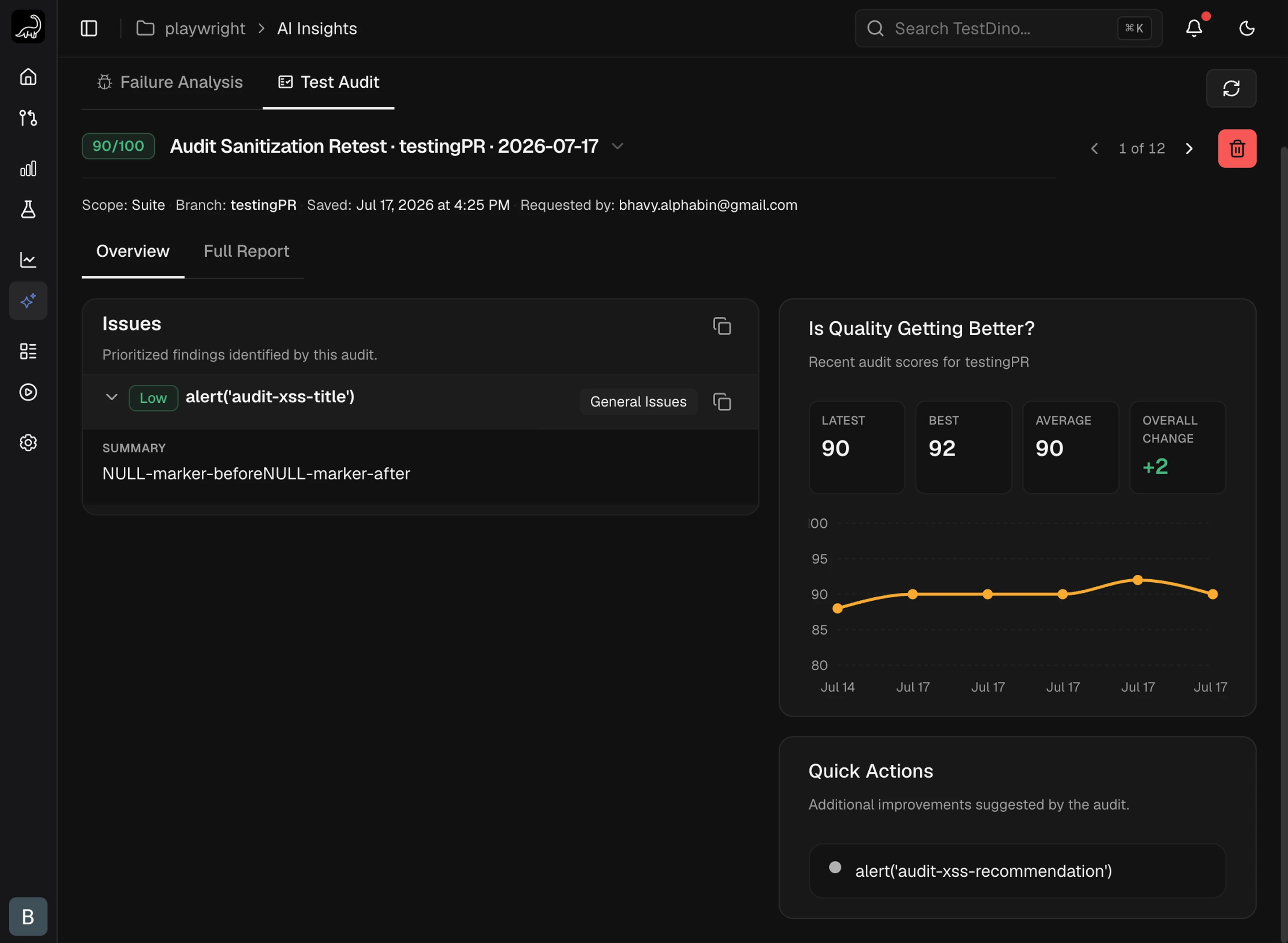
Test Audit produces a 0–100 health score for a Playwright suite, plus prioritized issues with file-level evidence and fix recommendations. Audits run through your AI agent via the [TestDino MCP server](/mcp/overview).
 ## Setup
Test Audit runs through the [TestDino MCP Server](/mcp/overview). Once MCP is configured, every audit is a single prompt to your AI agent.
Follow [MCP Overview](/mcp/overview) to install the server, generate a PAT, and configure your client.
Skip this step if MCP is already working in your client.
Open the Playwright repo in your IDE so the agent can read your test files. Then send one of these prompts:
| Scope | Sample Prompt |
| :------------ | :--------------------------------------------------------- |
| **Suite** | `Run a TestDino test audit on the full suite.` |
| **Feature** | `Run a TestDino audit on the feature.` |
| **Spec File** | `Run a TestDino audit on .` |
| **Test Case** | `Run a TestDino audit on the test case .` |
Critical and High issues are always reported, even outside the chosen scope.
Open **AI Insights → Test Audit** in [TestDino ↗](https://app.testdino.com). The new audit appears at the top of the history with the score, issues, and full report.
## Reading the Report
### Audit Score
Every audit returns a single **0–100 score**.
| Band | Score | Meaning |
| :------------ | :----- | :-------------------------------------------------- |
| **Excellent** | 85–100 | Strong validation, low flake risk, well-structured |
| **Fair** | 65–84 | Localized weaknesses; targeted fixes recommended |
| **Poor** | 0–64 | Critical gaps in validation, stability, or coverage |
A suite with multiple Critical issues cannot reach the Excellent band even if other dimensions look healthy.
### Overview Tab
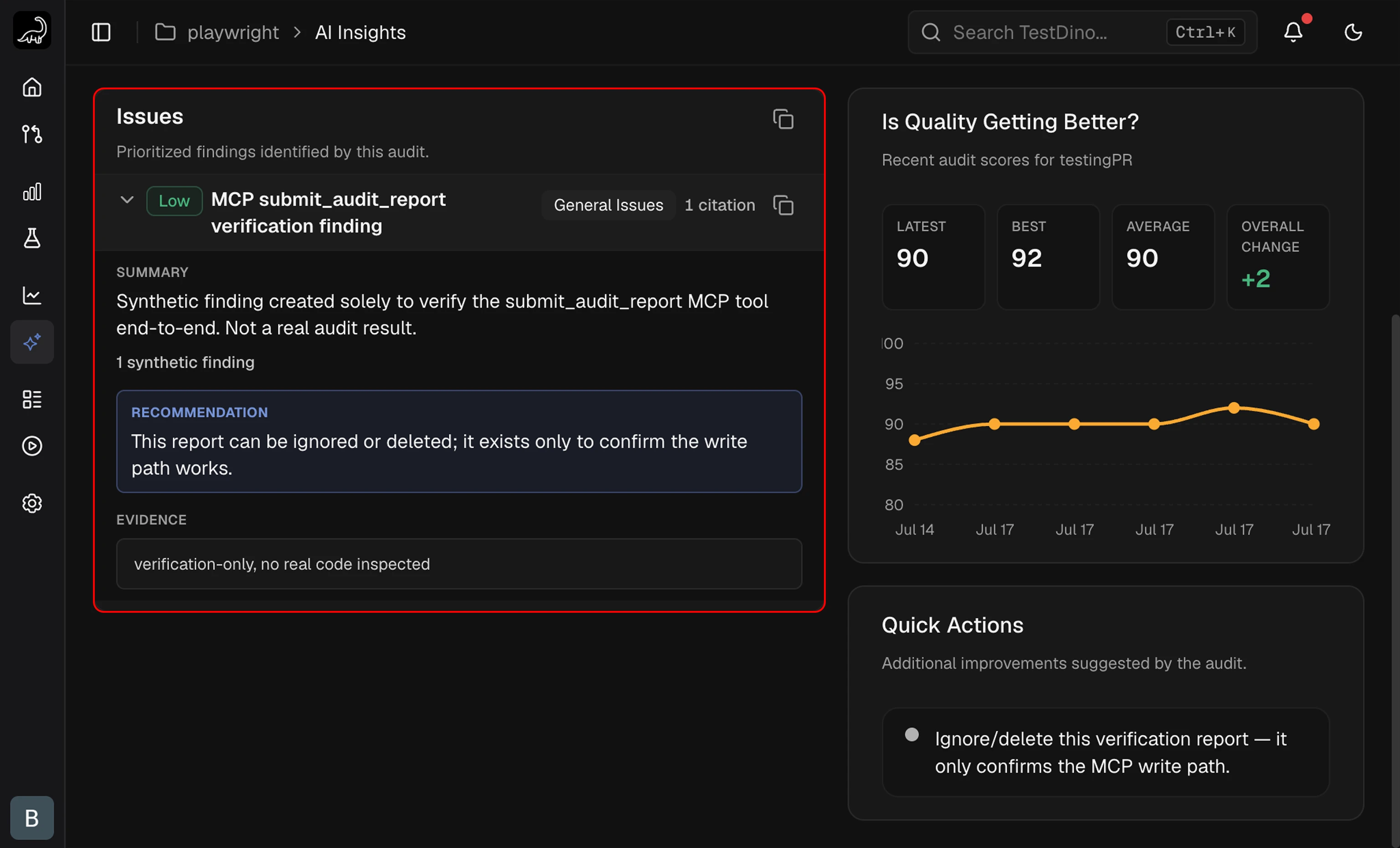
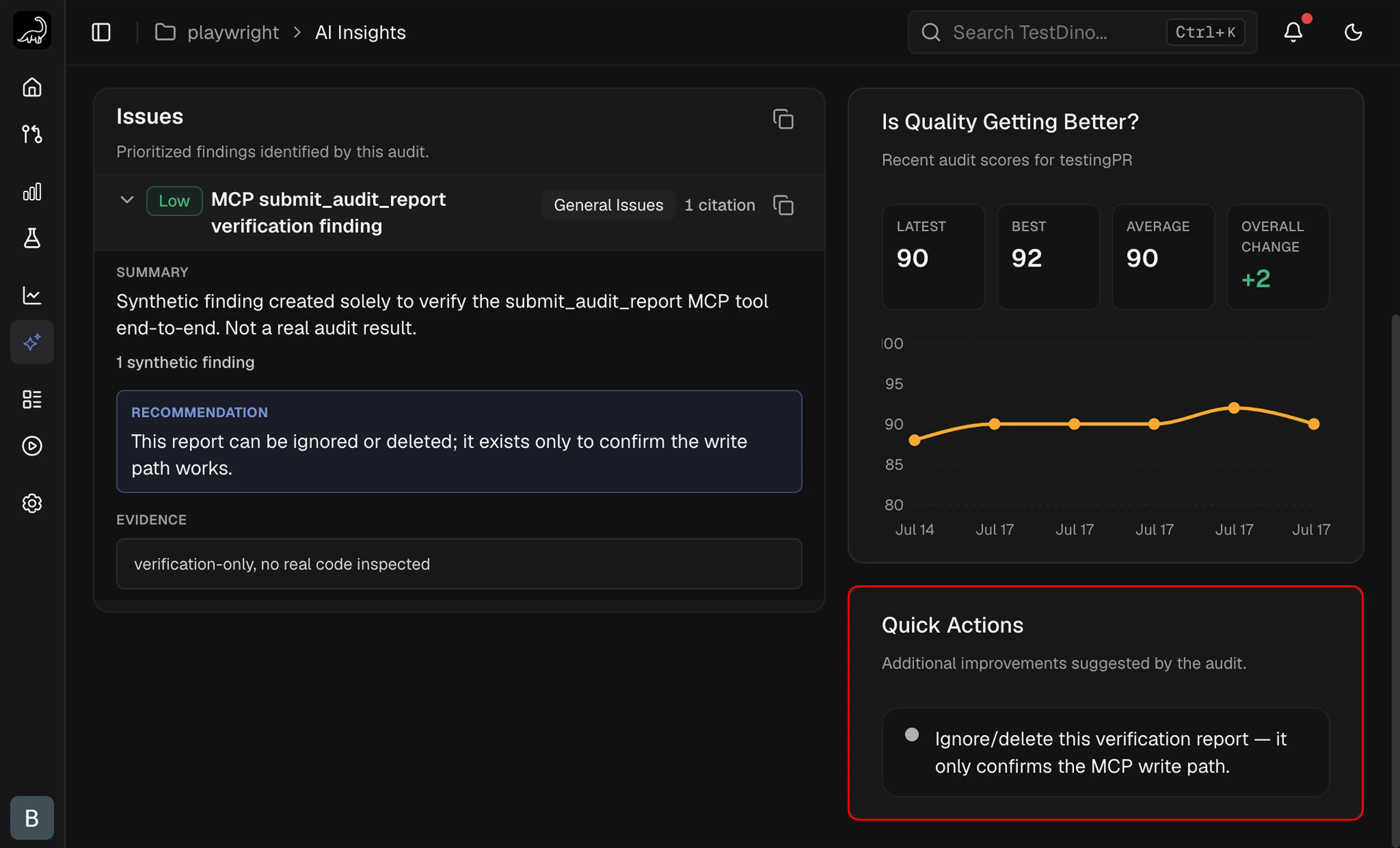
The Overview tab splits the audit into two panels side by side: a prioritized **Issues** list on the left and a **Quick Actions** sidebar on the right.
#### Issues
Each Issue card collapses to a single row with the severity badge, title, category badge, and citation count. Expanding the card reveals three blocks:
* **Summary**: what the issue is and why it matters.
* **Recommendation**: a concrete fix, often a one-line change at a `file:line` reference.
* **Evidence**: one or more `file:line` references, each with a short observation.
## Setup
Test Audit runs through the [TestDino MCP Server](/mcp/overview). Once MCP is configured, every audit is a single prompt to your AI agent.
Follow [MCP Overview](/mcp/overview) to install the server, generate a PAT, and configure your client.
Skip this step if MCP is already working in your client.
Open the Playwright repo in your IDE so the agent can read your test files. Then send one of these prompts:
| Scope | Sample Prompt |
| :------------ | :--------------------------------------------------------- |
| **Suite** | `Run a TestDino test audit on the full suite.` |
| **Feature** | `Run a TestDino audit on the feature.` |
| **Spec File** | `Run a TestDino audit on .` |
| **Test Case** | `Run a TestDino audit on the test case .` |
Critical and High issues are always reported, even outside the chosen scope.
Open **AI Insights → Test Audit** in [TestDino ↗](https://app.testdino.com). The new audit appears at the top of the history with the score, issues, and full report.
## Reading the Report
### Audit Score
Every audit returns a single **0–100 score**.
| Band | Score | Meaning |
| :------------ | :----- | :-------------------------------------------------- |
| **Excellent** | 85–100 | Strong validation, low flake risk, well-structured |
| **Fair** | 65–84 | Localized weaknesses; targeted fixes recommended |
| **Poor** | 0–64 | Critical gaps in validation, stability, or coverage |
A suite with multiple Critical issues cannot reach the Excellent band even if other dimensions look healthy.
### Overview Tab
The Overview tab splits the audit into two panels side by side: a prioritized **Issues** list on the left and a **Quick Actions** sidebar on the right.
#### Issues
Each Issue card collapses to a single row with the severity badge, title, category badge, and citation count. Expanding the card reveals three blocks:
* **Summary**: what the issue is and why it matters.
* **Recommendation**: a concrete fix, often a one-line change at a `file:line` reference.
* **Evidence**: one or more `file:line` references, each with a short observation.
 #### Quick Actions
A sidebar listing up to four lightweight improvements that fall outside the main Issues. Suggestions are free-text and do not carry severity, category, or evidence metadata.
#### Quick Actions
A sidebar listing up to four lightweight improvements that fall outside the main Issues. Suggestions are free-text and do not carry severity, category, or evidence metadata.
 ### Full Report Tab
The Full Report tab renders the complete markdown audit document. Use the **Download** button to save it as a `.md` file for pull-request reviews or wikis.
### Full Report Tab
The Full Report tab renders the complete markdown audit document. Use the **Download** button to save it as a `.md` file for pull-request reviews or wikis.
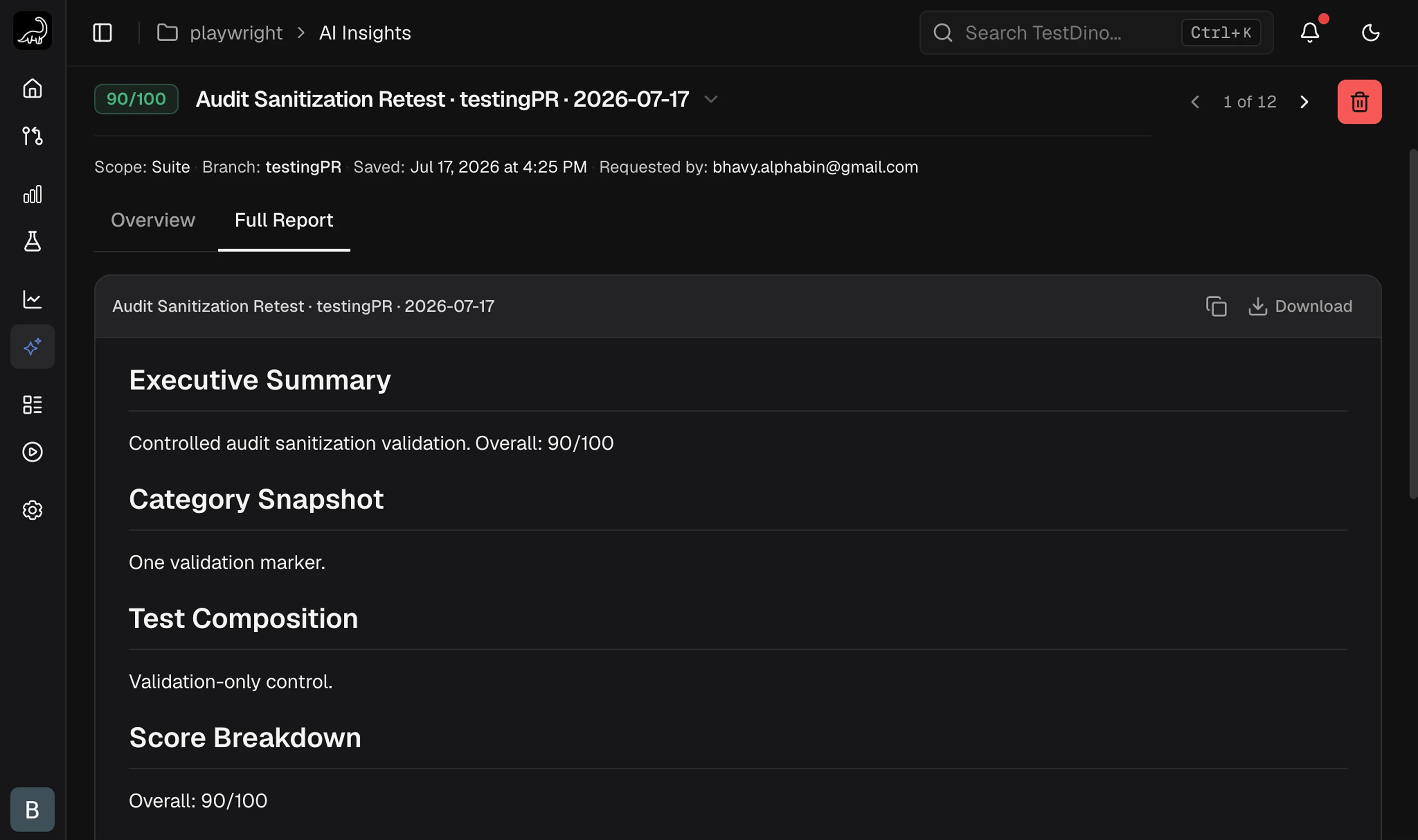 | Section | Contents |
| :---------------------------- | :----------------------------------------------------------------------------------------------------- |
| **Executive Summary** | 2–3 sentences: score, top finding, trend direction |
| **Category Snapshot** | Issue counts grouped by category |
| **Test Composition** | Breakdown of tests by type (Full Flows, Interactions, Render Checks, Page Loads, Accessibility, Other) |
| **Score Breakdown** | How the score was computed across dimensions |
| **Audit Coverage** | Folders scanned and bounded counts for Critical/High patterns |
| **Findings by Severity** | Issues grouped by severity |
| **Critical & High Issue Map** | Each cluster, why it matters, strongest evidence |
| **Recommendations** | Quick Wins, Medium Effort, Deep Refactors |
## Categories and Severity
### Issue Categories
Each finding is tagged with one of nine categories.
| Category | What It Flags |
| :--------------------------- | :-------------------------------------------------------------------- |
| **Surface-Level Tests** | Tests only check page load or basic UI presence, not real behavior |
| **Missing Validation** | An action runs but the important outcome is never asserted |
| **Flaky or Unstable** | Hardcoded waits, race conditions, shared state, order-dependent steps |
| **Hard to Maintain** | Brittle selectors, repeated `.first()`, no fixtures or page objects |
| **Missing Scenarios** | Gaps in error, empty-state, mobile, accessibility, or modal coverage |
| **Organization & Ownership** | Unowned `test.skip` or `test.fixme`, weak tagging, quarantine bloat |
| **Setup & Configuration** | Retries hiding flakes, weak CI artifacts, risky worker isolation |
| **Duplication & Overlap** | Multiple weak variants that should collapse into one stronger test |
| **General Issues** | Findings that do not fit the categories above |
### Severity Levels
| Level | Definition |
| :----------- | :------------------------------------------------------------------------------ |
| **Critical** | Broken product behavior can ship, or confidence in a major area is invalidated |
| **High** | Widespread reliability or validation weakness across multiple files or features |
| **Medium** | Important but localized issue |
| **Low** | Narrow cleanup |
A scope with more than 50% surface-level tests is automatically reported as Critical.
## Audit History
Past audits are stored per project and shown in the picker at the top of the Test Audit tab.
| Section | Contents |
| :---------------------------- | :----------------------------------------------------------------------------------------------------- |
| **Executive Summary** | 2–3 sentences: score, top finding, trend direction |
| **Category Snapshot** | Issue counts grouped by category |
| **Test Composition** | Breakdown of tests by type (Full Flows, Interactions, Render Checks, Page Loads, Accessibility, Other) |
| **Score Breakdown** | How the score was computed across dimensions |
| **Audit Coverage** | Folders scanned and bounded counts for Critical/High patterns |
| **Findings by Severity** | Issues grouped by severity |
| **Critical & High Issue Map** | Each cluster, why it matters, strongest evidence |
| **Recommendations** | Quick Wins, Medium Effort, Deep Refactors |
## Categories and Severity
### Issue Categories
Each finding is tagged with one of nine categories.
| Category | What It Flags |
| :--------------------------- | :-------------------------------------------------------------------- |
| **Surface-Level Tests** | Tests only check page load or basic UI presence, not real behavior |
| **Missing Validation** | An action runs but the important outcome is never asserted |
| **Flaky or Unstable** | Hardcoded waits, race conditions, shared state, order-dependent steps |
| **Hard to Maintain** | Brittle selectors, repeated `.first()`, no fixtures or page objects |
| **Missing Scenarios** | Gaps in error, empty-state, mobile, accessibility, or modal coverage |
| **Organization & Ownership** | Unowned `test.skip` or `test.fixme`, weak tagging, quarantine bloat |
| **Setup & Configuration** | Retries hiding flakes, weak CI artifacts, risky worker isolation |
| **Duplication & Overlap** | Multiple weak variants that should collapse into one stronger test |
| **General Issues** | Findings that do not fit the categories above |
### Severity Levels
| Level | Definition |
| :----------- | :------------------------------------------------------------------------------ |
| **Critical** | Broken product behavior can ship, or confidence in a major area is invalidated |
| **High** | Widespread reliability or validation weakness across multiple files or features |
| **Medium** | Important but localized issue |
| **Low** | Narrow cleanup |
A scope with more than 50% surface-level tests is automatically reported as Critical.
## Audit History
Past audits are stored per project and shown in the picker at the top of the Test Audit tab.
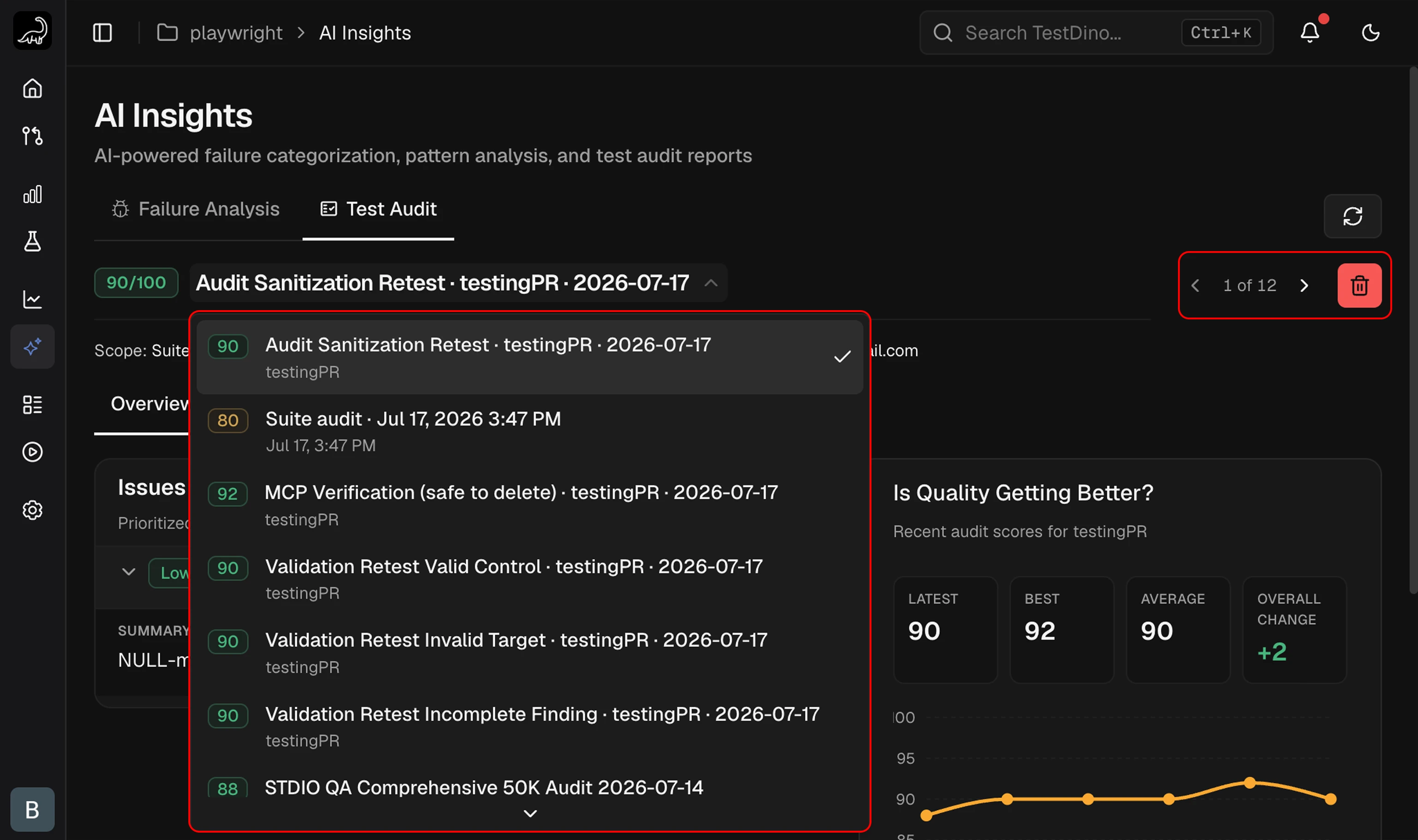 * **Navigate**: use the `<` and `>` arrows, or open the dropdown to jump to any audit.
* **Pagination**: 10 audits per page.
* **Select**: click any past audit to load its Overview and Full Report.
* **Delete**: the trash icon removes the selected audit. This cannot be undone.
* **Re-run**: ask your AI agent for a new audit at any time. New reports are added to history without overwriting previous ones.
## Related
Cross-run failure categorization and patterns
Connect AI agents to TestDino
All MCP tool specifications
Per-run failure categorization
Per-case AI diagnosis
AI controls and access tokens
* **Navigate**: use the `<` and `>` arrows, or open the dropdown to jump to any audit.
* **Pagination**: 10 audits per page.
* **Select**: click any past audit to load its Overview and Full Report.
* **Delete**: the trash icon removes the selected audit. This cannot be undone.
* **Re-run**: ask your AI agent for a new audit at any time. New reports are added to history without overwriting previous ones.
## Related
Cross-run failure categorization and patterns
Connect AI agents to TestDino
All MCP tool specifications
Per-run failure categorization
Per-case AI diagnosis
AI controls and access tokens