> ## Documentation Index
> Fetch the complete documentation index at: https://docs.testdino.com/llms.txt
> Use this file to discover all available pages before exploring further.
# Playwright Test Runs
> View, filter, and debug every Playwright test run in your project.
export const VideoSchema = ({name, description, thumbnailUrl, uploadDate, duration, contentUrl, embedUrl}) => {
const schema = {
"@context": "https://schema.org",
"@type": "VideoObject",
name,
description,
thumbnailUrl,
uploadDate,
...duration ? {
duration
} : {},
...contentUrl ? {
contentUrl
} : {},
...embedUrl ? {
embedUrl
} : {},
publisher: {
"@type": "Organization",
name: "TestDino",
logo: {
"@type": "ImageObject",
url: "https://docs.testdino.com/logo/light.svg"
}
}
};
return ;
};
The Test Runs page lists every Playwright test run in your project. Filter the list, open a run, and use the detail tabs for evidence and AI insights.
## Open a run
1. Filter by time, environment, branch, status, or tags
2. Scan result counts and open a run that needs action
3. Use the detail tabs:
| Tab | What it shows |
| :------------------------------------------------------------ | :------------------------------------------------------- |
| [Summary](/platform/test-runs/playwright-failure-summary) | Failed, flaky, and skipped groups with detailed analysis |
| [Specs](/platform/playwright-test-runs/specs) | Results by spec file |
| [Errors](/platform/playwright-test-runs/errors) | Failures grouped by error message |
| [Anomalies](/platform/playwright-test-runs/anomalies) | Changes versus the recent baseline |
| [Configuration](/platform/playwright-test-runs/configuration) | Source, CI, system, and Playwright config |
| [Coverage](/platform/playwright-test-runs/coverage) | Per-run code coverage |
| [AI Insights](/platform/playwright-test-runs/ai-insights) | Per-run classification and patterns |
## Search and filters
| Control | Purpose |
| :-------------- | :---------------------------------------------------------------------------------------------- |
| **Search** | Commit message or run number (for example, `#1493`) |
| **Time Period** | Last 24 hours through 30 days, or Custom |
| **Test Status** | Passed, Failed, Skipped, Flaky |
| **Duration** | Sort low to high or high to low |
| **Author** | One or more authors |
| **Environment** | Mapped environments |
| **Branch** | One or more branches |
| **Tags** | **Run Tags** (`--tags` CLI) or **Case Tags** (Playwright `tag` metadata). Multiple tags use OR. |
### Active test runs
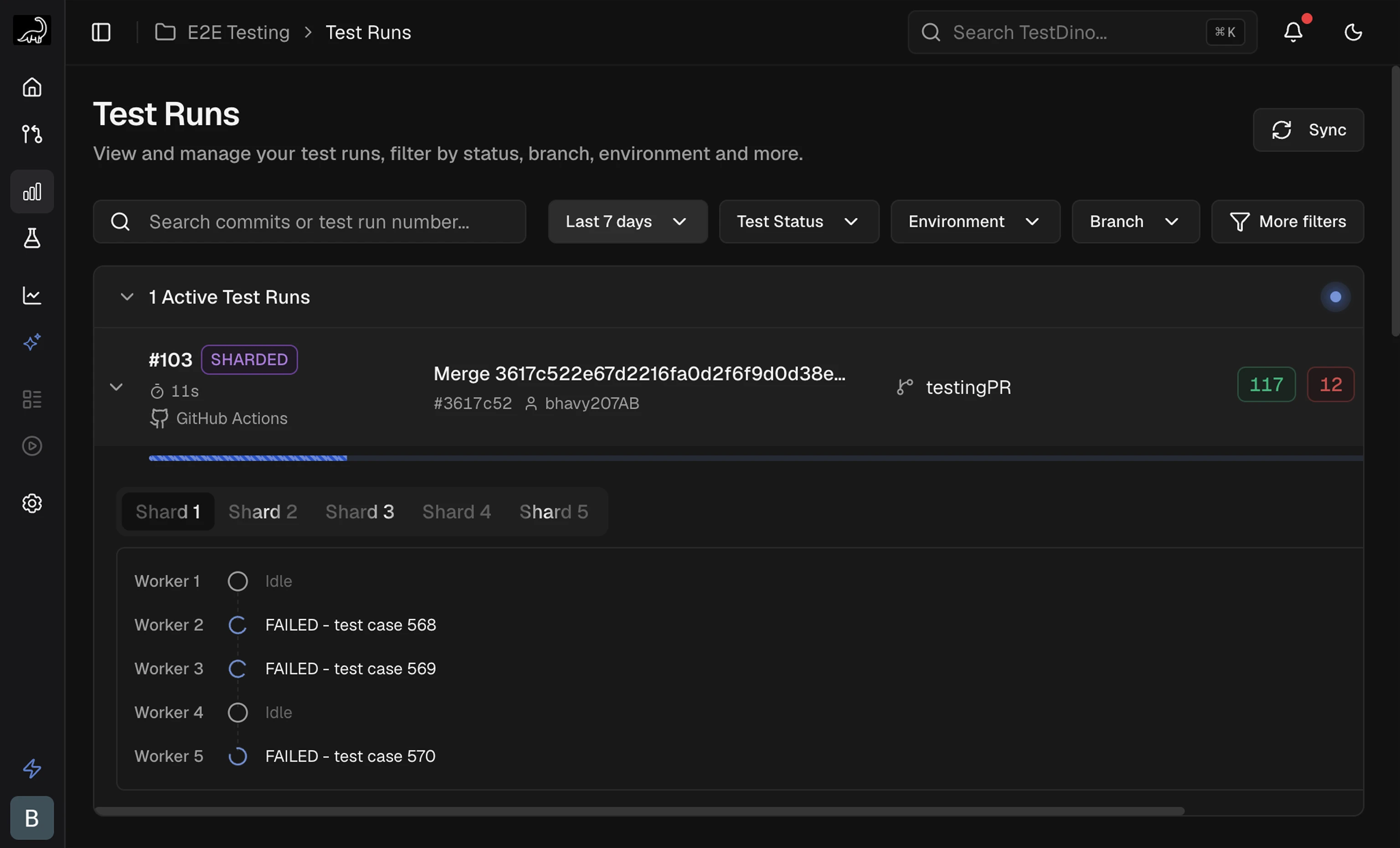
Runs still executing appear in **Active Test Runs** at the top, with a live progress bar and pass/fail/skip counts. Sharded runs show a **SHARDED** label and per-shard tabs.
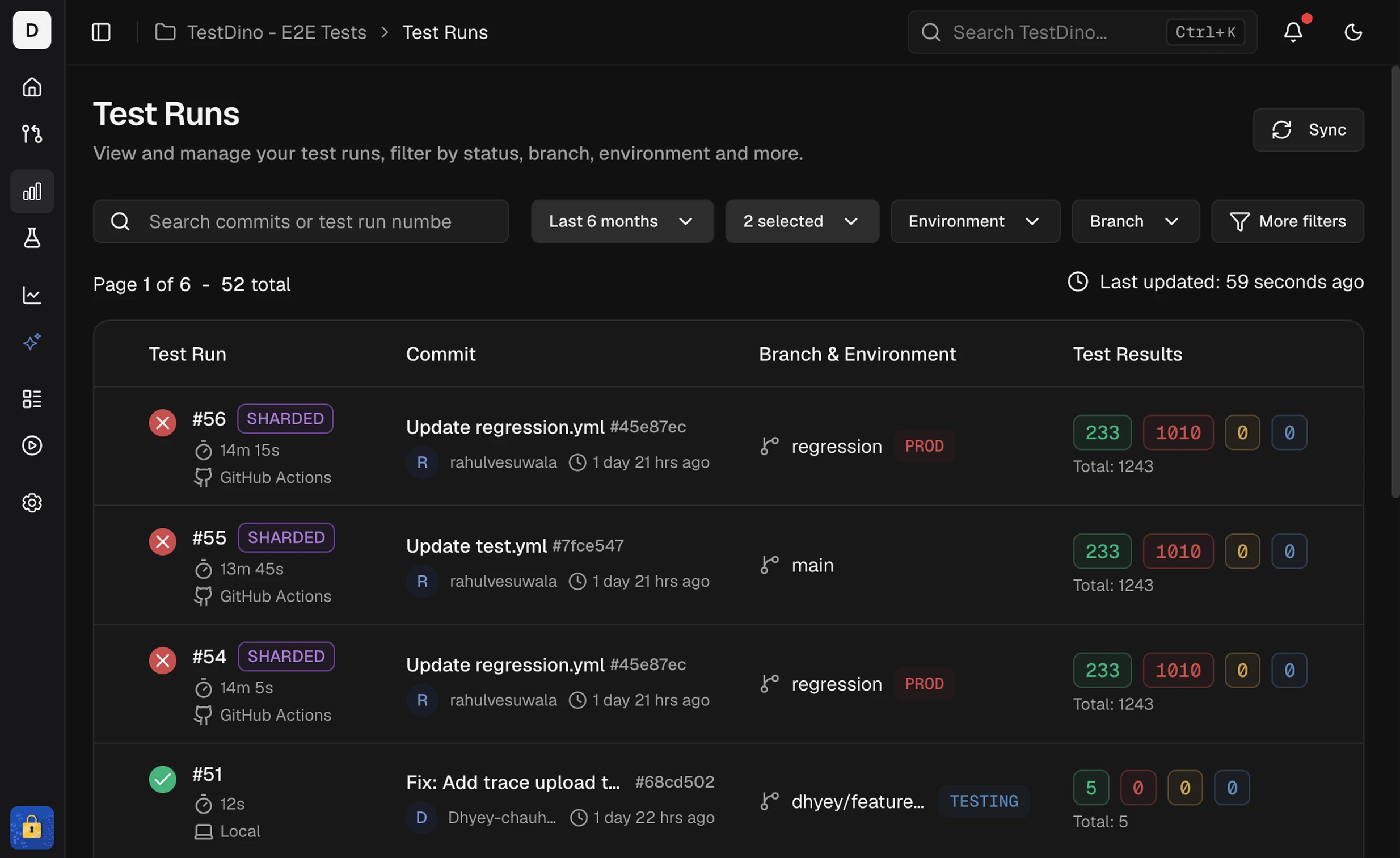
## Run list columns
| Column | Description |
| :------------------- | :------------------------------------------------------------------------ |
| Test Run | Run ID, start time, and executor (CI or Local). CI label opens the job. |
| Commit | Message, short SHA, and author. Links to the Git host. |
| Branch & Environment | Branch, mapped environment, and run-level tag chips (`+N` when truncated) |
| Test Results | Passed, Failed, Flaky, Skipped, Interrupted, and total |
Runs that share the same commit hash and message group as attempts (for example, Attempt #1, Attempt #2). Expand the group to compare reruns for that commit.
## Run-level tags
Label an entire run with `--tags`. These are separate from test-case tags set via [annotations](/guides/playwright-test-annotations).
```bash theme={null}
npx tdpw test -t "$TESTDINO_TOKEN" --server-url https://reporter.testdino.com --tags "regression,smoke"
```
| Tag type | Set via | Scope |
| :-------------- | :---------------- | :-------------------- |
| Run-level | `--tags` CLI flag | Entire test run |
| Test-case-level | Test annotations | Individual test cases |
## Run detail header
| Element | Description |
| :------------------- | :------------------------------------------ |
| Commit message | Message and run number |
| Environment / Branch | Mapped environment badge and branch name |
| Commit SHA / Author | Short SHA (links to Git host) and committer |
| Timestamp / Duration | Start time and total run time |
| Tags | Run-level chips (same as `--tags`) |
## Shards breakdown
Sharded runs (`--shard`) show a **Shards** section on Summary. Pass the same `--ci-run-id` to every shard so TestDino merges them into one run. Setup: [Node.js CLI → Sharded runs](/cli/testdino-playwright-nodejs#sharded-runs).
| Column | Shows |
| :----------- | :-------------------------------------------------- |
| Shard | Number, status, and **Slowest** tag when applicable |
| Duration | Shard runtime |
| Breakdown | Pass / fail / flaky / skipped mix |
| Test results | Totals per outcome |
After the run finishes, imbalance (for example `3.0×`) compares slowest to fastest shard. A failure-concentration note appears when one shard holds most failures. Click shard rows to filter Detailed Analysis to those shards.
Failures and flakiness by cause
Group failures by error message
What changed versus the baseline
Evidence and AI analysis per test
 ## Run list columns
 | Column | Description |
| :------------------- | :------------------------------------------------------------------------ |
| Test Run | Run ID, start time, and executor (CI or Local). CI label opens the job. |
| Commit | Message, short SHA, and author. Links to the Git host. |
| Branch & Environment | Branch, mapped environment, and run-level tag chips (`+N` when truncated) |
| Test Results | Passed, Failed, Flaky, Skipped, Interrupted, and total |
Runs that share the same commit hash and message group as attempts (for example, Attempt #1, Attempt #2). Expand the group to compare reruns for that commit.
## Run-level tags
Label an entire run with `--tags`. These are separate from test-case tags set via [annotations](/guides/playwright-test-annotations).
```bash theme={null}
npx tdpw test -t "$TESTDINO_TOKEN" --server-url https://reporter.testdino.com --tags "regression,smoke"
```
| Tag type | Set via | Scope |
| :-------------- | :---------------- | :-------------------- |
| Run-level | `--tags` CLI flag | Entire test run |
| Test-case-level | Test annotations | Individual test cases |
## Run detail header
| Element | Description |
| :------------------- | :------------------------------------------ |
| Commit message | Message and run number |
| Environment / Branch | Mapped environment badge and branch name |
| Commit SHA / Author | Short SHA (links to Git host) and committer |
| Timestamp / Duration | Start time and total run time |
| Tags | Run-level chips (same as `--tags`) |
## Shards breakdown
Sharded runs (`--shard`) show a **Shards** section on Summary. Pass the same `--ci-run-id` to every shard so TestDino merges them into one run. Setup: [Node.js CLI → Sharded runs](/cli/testdino-playwright-nodejs#sharded-runs).
| Column | Shows |
| :----------- | :-------------------------------------------------- |
| Shard | Number, status, and **Slowest** tag when applicable |
| Duration | Shard runtime |
| Breakdown | Pass / fail / flaky / skipped mix |
| Test results | Totals per outcome |
After the run finishes, imbalance (for example `3.0×`) compares slowest to fastest shard. A failure-concentration note appears when one shard holds most failures. Click shard rows to filter Detailed Analysis to those shards.
| Column | Description |
| :------------------- | :------------------------------------------------------------------------ |
| Test Run | Run ID, start time, and executor (CI or Local). CI label opens the job. |
| Commit | Message, short SHA, and author. Links to the Git host. |
| Branch & Environment | Branch, mapped environment, and run-level tag chips (`+N` when truncated) |
| Test Results | Passed, Failed, Flaky, Skipped, Interrupted, and total |
Runs that share the same commit hash and message group as attempts (for example, Attempt #1, Attempt #2). Expand the group to compare reruns for that commit.
## Run-level tags
Label an entire run with `--tags`. These are separate from test-case tags set via [annotations](/guides/playwright-test-annotations).
```bash theme={null}
npx tdpw test -t "$TESTDINO_TOKEN" --server-url https://reporter.testdino.com --tags "regression,smoke"
```
| Tag type | Set via | Scope |
| :-------------- | :---------------- | :-------------------- |
| Run-level | `--tags` CLI flag | Entire test run |
| Test-case-level | Test annotations | Individual test cases |
## Run detail header
| Element | Description |
| :------------------- | :------------------------------------------ |
| Commit message | Message and run number |
| Environment / Branch | Mapped environment badge and branch name |
| Commit SHA / Author | Short SHA (links to Git host) and committer |
| Timestamp / Duration | Start time and total run time |
| Tags | Run-level chips (same as `--tags`) |
## Shards breakdown
Sharded runs (`--shard`) show a **Shards** section on Summary. Pass the same `--ci-run-id` to every shard so TestDino merges them into one run. Setup: [Node.js CLI → Sharded runs](/cli/testdino-playwright-nodejs#sharded-runs).
| Column | Shows |
| :----------- | :-------------------------------------------------- |
| Shard | Number, status, and **Slowest** tag when applicable |
| Duration | Shard runtime |
| Breakdown | Pass / fail / flaky / skipped mix |
| Test results | Totals per outcome |
After the run finishes, imbalance (for example `3.0×`) compares slowest to fastest shard. A failure-concentration note appears when one shard holds most failures. Click shard rows to filter Detailed Analysis to those shards.