> ## Documentation Index
> Fetch the complete documentation index at: https://docs.testdino.com/llms.txt
> Use this file to discover all available pages before exploring further.
# Playwright Test Run AI Insights
> AI-powered failure categorization, error variants, and patterns per run.
export const VideoSchema = ({name, description, thumbnailUrl, uploadDate, duration, contentUrl, embedUrl}) => {
const schema = {
"@context": "https://schema.org",
"@type": "VideoObject",
name,
description,
thumbnailUrl,
uploadDate,
...duration ? {
duration
} : {},
...contentUrl ? {
contentUrl
} : {},
...embedUrl ? {
embedUrl
} : {},
publisher: {
"@type": "Organization",
name: "TestDino",
logo: {
"@type": "ImageObject",
url: "https://docs.testdino.com/logo/light.svg"
}
}
};
return ;
};
**What you'll learn**
* How AI categorizes failures (Actual Bug, UI Change, Unstable, Miscellaneous)
* What error variants and failure patterns reveal
* How to filter the error analysis table by variant, category, and pattern
The AI Insights tab analyzes a test run and summarizes failures. It groups similar errors, assigns a category to failures, and highlights patterns across recent executions.
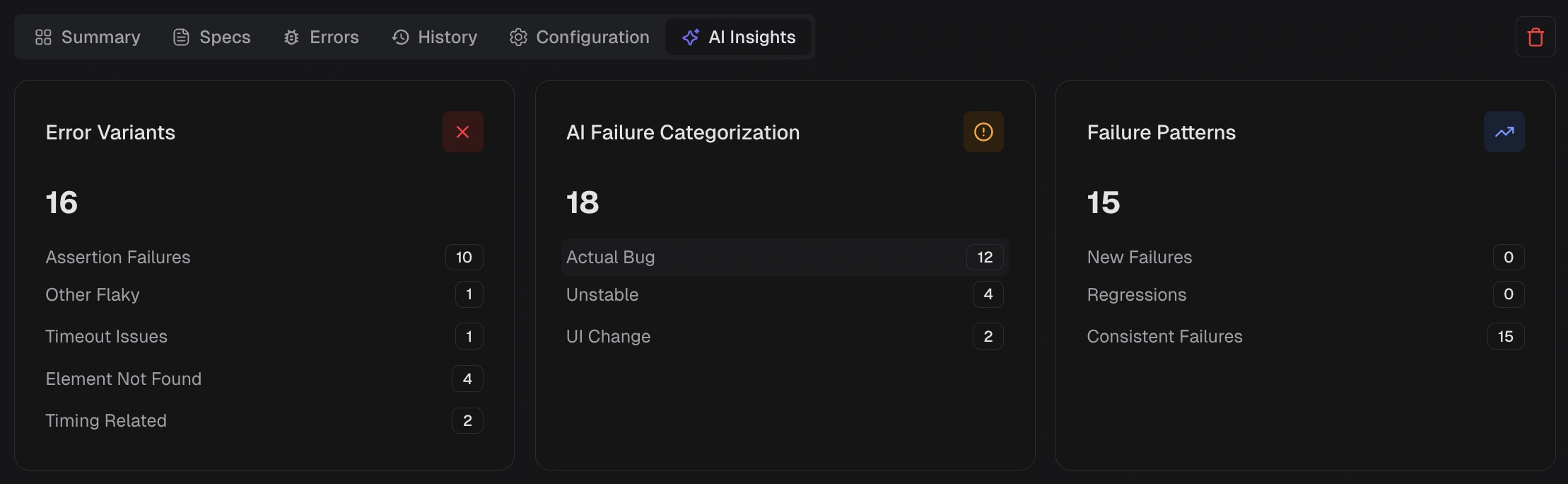 ## KPI Tiles
### Error Variants
Shows distinct error signatures and how many tests match each variant, for example, timeout, element not found, network error, or timing-related.
Use this to identify the most common failure shape in the run.
### AI Failure Categorization
Shows how failures are classified into:
* Actual bug
* UI change
* Unstable Test
* Miscellaneous
Each label includes a confidence score.
Use this to separate likely product issues from unstable tests.
### Failure Patterns
Highlights how failing tests behave across recent executions:
* **New Failures:** Tests that started failing within the selected window.
* **Regressions:** Tests that passed recently but now fail again.
* **Consistent Failures:** Tests failing across most or all recent runs.
Use this to decide what to investigate first.
## Error Analysis
This table lists failing tests with:
* Test case
* Failure category
* Error text
* Error variant
* Duration
Use the duration filter to scope by runtime, for example, fast or medium, when investigating clusters.
### Filtering
Selecting any tile (variant, category, or pattern) adds an active filter chip and scopes the table to matching tests.
Combine one **Error Variant** with one **AI Category** to get a focused slice, for example, **Actual Bug** + **Timeout**.
## Related
Group failures by cause
Review results by spec file
Group failures by error message
Spot regressions and drift
Debug environment differences
Individual test analysis
## KPI Tiles
### Error Variants
Shows distinct error signatures and how many tests match each variant, for example, timeout, element not found, network error, or timing-related.
Use this to identify the most common failure shape in the run.
### AI Failure Categorization
Shows how failures are classified into:
* Actual bug
* UI change
* Unstable Test
* Miscellaneous
Each label includes a confidence score.
Use this to separate likely product issues from unstable tests.
### Failure Patterns
Highlights how failing tests behave across recent executions:
* **New Failures:** Tests that started failing within the selected window.
* **Regressions:** Tests that passed recently but now fail again.
* **Consistent Failures:** Tests failing across most or all recent runs.
Use this to decide what to investigate first.
## Error Analysis
This table lists failing tests with:
* Test case
* Failure category
* Error text
* Error variant
* Duration
Use the duration filter to scope by runtime, for example, fast or medium, when investigating clusters.
### Filtering
Selecting any tile (variant, category, or pattern) adds an active filter chip and scopes the table to matching tests.
Combine one **Error Variant** with one **AI Category** to get a focused slice, for example, **Actual Bug** + **Timeout**.
## Related
Group failures by cause
Review results by spec file
Group failures by error message
Spot regressions and drift
Debug environment differences
Individual test analysis