> ## Documentation Index
> Fetch the complete documentation index at: https://docs.testdino.com/llms.txt
> Use this file to discover all available pages before exploring further.
# Playwright Test Run Error Grouping
> Group failed and flaky tests by error message within a run.
The Errors tab groups failed and flaky tests by error message. Use it to see which errors affected the run and how many tests each error impacts.
**Tip**
**QA Engineers**: spot whether a single error causes most failures or if problems are unrelated. **Developers**: jump directly to error messages and stack traces without clicking through individual tests.
## Layout
The page consists of three main sections: a search bar, status filters, and an error groups table.
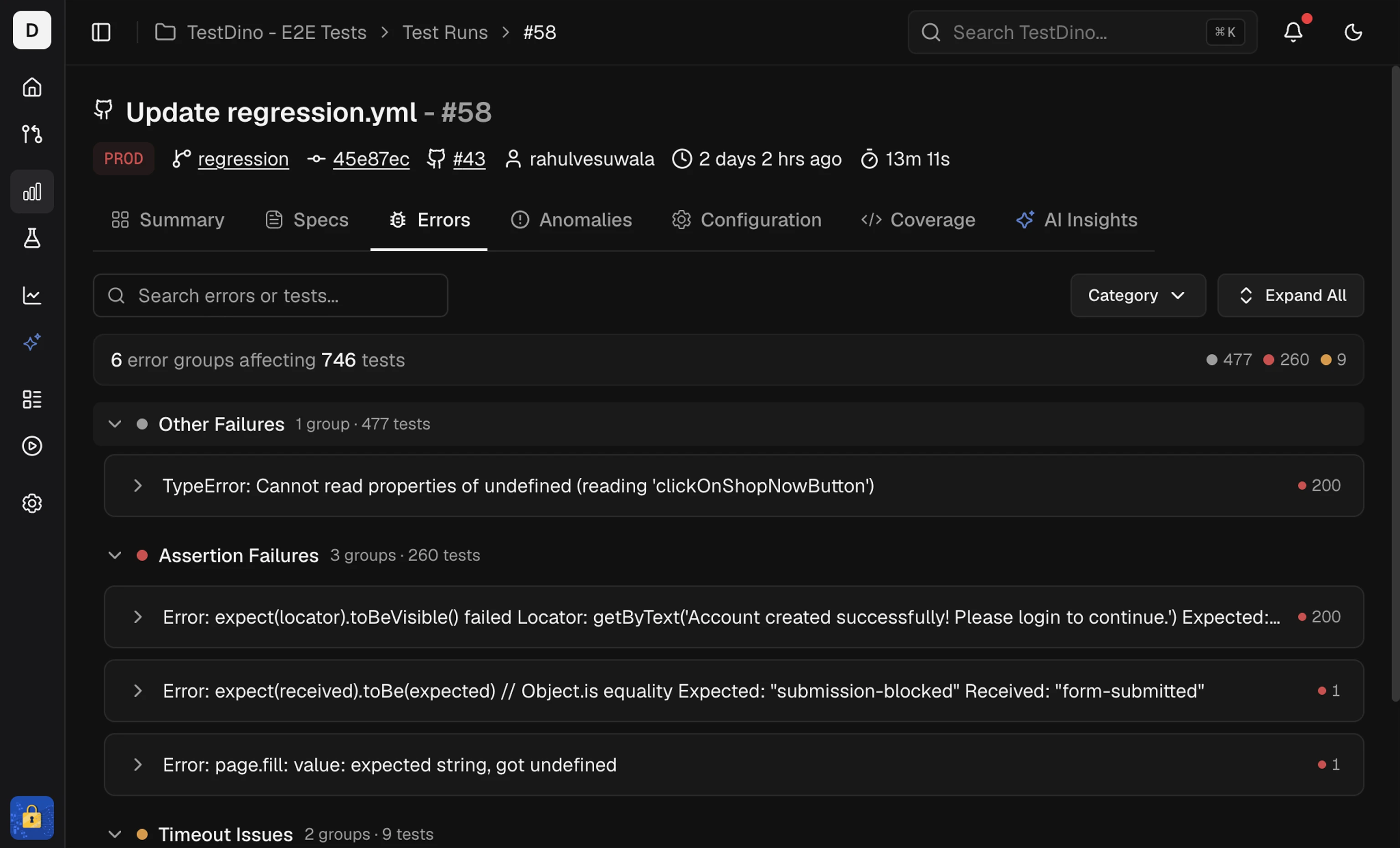 ### Search
Search by test name or error text. Results update as you type.
### Tag Filter
Filter error groups by test-case tags. Select one or more tags to show only error groups that contain tests with the selected tags. This narrows the error list to failures within a specific tag category (for example, `@smoke` or `@checkout`).
### Status Filters
Filter the grouped list by outcome:
**All:** Shows all test cases in the run, grouped by error
**Failed:** Only failed test cases
### Search
Search by test name or error text. Results update as you type.
### Tag Filter
Filter error groups by test-case tags. Select one or more tags to show only error groups that contain tests with the selected tags. This narrows the error list to failures within a specific tag category (for example, `@smoke` or `@checkout`).
### Status Filters
Filter the grouped list by outcome:
**All:** Shows all test cases in the run, grouped by error
**Failed:** Only failed test cases
 **Flaky:** Test cases that passed on retry but had at least one failure (See: [common reasons](/guides/playwright-flaky-test-detection)).
 Each filter displays a count: See how many test cases fall into each category.
**Expand / Collapse:** Use the toggle on the right to expand all error groups at once or collapse them back to the error headers.
### Error Groups
Each row in the table represents a unique error message. The row shows:
* Error text
* Number of affected tests
Expand a row to list the tests that hit that error in the run.
#### Test Case Rows
Each test case row shows:
* **Status icon:** A ❌ for failed, a ⚠️ for flaky.
* **Test name:** The full test case title.
* **Browser:** Which browser ran the test (Chromium, Firefox, Webkit, iOS, etc.).
* **Duration:** How long the test took.
* **Retries:** Number of retry attempts, if any.
Click any test case row to open the side panel.
## Side Panel
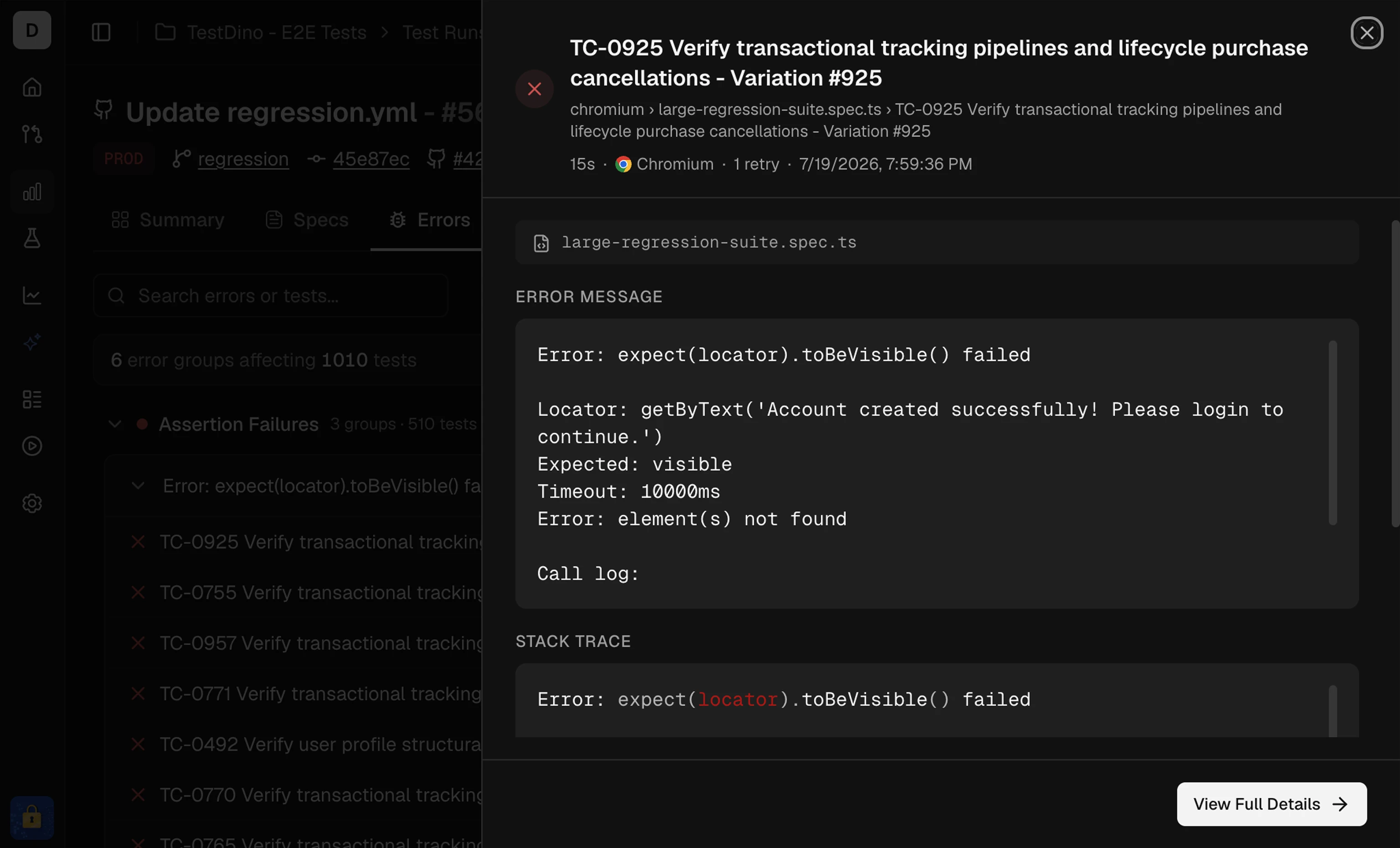
The side panel displays details for one test case without leaving the Errors tab.
Each filter displays a count: See how many test cases fall into each category.
**Expand / Collapse:** Use the toggle on the right to expand all error groups at once or collapse them back to the error headers.
### Error Groups
Each row in the table represents a unique error message. The row shows:
* Error text
* Number of affected tests
Expand a row to list the tests that hit that error in the run.
#### Test Case Rows
Each test case row shows:
* **Status icon:** A ❌ for failed, a ⚠️ for flaky.
* **Test name:** The full test case title.
* **Browser:** Which browser ran the test (Chromium, Firefox, Webkit, iOS, etc.).
* **Duration:** How long the test took.
* **Retries:** Number of retry attempts, if any.
Click any test case row to open the side panel.
## Side Panel
The side panel displays details for one test case without leaving the Errors tab.
 ### Header
Shows the test name and status.
### Details
| Field | What It Shows |
| ------------ | ----------------------------------- |
| **Status** | Failed or Flaky. |
| **Duration** | Total time the test took to run. |
| **Retries** | Number of retry attempts. |
| **Browser** | The browser or device used. |
| **Started** | Exact date and time the test began. |
### Error Message
Shows the Playwright error text for the failing attempt.
### Stack Trace
The call stack at the point of failure. Use this to trace back to the exact line in your test or application code.
### View Details
Opens the full test case details page for deeper analysis. From there, you can access the Overview and History tabs.
## Related
Group failures by cause
Review results by spec file
Track reliability and duration trends over runs
### Header
Shows the test name and status.
### Details
| Field | What It Shows |
| ------------ | ----------------------------------- |
| **Status** | Failed or Flaky. |
| **Duration** | Total time the test took to run. |
| **Retries** | Number of retry attempts. |
| **Browser** | The browser or device used. |
| **Started** | Exact date and time the test began. |
### Error Message
Shows the Playwright error text for the failing attempt.
### Stack Trace
The call stack at the point of failure. Use this to trace back to the exact line in your test or application code.
### View Details
Opens the full test case details page for deeper analysis. From there, you can access the Overview and History tabs.
## Related
Group failures by cause
Review results by spec file
Track reliability and duration trends over runs