> ## Documentation Index
> Fetch the complete documentation index at: https://docs.testdino.com/llms.txt
> Use this file to discover all available pages before exploring further.
# Playwright Test Run Spec File View
> View test run results grouped by spec file.
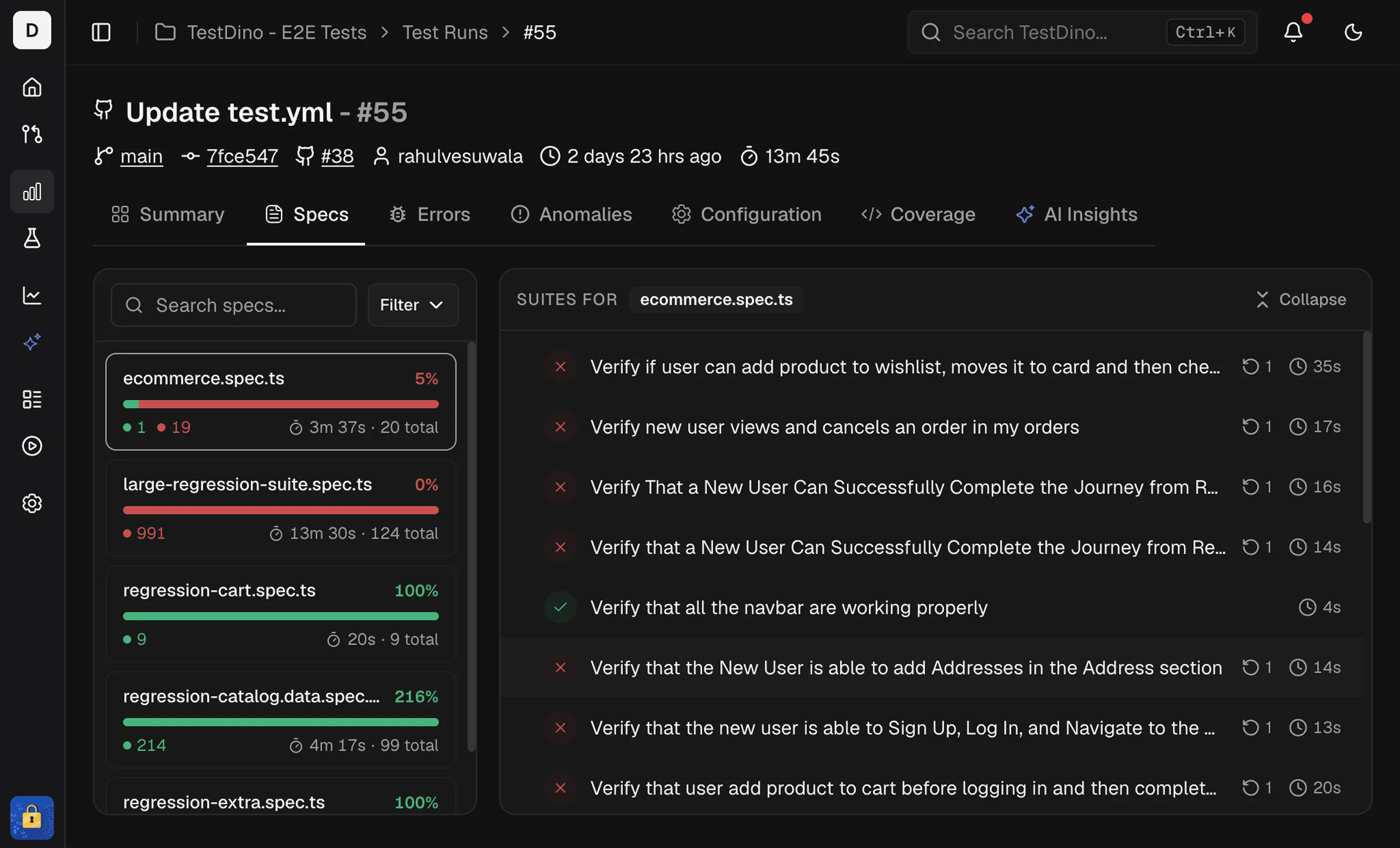
The Specs tab shows results for a single test run grouped by spec file. Use it to find files that are failing or slow, then open the test cases within a spec.
 ## Spec List
The left panel lists every spec file in the run. Each item shows:
* **Spec card:** File name, total tests, a status bar (pass/fail/flaky/skipped), and total duration.
* **Sort:** by Name, Duration, or Status to surface slow or failing files.
* **Filter:** show only Passed, Failed, Flaky, or Skipped specs.
* **Search:** type a file name to jump to a spec.
## Spec Details
The right panel shows tests for the selected spec. It includes:
* Suite totals at the top, including total time and test count
* A test list with status, duration, and retry or attempt badges
From a test row, open the test detail view to review available evidence, including steps, errors, screenshots, and the trace viewer.
**Note**
Sort by **duration** to find long-running specs first.
## Related
Group failures by cause
Group failures by error message
Track tag and reliability trends across runs
Add tags and annotations to your tests
## Spec List
The left panel lists every spec file in the run. Each item shows:
* **Spec card:** File name, total tests, a status bar (pass/fail/flaky/skipped), and total duration.
* **Sort:** by Name, Duration, or Status to surface slow or failing files.
* **Filter:** show only Passed, Failed, Flaky, or Skipped specs.
* **Search:** type a file name to jump to a spec.
## Spec Details
The right panel shows tests for the selected spec. It includes:
* Suite totals at the top, including total time and test count
* A test list with status, duration, and retry or attempt badges
From a test row, open the test detail view to review available evidence, including steps, errors, screenshots, and the trace viewer.
**Note**
Sort by **duration** to find long-running specs first.
## Related
Group failures by cause
Group failures by error message
Track tag and reliability trends across runs
Add tags and annotations to your tests