> ## Documentation Index
> Fetch the complete documentation index at: https://docs.testdino.com/llms.txt
> Use this file to discover all available pages before exploring further.
# Playwright Pull Request Test Summary
> View test results and run history for every pull request.
export const VideoSchema = ({name, description, thumbnailUrl, uploadDate, duration, contentUrl, embedUrl}) => {
const schema = {
"@context": "https://schema.org",
"@type": "VideoObject",
name,
description,
thumbnailUrl,
uploadDate,
...duration ? {
duration
} : {},
...contentUrl ? {
contentUrl
} : {},
...embedUrl ? {
embedUrl
} : {},
publisher: {
"@type": "Organization",
name: "TestDino",
logo: {
"@type": "ImageObject",
url: "https://docs.testdino.com/logo/light.svg"
}
}
};
return ;
};
**What you'll learn**
* How to view test results for every pull request
* How to filter, sort, and navigate PR rows
* What each detail tab (Overview, Timeline, Files Changed) shows
The Pull Requests view lists all PRs with their latest test runs. Click any PR to open a detailed view with three tabs: [Overview](/platform/pull-requests/overview), [Timeline](/platform/pull-requests/timeline), and [Files Changed](/platform/pull-requests/files-changed).
## Key Benefits
| Benefit | Description |
| ----------------------- | --------------------------------------------------------------------------------------------------------------- |
| Run context at a glance | See run ID, duration, and pass/fail/flaky/skipped counts per PR |
| Open for proof | Click a row to view [failure clusters](/guides/playwright-error-grouping), specs, logs, screenshots, and traces |
| Verifiable history | Expand a PR to see all runs and confirm if the retries stabilized tests |
| Fast handoff | Jump from PR to a failing run or test case to file an issue |
| Integrated code review | Review diffs in Files Changed alongside test results |
| Filterable timeline | Trace which commits led to specific failures or fixes |
## Layout
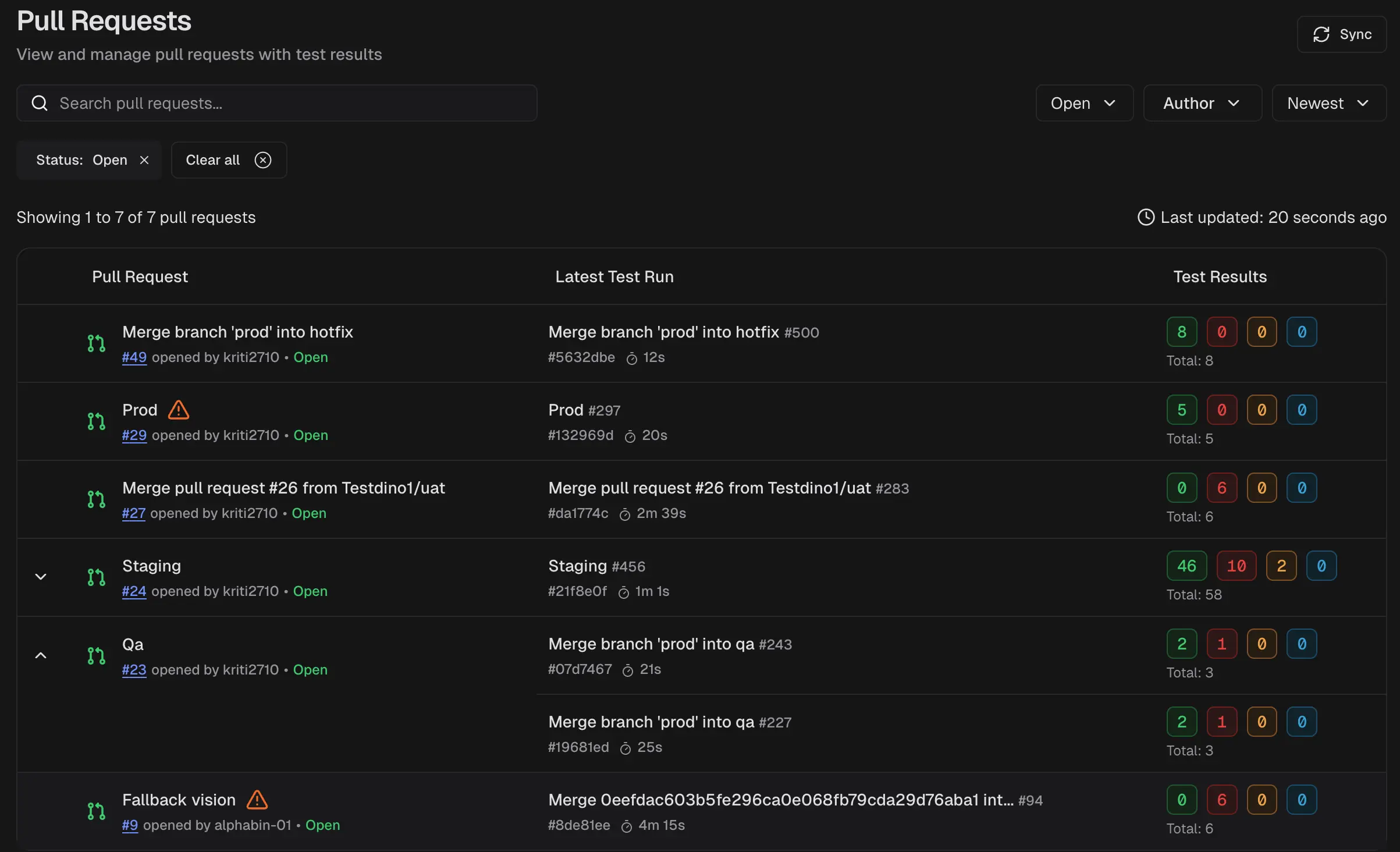
Each row represents a PR and includes:
* **Pull request metadata:** title, number, author, and state
* **Latest test run:** test run ID, start time, and duration
* **Test results summary:** counts for passed, failed, flaky, and skipped
* **Row expander:** full run history for that pull request
### PR State Badges
* **Open:** Active PR under review. New commits trigger runs.
* **Merged:** Changes integrated into the base branch. History retained.
* **Closed:** PR closed without merging. History remains, but no new runs trigger.
**Tip**
Click the **PR number** to open the PR in GitHub or the merge request in GitLab.
### Filters and Controls
Use the controls to narrow the list and refresh data:
* Search by pull request title or number
* Filter by status and author
* Sort by newest (or other available sort order)
* Sync to refresh the list
## Pull Request Detail View
Select a pull request to open its detail view.
### Overview
Use this tab to review the current test health for the pull request and open the latest run for deeper debugging.
### Timeline
Use this tab to correlate activity over time. It can include:
* Commits
* Test runs
* Pull request and code comments
Use the timeline to identify when failures began and whether subsequent runs improved.
### Files Changed
Use this tab to review code diffs associated with the pull request while keeping test results in context.
## Get Started
Filter the PR list by Status and Author.
Scan the Latest Test Run and Test Results columns to identify risky pull requests.
Click any PR row, and open the pull request detail view.
Use Overview for current status, Timeline for cause and sequence, and Files Changed for the related code diff.
**Tip**
If needed, open a failing run to inspect logs, screenshots, traces, and console output.
## Beyond GitHub
| Feature | Description |
| ------------------------------------------------------------------------------- | ------------------------------------------------------------------------------ |
| [Test run summary per PR](/platform/pull-requests/overview) | View all test runs per PR with pass/fail/flaky counts without opening CI pages |
| [One click triage](/platform/playwright-test-runs) | Jump from PR to full test run and create Jira, Linear, Asana, or monday issues |
| [Flakiness visibility](/guides/playwright-flaky-test-detection#quick-reference) | View run-to-run patterns to confirm fixes or spot recurring instability |
| [Environment context](/guides/environment-mapping) | Results mapped to environments (dev, stage, prod) for quick impact assessment |
| [Code diffs in context](/platform/pull-requests/files-changed) | Files Changed shows additions and deletions alongside test results |
| [Timeline filtering](/platform/pull-requests/timeline) | Filter by event type to show only test runs, commits, or comments |
## Related
Check PR health and test status at a glance
Chronological log of commits, test runs, and review activity
Review code diffs and modifications inside TestDino