What you’ll learn
  • What Test Management includes and how it fits into your workflow
  • The three main views: Suites, Test Cases, and Automation
  • How to navigate between creating, organizing, and linking tests
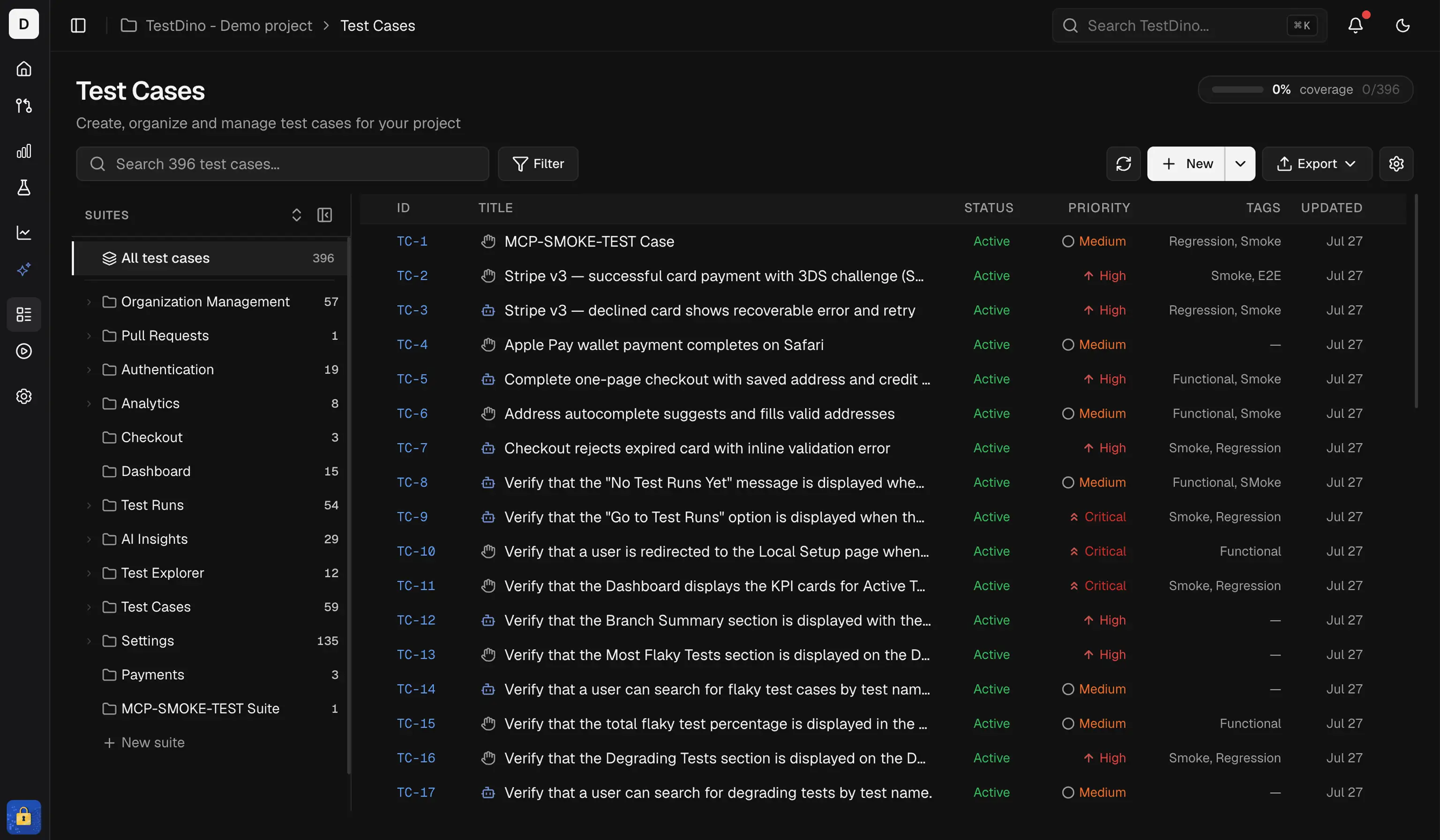
Test Management in TestDino is a standalone workspace for creating, organizing, classifying, and tracking manual test cases. Link them to automated Playwright tests from your CI pipeline to build traceability between what you planned to test and what actually runs. Test Management page showing Suites, Test Cases, and Automation views with Details Sheet open

Capabilities

CapabilityDescription
Create & organizeBuild test cases inside nested test suites. Drag-and-drop to reorder suites.
ClassifyTag every test case with severity, priority, type, layer, behavior, and automation status.
Version historyEvery edit is tracked. Compare versions side-by-side and restore any previous version.
Bulk actionsSelect multiple test cases and edit, delete, or print them in one action.
Search & filterFull-text search plus filters for status, priority, and automation status. Sort by Case ID, title, or last updated.
Import / ExportImport from CSV (TestDino, TestRail, or custom) or JSON. Export to JSON (with optional attachments) or CSV.
Automation linkingLink manual test cases to automated tests. Use AI-powered Auto-Match and Auto-Generate.
CustomizationConfigure enum dropdown values, create custom fields, and toggle features per project.

Three Main Views

The Test Management page has three tabs at the top. Each view serves a different purpose.
ViewWhat It DoesWhen to Use
SuitesBrowse test suites as a collapsible tree with test cases nested insideOrganizing tests by feature, module, or area
Test CasesFlat list of all test cases across all suites with search, sort, and filterFinding specific tests, bulk selection, quick scanning
AutomationDual-panel view linking manual test cases to automated testsConnecting planned tests to CI pipeline results

Concepts & Settings

Suites, test cases, steps, versions, and project settings

Suites

Organize tests in a tree structure

Automation

Link manual tests to automated CI runs

Import & Export

Bring data in and out of Test Management

Concepts & Settings

Core terminology, field definitions, test steps, version history, and project-level customization settings.

Test Suites

Organize test cases into nested suites using the tree view.

Test Cases

Search, sort, and filter test cases in a flat list, and view full details with tabs for overview, attachments, history, and linked tests.

Automation

Link manual test cases to automated Playwright tests using drag-and-drop, Auto-Match, and Auto-Generate.

Bulk Actions

Select multiple test cases to edit, delete, or print in one action.

Import and Export Test Cases

Import test cases from CSV or JSON, and export to JSON, ZIP, or CSV.