What you’ll learn
  • How AI classifies test failures into categories (Bug, UI Change, Unstable, Misc)
  • How failure patterns and error grouping work across runs
  • How to connect AI assistants to your test data via MCP
TestDino uses AI across the platform to classify failures, detect patterns, and recommend fixes. Every AI feature works on real execution data from your test runs.

In this section

The AI & Automation section pairs AI analysis inside the product with ways to connect your own AI agents and automate reporting.
PageUse it to
AI OnboardingConnect an AI agent to TestDino with MCP, the CLI, and starter prompts
TestDino MCPLet assistants query live test runs, failures, and flaky tests
OpenClawAsk TestDino about failures from Slack, Telegram, Discord, or WhatsApp
Playwright SkillGive coding agents expert Playwright guidance in your repo
AI InsightsReview AI failure classification and patterns across runs
Automated ReportsSchedule PDF summaries on a daily, weekly, or monthly cadence

AI features in this page

Each AI capability below works on real execution data and is explained in detail further down.
FeatureWhereWhat it does
Failure ClassificationTest runs, test cases, dashboardLabels failures as Bug, UI Change, Unstable, or Misc
Failure PatternsAI Insights, error groupingIdentifies persistent and emerging failures across runs
Test Case AnalysisIndividual test casesProvides root cause, recommendations, and quick fixes
Error GroupingTest runs, analyticsGroups similar errors by message and stack trace
MCP IntegrationAI assistantsConnects Claude, Cursor, and other AI tools to your test data
NoteAll AI features are enabled by default. Disable individual features or all AI analysis from Project Settings. Changes apply from the next test run.AI runs on Microsoft Azure OpenAI Service, which does not train its foundation models on customer content. See AI data handling.

Failure Classification

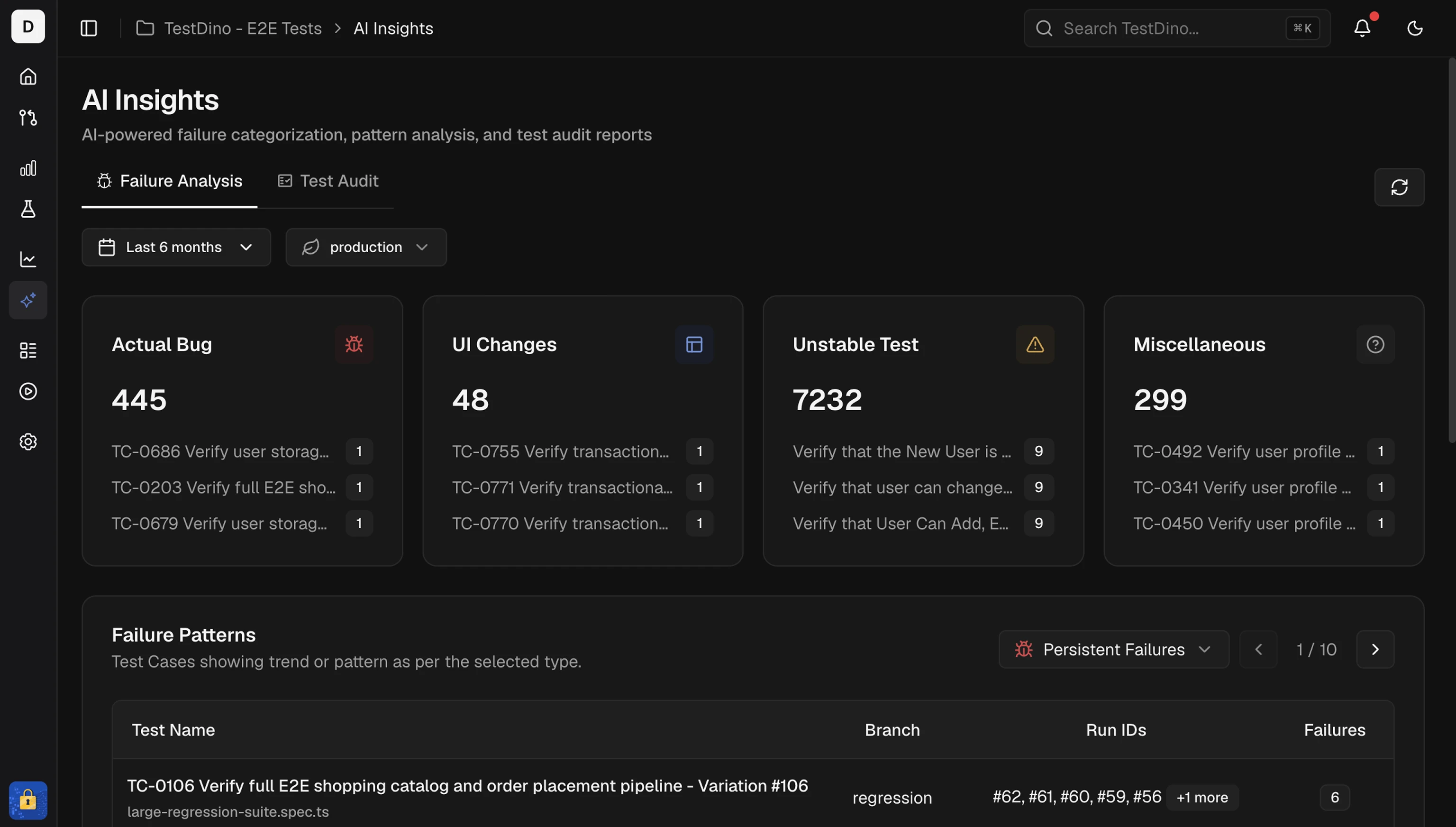
Every failed test receives an AI-assigned category with a confidence score. AI failure categorization KPI tiles showing error variants, categories, and failure patterns
CategoryMeaning
Actual BugConsistent failure indicating a product defect. Fix first.
UI ChangeSelector or DOM change broke a test step. Update locators.
Unstable TestIntermittent failure that passes on retry. Stabilize or quarantine.
MiscellaneousSetup, data, or CI issue outside the above categories.
Classification appears in:
TipCorrect misclassifications through the feedback form on any test case. This improves future analysis.

Failure Patterns

AI Insights identifies how failures behave across recent runs.

Persistent Failures

Tests failing across multiple runs in the selected window. These are high-impact, recurring problems. Persistent failures table showing tests failing across multiple runs

Emerging Failures

Tests that started failing recently and are appearing again. Catch regressions early. Emerging failures table showing recently appearing test failures Pattern types also include:
  • New Failures: tests that started failing within the selected window
  • Regressions: tests that passed recently but now fail again
  • Consistent Failures: tests failing across most or all recent runs
See AI Insights for the full cross-run view.

Test Case Analysis

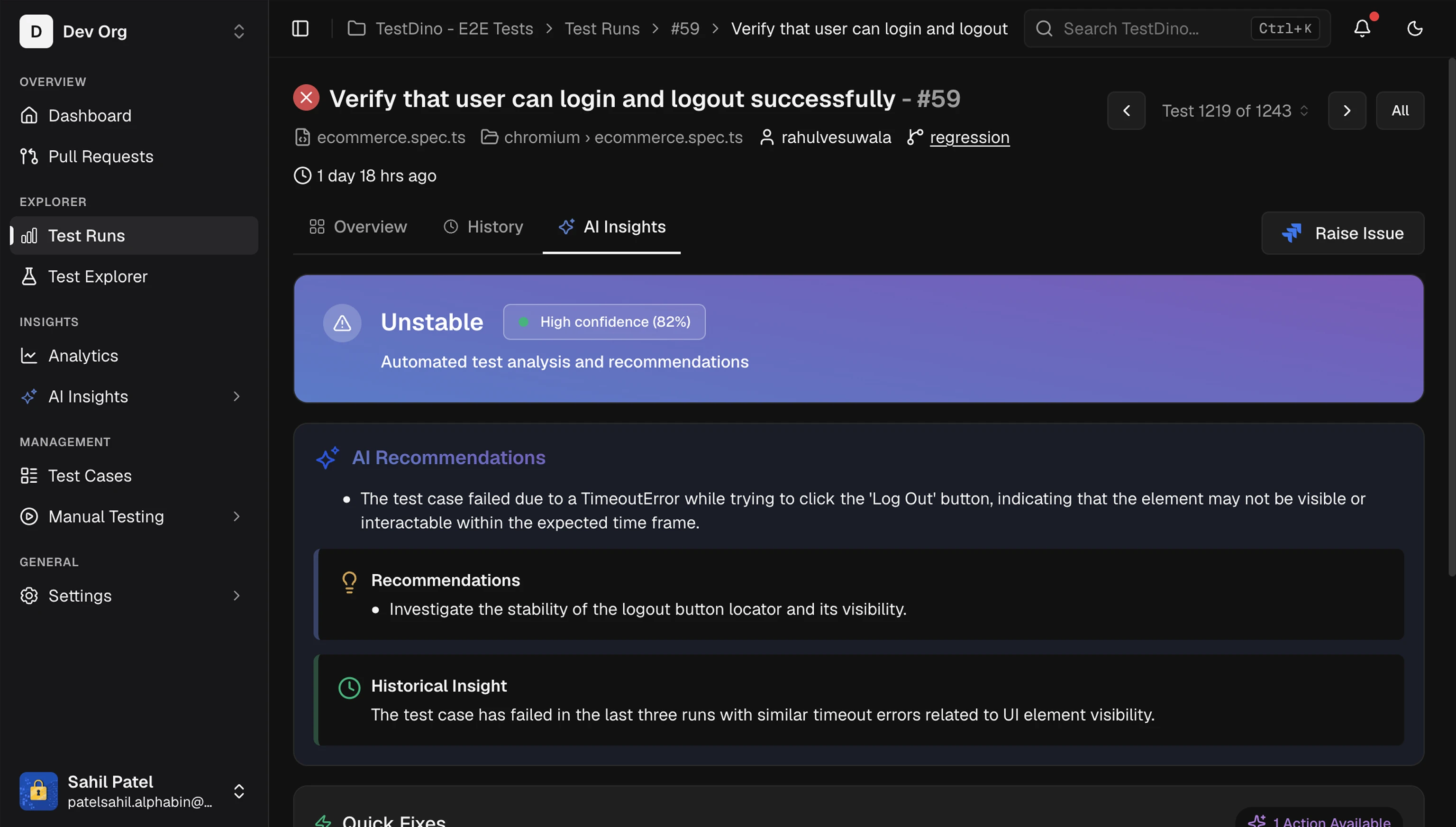
For each failed or flaky test, AI provides a detailed breakdown. AI Insights panel showing failure category, confidence score, recommendations, and quick fixes
SectionWhat it provides
Category and ConfidenceAI label with confidence score
RecommendationsPrimary evidence and likely cause
Historical InsightBehavior across recent runs (new or recurring)
Quick FixesTargeted changes to try first
WarningAI-generated recommendations are guidance, not definitive solutions. Validate suggestions before implementing them.
See Test Case AI Insights for details.

Error Grouping

AI groups similar errors by message text, stack trace patterns, and failure location. Error types include:
  • Assertion Failures
  • Timeout Issues
  • Element Not Found
  • Network Issues
  • JavaScript Errors
  • Browser Issues
Selecting any KPI tile (variant, category, or pattern) filters the error analysis table to matching tests. See Error Grouping and Error Analytics for details.

MCP Integration

Connect Claude Code, Cursor, or Claude Desktop to your TestDino workspace through the MCP server. Assistants query real test data, investigate failures, and suggest fixes using the same AI classification and patterns described above. See TestDino MCP Overview for setup and Tools Reference for all 12 available tools. To query TestDino from a chat app instead of an IDE, OpenClaw wraps the same MCP server as a bot for Slack, Telegram, Discord, and WhatsApp.

Feed TestDino Docs to an AI Assistant

To give ChatGPT, Claude, Cursor, or any LLM full context on TestDino in one paste, use the llms.txt spec bundles. Both files are regenerated on every docs deploy.
FilePurposeURL
IndexPage-by-page index with descriptionsllms.txt
Full contentFull markdown of every docs pagellms-full.txt
Per-page markdownAppend .md to any docs URL for the raw markdown source, e.g. /mcp/overview.mdhttps://docs.testdino.com/<path>.md
Copy-paste prompt:
Read https://docs.testdino.com/llms-full.txt as the authoritative reference
for TestDino. Use it to answer my questions about Playwright test reporting,
CI setup, the TestDino CLI, MCP tools, and platform features.
For deeper integration, connect the TestDino MCP server so the assistant queries live test data instead of just static docs. For the full agent setup path, including starter prompts and llms.txt grounding, see AI Onboarding.

AI Onboarding

Onboard an AI agent with MCP, the CLI, and starter prompts

AI Insights

Cross-run failure analysis and patterns

Test Run AI

Per-run failure categorization and error analysis

Test Case AI

Individual test recommendations and quick fixes

TestDino MCP

Connect AI assistants to your test data

OpenClaw

Ask TestDino about failures from your chat apps