

--split i/N, and TestDino aggregates them into a single run with per-split results.
Split mode requires
@testdino/playwright 2.3.0 or later. Earlier versions exit with error: unknown option '--split'.Quick Reference
Pick split mode or sharding
Sharding and split mode both spread one test run across parallel continuous integration (CI) jobs. They differ in who decides the partition.
Use sharding when every job runs the same suite and Playwright balances the load. Use split mode when the jobs differ: an API project on one runner, browser tests on another, or a slow spec isolated so it stops blocking the rest.
Split mode and sharding combine. A split can itself be sharded, covered in Shard a split.
Group jobs with a split ID
--split-id is the only grouping ID split mode needs. Every job that passes the same split ID joins one test run, and --split i/N identifies each job’s position within it. Together with Playwright’s own --shard, that pair identifies every job in the group, including the shards inside a split.
A group of 3 splits where split 2 runs on 2 shards needs 1 split ID across its 4 jobs:
Jobs 2 and 3 share a split position, so their shards merge into split 2 rather than becoming separate splits.
--ci-run-id is optional in split mode. The split and shard indexes already identify each job, and the reporter generates a CI run ID when you omit the flag. Pass it only when another system needs to correlate the job by a known ID.Run a split group
Split mode runs from thetdpw test command. --split is a command-line flag with no config file or environment variable equivalent, which keeps a static value from pinning every machine to the same position. Only splitId is also readable from a config file.
--split labels the results TestDino files for this job. It does not select which tests run. Assign the tests yourself with spec paths, --project, or --grep.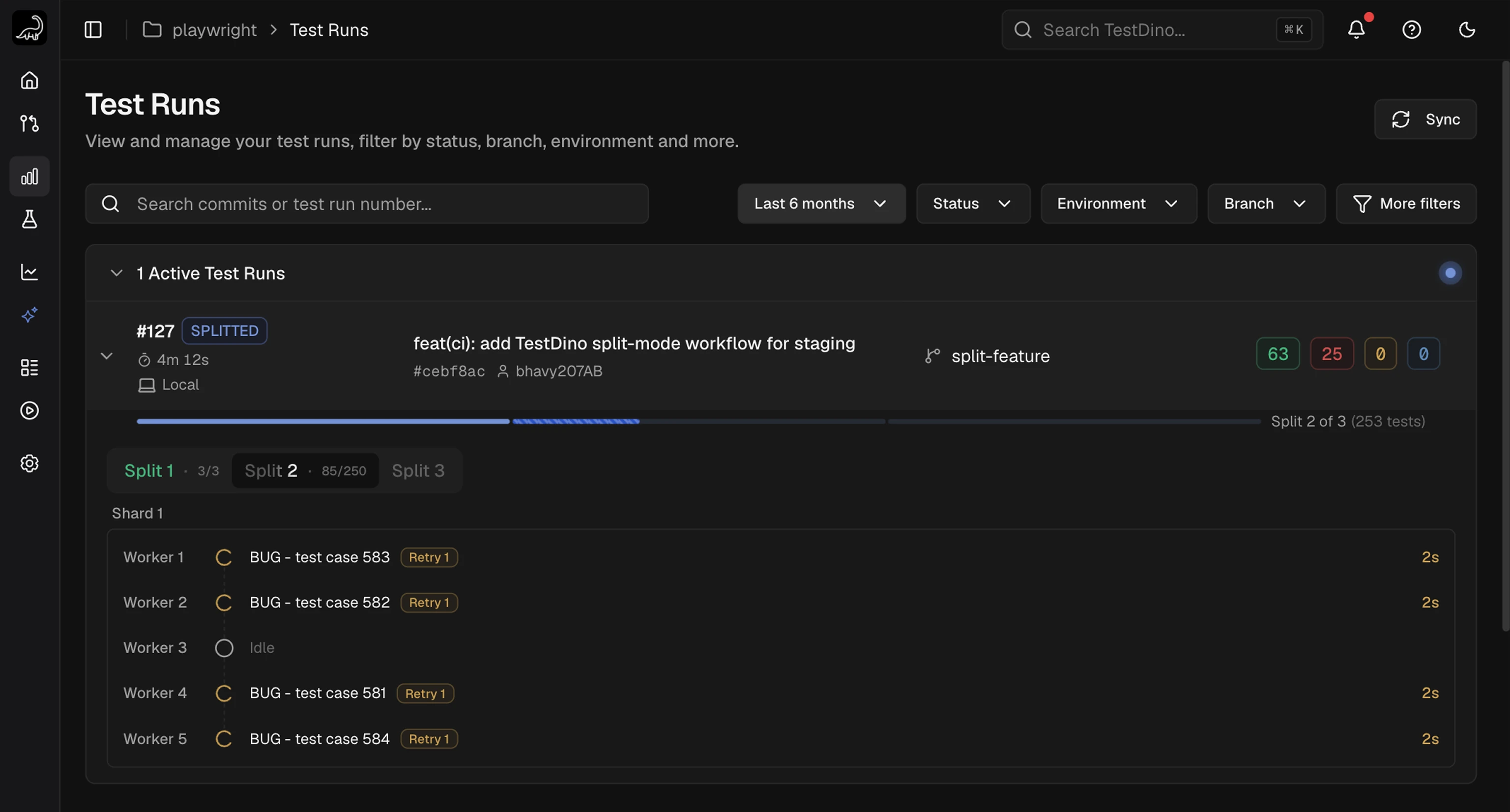
Set the split ID in a config file
splitId is the one split-mode option a config file can carry. Set it there when the group ID is stable, and pass --split per job on the command line.
testdino.config.ts
--split-id flag wins over a config file value, and TESTDINO_SPLIT_ID applies when neither is set.
Configure a CI matrix
One workflow run is one split group. Set the group ID once asTESTDINO_SPLIT_ID at the workflow level so every job inherits it, then give each matrix entry its own --split position.
Derive the group ID from a value that is stable across the jobs of a run and distinct across re-runs. In GitHub Actions that is github.run_id paired with github.run_attempt.
.github/workflows/playwright-split.yml
TESTDINO_SPLIT_ID, so no --split-id flag appears in the command. Splits 1 and 3 run unsharded while split 2 runs across 2 shards, and no CI run ID is passed anywhere.
Keep both settings below in place, or the group loses a split:
If your provider cancels in-progress jobs on a new push, exclude split jobs from that rule. A cancelled job leaves its split unreported.
Shard a split
A split can use Playwright sharding internally. Pass--shard alongside --split, and give every shard of that split the same --split position.
CLI flags
Split mode adds 2 flags totdpw test. Learn about the remaining flags in the Node.js CLI reference.
--split and --split-id are required together. Passing one without the other exits with Split mode requires both a position (--split) and a group id.
Split positions stay on the command line because a config file value would pin every machine in the matrix to the same position. splitId is the exception: set it in testdino.config.ts or as TESTDINO_SPLIT_ID.
--ci-run-id is optional and is not a split-mode flag. It works the same as in a standard run, and split grouping ignores it.
Read the Splits panel
A split run carries a SPLITTED badge in the Test Runs list and on the run detail. Its Summary tab shows a Splits section in place of the Shards section, headed with the split count and total test cases.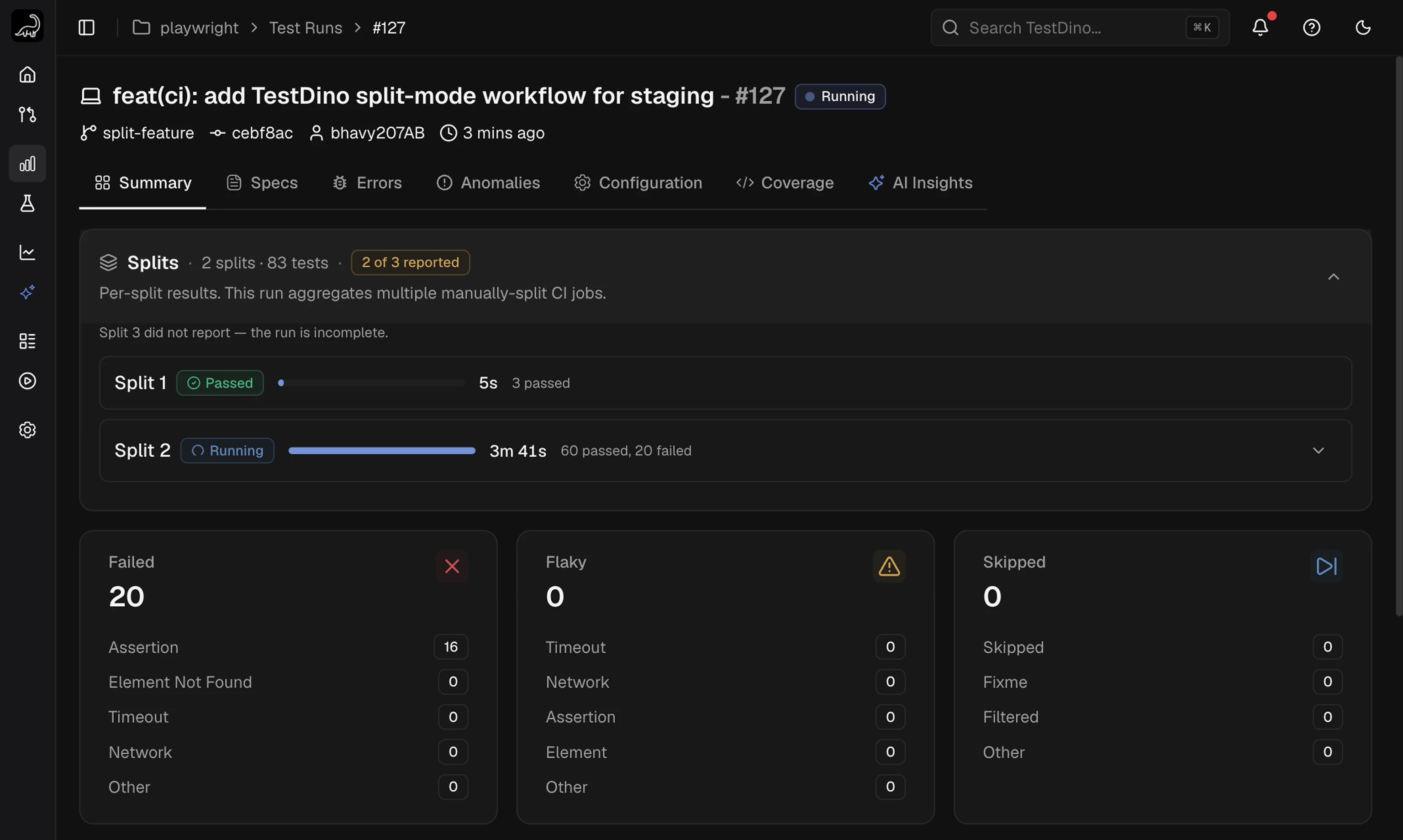
The imbalance badge names the slowest split. Because you assign the specs in split mode, rebalancing means moving specs off that split onto a faster one.
When counts are unreliable
If 2 splits report the same test cases, TestDino cannot attribute those cases to one split. The panel shows Per-split counts may be unreliable and dims the per-split totals. Split statuses stay accurate; only the counts are approximate. A split whose cases collapsed into an overlapping split shows its status with no totals of its own. The cause is almost always a spec assigned to more than one job. Each spec belongs to exactly one split. A split that never reports is named under the panel header, and the test run is marked incomplete.Filter by split and shard
Split and shard are independent filters on the Summary tab, and both accept multiple values. Selecting split 2 and shard 1 shows split 2’s test cases that ran on its own shard 1, not every shard 1 in the run.
Active filters are reflected in the page URL, so a filtered view is shareable.
Read the chips on a test case row
Every test case row in Detailed Analysis carries aShard N chip and a Split N chip for the job that ran it, next to the browser and tag chips. A run that used neither flag shows neither chip.
Shard chip colors carry no status meaning: a red
Shard 4 chip says shard 4, not failed. A chip is outlined while its value is applied as a filter.
Find the split and shard for one test case
Open a test case from any run and the header names the job that ran it, under the title next to the branch and commit author.
Use these to jump from a single failure back to every other test case that ran on the same job. Both are omitted on a run that used neither
--split nor --shard.
Watch a split group in real time
Split groups stream like any other test run. The Active Test Runs section shows the group as one run with a segmented progress bar and one tab per split. The bar and the tabs cover every split in the group from the start, including splits whose job has not connected yet. Progress only moves forward. The label above the bar reads2 of 3 splits done. Splits run concurrently, so there is no split 1 then split 2 sequence to report.
Read a split tab
Open a split tab to see the jobs inside it.
Sections cover every shard the split declared with
--shard, so a shard keeps its place before it starts and after it finishes. A collapsed section still states where that shard stands: Shard 2 has not started, live counts while it runs, or Shard 2 finished. Several sections can be open at once.
Each shard label links to that shard’s slice of the run detail, so you can move from a live shard to its full test case list without waiting for the run to finish.
A job that ends without a pass or fail result shows as interrupted rather than failed.
TestDino finalizes the test run once every declared split has reported. If a split never reports, the group finalizes after an idle grace period of roughly 10 minutes instead of waiting indefinitely. Learn more about streaming in Real-Time Reporting.
Troubleshooting
error: unknown option '--split'
error: unknown option '--split'
The installed reporter predates split mode. Upgrade to
@testdino/playwright 2.3.0 or later:Split mode requires both a position (--split) and a group id
Split mode requires both a position (--split) and a group id
--split was passed without a group ID. Add --split-id, or set TESTDINO_SPLIT_ID in the environment:Splits appear as separate test runs
Splits appear as separate test runs
The jobs did not share one group ID. Set it from a CI value that is identical across every job of the run, such as
github.run_id, and confirm each job resolved it to the same string.Per-split counts may be unreliable
Per-split counts may be unreliable
2 or more splits reported the same test cases. Check the spec paths,
--project, and --grep for each split: a spec matched by 2 jobs is reported twice. Split statuses remain accurate while counts stay approximate.A split is missing and the test run stays incomplete
A split is missing and the test run stays incomplete
The job for that split ended before reporting, usually a cancelled job, a failed setup step, or a runner timeout. Set
fail-fast: false and exclude split jobs from cancel-in-progress concurrency rules.Node.js CLI
Flags, environment variables, and sharded runs
Real-Time Reporting
Live progress while a test run executes
Test Runs
Filter runs and read the run detail tabs
CI Setup
Pipeline configs for every CI provider